
Archived topic
h1 underlined text on hover. Page hero on home page
16 replies · Started by francesco on January 20, 2023
I'm currently using this CSS, but it only underlines the last part of the text, instead I'd like it to underline all the text.
Aah you have a container link.
Change the CSS to:.border-hover:not(:hover) h2 { border-color: transparent !important; }And move the border-hover class to the GB Container Block that has the container link.
Note that : I also use this CSS.
@media(min-width: 769px) and (pointer: fine) {

    .paging-navigation p a:hover,
    h2.wp-show-posts-entry-title a:hover,
    div#rpwwt-recent-posts-widget-with-thumbnails-2 ul li a:hover,
    .generate-columns-container article.post:hover h2 {
        text-decoration: underline;
    }

}Hi there,
you can't use the border property. Can you remove that CSS?
sure david, done
Try this CSS:
.border-hover h2 {
    text-decoration: underline;
    text-underline-offset: 5px;
    text-decoration-thickness: 2px;
    text-decoration-color: transparent;
}

.border-hover:hover h2 {
    text-decoration-color: #fff;
}hi david, dont work
Can i see the page ? it requires a login to get passed the maintenance mode.
hi david, done..
I'm looking for a way to add hover styling to the title block, but only appears in the page hero with a different colored title.
You need to add the border-hover class back on the Container Block
but for the text or for the border? i want hover text
Hi Francesco,
For the text, you need to add it to the Container Block.
The CSS provided by David works that way.
For the border, to clarify, are you looking for the underline effect or simply just a border? Do you want this on hover as well?
hi fernando, I would like the entire text underlined on hover over the entire block
If you:
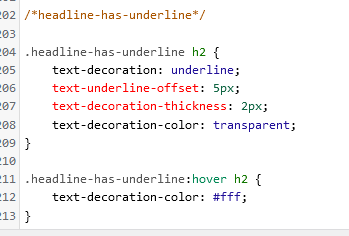
1. select the container block for that column, and give it an advanced > Additional CSS Class of: headline-has-underline
2. add this CSS:
.headline-has-underline h2 {
    text-decoration: underline;
    text-underline-offset: 5px;
    text-decoration-thickness: 2px;
    text-decoration-color: transparent;
}

.headline-has-underline:hover h2 {
    text-decoration-color: #fff;
}
Its the same as before i just changed the CSS Class name to make it more in line with the style change.
Now when you hover on the Container with the headline-has-underline class, it will add the underline to the H2 inside it.
done david, thnx
Did you add the headline-has-underline class to the Container Blocks > Advanced > Additional CSS Classes ?