
Archived topic
Generate Press - Build with Elementor got CSS Broken
9 replies · Started by Tuan on October 4, 2020
Hi Generate Press Support,
I'm using Generate Press Pro, and have Elementor Pro on top. However, when I create the template for my blog post (using Elementor), the css got broken. The page just keep left-align and I cannot make it goes to the center.
Please see the screenshot here: http://prntscr.com/ust19s
You could see the problem live at this URL: https://constantdelights.com/post/best-budget-chainsaw (As my site is low traffic, I'm keeping it although it's having css issue)
I really appreciate your help,
Thanks,
Jimmy.
Hi there,
did you resolve this issue? As i cannot see what the problem is - let me know
Hi,
I haven't resolved the issue yet. Please help :(
Thank you,
Jimmy
Can you explain more on what you want to do ? Maybe a screenshot of how it should look would help
Hi David,
I've made available this page as example of the mis-alignment: https://constantdelights.com/post/best-gazebo-for-high-winds
You could see more clearly here the screenshot below. The Header and the below Content clearly misalign.
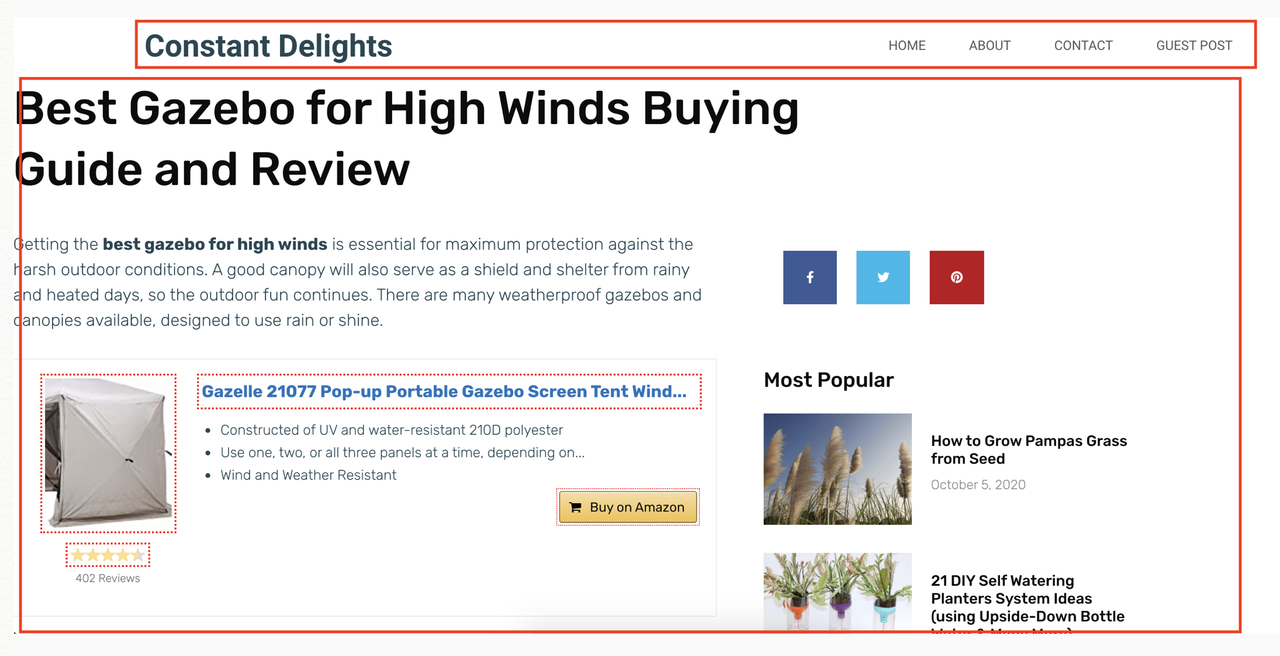
Please help if there's any CSS fixed.
Thanks,
Jimmy.
Aah ok.
Could you disable Autoptimize so i can take a look at the CSS
Hi David,
I've deactivated the Auto Optimize plugin.
Please help me look at the CSS.
Thanks,
Jimmy.
Try adding this CSS:
.elementor-template-full-width .site-content {
    justify-content: center;
}Hi David,
It works perfectly.
Thanks a lot,
Jimmy.
Glad to hear that.
In GP 3.0 you won't need that CSS.
