
Archived topic
First - Previous - Next - Last Navigation
8 replies · Started by Todd on January 26, 2019
Hi there. Trying to do the exact same thing that's explained in this support thread. However, when I put the provided php code into my child theme's functions.php file, nothing happens. It's the only code in the functions.php currently (other than an opening '<?php').
I've verified the functions.php is appropriately placed within the child theme by using other php code that does modify the site as expected.
login: tom/generate
Hey Todd,
I think that code will only work on single posts.
For archive, you could try this plugin: https://en-ca.wordpress.org/plugins/wp-pagenavi/
You can integrate it into GP with this PHP:
add_action( 'generate_paging_navigation', function() {
    if ( function_exists( 'wp_pagenavi' ) ) {
        wp_pagenavi();
    }
} );
Then add this CSS:
.page-numbers {
      display: none;
}
Let me know :)
Hah... I just installed that plugin about 10 minutes ago and have been tinkering with it. Thanks for the php / css... that will save me some head scratching! :)
No problem! Hopefully it does the trick :)
So, this is working pretty well. I've been able to get rid of the old paging nav and the plugin's nav is showing up, which is great! But I can't get the 'First' and 'Last' links to show up. I don't expect you to troubleshoot the plugin, but do you know if these missing links are tied to how they are (or more likely are not) implemented in the gp theme?
i.e. Since First / Last aren't available in gp, wp-pagenavi can't display them on the page?
Have you tried adjusting the settings?: https://ps.w.org/wp-pagenavi/assets/screenshot-2.png?rev=1206758
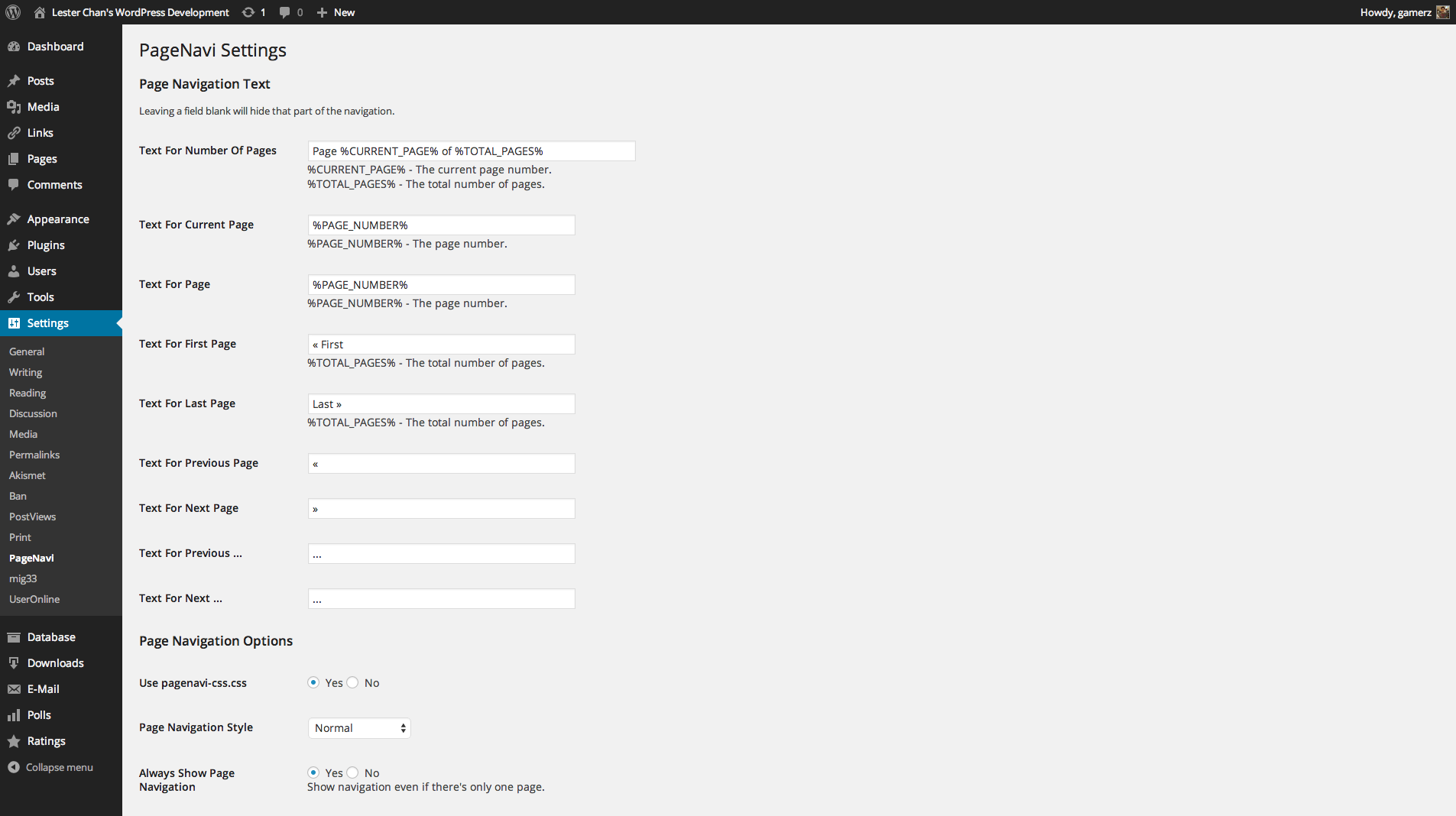
Looks like it has support for First/Last links.
Yeah, I adjusted those, but no go. I read through the support forum for the plugin and every time somebody asked about the first / last links or something similar they said to ask the theme creator... hah. :) If there's nothing obvious you can think of I'll keep fiddling with it to see if I can figure it out.
I figured this out and wanted to post the solution in case it's helpful to somebody using the support forum in the future. Basically, it seems like there's a bit of a flaw / oversight in the wp-pagenavi plugin where 'First' / 'Last' won't show up if the number of posts you have is lower than the value in the "Number of pages to show" in the settings. I reduced this value to zero, since I don't care about page numbers being displayed, and I'm seeing First / Previous / Next / Last, like I wanted.
Awesome! Thanks so much for posting the solution :)