
Archived topic
Featured image above content and sidebar on homepage
13 replies · Started by Bas on November 28, 2019
On the single /posts/pages, I've set the featured image to "above content area" and adjusted the width to 1100 px so it's placed above the sidebar. How can I achieve that on (only!) the homepage as well?
Hi there,
do you want to place a featured image above the content? Or move the featured post?
This is what I want:
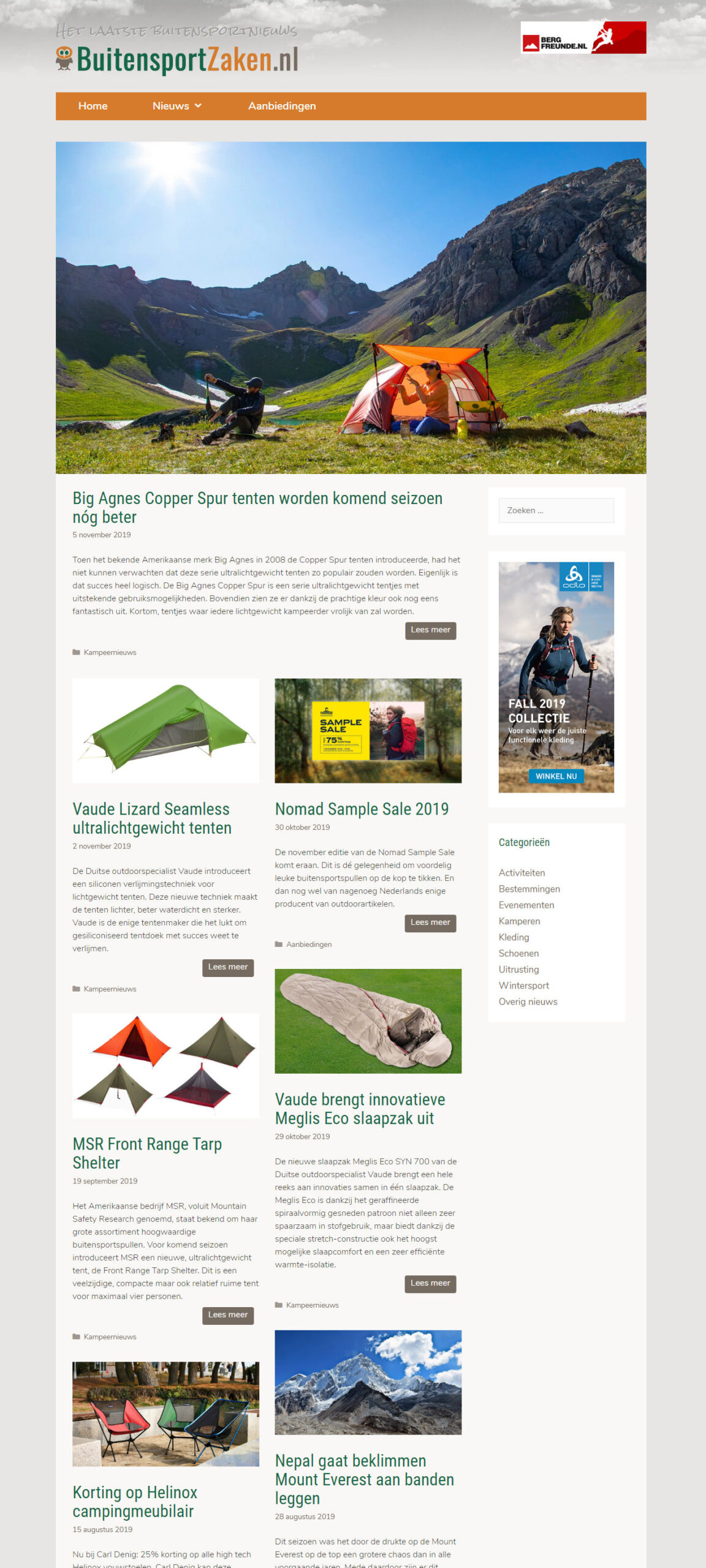
Hmmm tricky one.
First lets see if we can get the featured image of the first post above the container.
Create a new Hook Element.
Add this for the content to pull in the latest post image:
<?php
$args = array(
    'posts_per_page' => 1,
    'order_by' => 'date',
    'order' => 'desc'
);

$post = get_posts( $args );
if($post) {
    $post_id = $post[0]->ID;
    if(has_post_thumbnail($post_id)){
        echo '<div class="featured-post-image grid-container"><a href="' . get_permalink( $post_id ) .'">' . get_the_post_thumbnail( $post_id ) . '</a></div>';
    }
}
?>
Select the inside_container hook and check execute PHP.
Then set the Display Rules to Front Page.
Okay, after dealing with the "Unable to execute PHP as DISALLOW_FILE_EDIT is defined" error, your script puts the featured image on top indead. Thanks! Unfortunately this image has no link to the post and the first post still shows the original featured image. That means I have two featured images.
The image is also a bit smaller bit that's an CSS-issue which I should be able to resolve by myself.
Edited code above to include the link.
You can use some CSS to hide the first articles post image - as its already being requested by the hook it won't make a second request.
Works great, many thanks! I simply love the 'Elements'option of GP!
I've added some CSS to get rid of the old featured image and adjust the size etc:
.home .featured-column img{
display:none;
}

.featured-post-image {
padding:0;
margin: 0 0 1em -2.5em;
width:1100px;
background:#e8e6e4;
}
Still have to look into the background colour just above the large featured image and the responsiveness but I'm quite happy like it is now!
Thats awesome - great idea - and simpler then i first thought :)
The white space is coming from the Container padding.
If you want to remove that just on the home page then this CSS:
body.home .site-content {
    padding-top: 0;
}
And if you want to add the space so the body background is visible then some bottom margin on the nav:
body.home .site-navigation {
    margin-bottom: 25px;
}I want to keep the gap. Adding a background color was tricky since it's also the content container. For who is interested, this was helpful:
.home .site-content{
  box-shadow: 0 100px 0 0 #e8e6e4 inset;
}
Looks great - thanks for sharing that fix.
Must bookmark this for future use :)
Hmm, I found one issue: the image also shows on URL/page2/ etc. I can't find a proper display rule. Even "exclude entire site" didn't work.
That works fine, thanks! I wasn't too pleased with all the margins, paddings etc I had to adjust in the CSS. The CSS became quite complicated since the .home class also adresses URL/page/2 etc.
I got tired of struggling with that and tried placing the Element in the "inside_site_container". That works also fine. In that case I only needed this CSS:
@media (max-width: 1024px) {
.home .featured-post-image img{display:none}
}

@media (min-width: 1025px) {
	.home .featured-column img{display:none;}

.featured-post-image {padding:0;width:1100px;border-top:1.7em solid #e8e6e4;}
}
As far as I can see, the above works fine.
Looks awesome - great design :)
