
Archived topic
Display order issue - shortcode block below paragraph block
6 replies · Started by Kurt on August 11, 2022
I have an issue that I can't figure out. I'm using GP Premium 2.1.2 and I've created a short code, displayed via the shortcode block underneath a paragraph block (containing "Use the search box below to view ......")
The issue is that the echoed form element in the shortcode is appearing above the paragraph block that sits above it on the page. I can't figure out how to get them displayed in the proper order.
Here's the sample page: https://fibrofoundation.org/research/funded-projects-2/
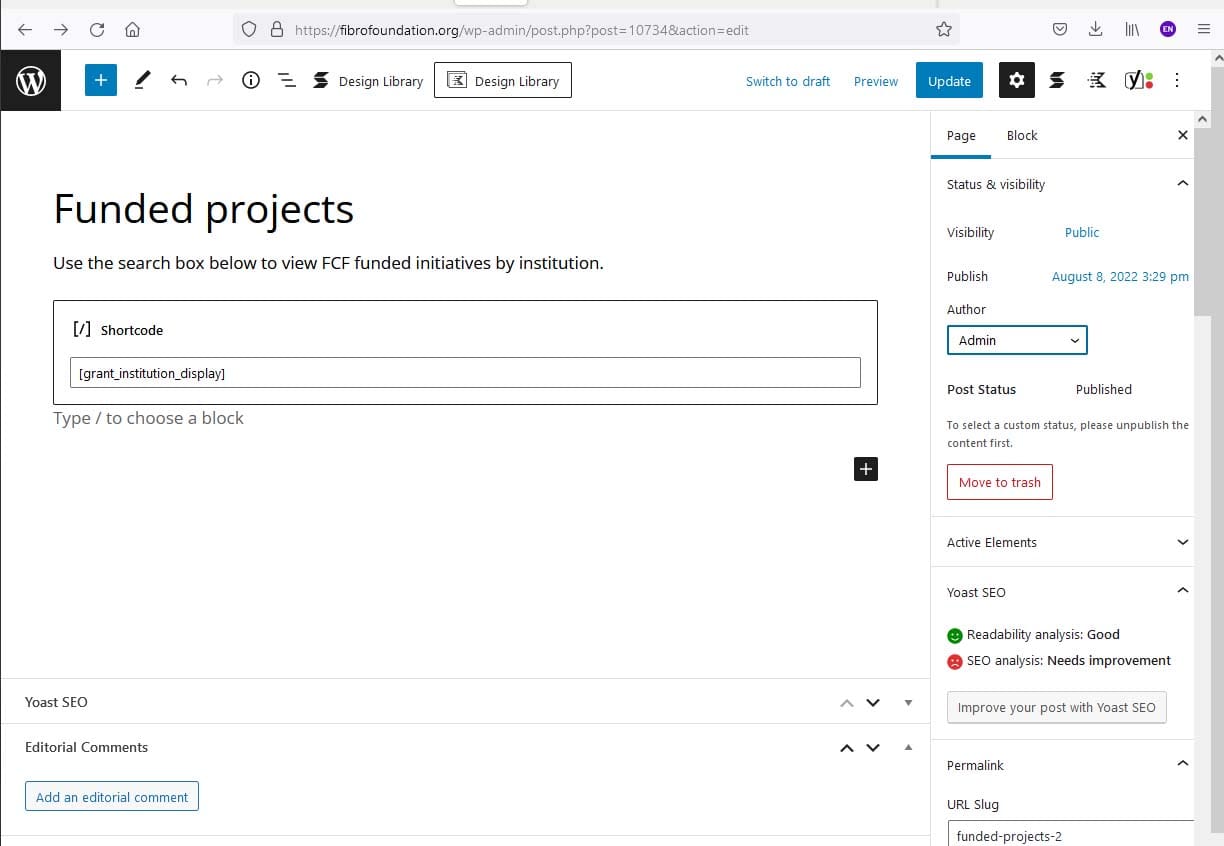
Here's a screenshot of the simple page in wp-admin: https://fibrofoundation.org/wp-content/uploads/2022/08/page-screenshot.jpg
Here's the shortcode snippet:
// Shortcode to create dropdown for grant institutions
add_shortcode( 'grant_institution_display', 'grant_institution_display_shortcode' );
function grant_institution_display_shortcode( $atts ) {
ob_start();
$args = array(
'orderby' => 'name',
'show_count' => 0,
'pad_counts' => 0,
'hierarchical' => 1,
'show_option_all' => 'Any',
'taxonomy' => 'fcf_grant_institution',
);
'<div class="post-list-grant">';
echo '<form action="" method="post" >';
wp_dropdown_categories($args);
echo '<input type="submit" value="List projects by institution" />';
'</form>';
'</div>';
$catid = $_POST["cat"];
$catname = get_term_by('term_taxonomy_id', $catid, 'fcf_grant_institution');
$cname = $catname->name;
$cnameresult .= '<span class="post-list-name">' . $cname;
echo $cnameresult;
// Define category query parameters based on attributes
$options = array(
'post_type' => 'fcf_grants',
'order' => 'ASC',
'orderby' => 'meta_value_num',
'meta_key' => 'status',
'posts_per_page' => -1,
'tax_query' => array(
array(
'taxonomy' => 'fcf_grant_institution',
'field' => 'term_taxonomy_id',
'terms' => $catid,
),
),
'has_password' => false,
);
$query = new WP_Query( $options );
if($query->have_posts() ) :
while($query->have_posts()) : $query->the_post();
$result .= '<div class="post-list-item">';
$result .= '<div class="post-list-bullet"> ● </div>';
$result .= '<div class="post-list-cell">';
$result .= '<span class="post-list-name"><a href="' . get_the_permalink() . '">' . get_the_title() . '</a></span>';
$result .= '<span class="post-list-name">' . get_field('institution') . '</span>';
$result .= '<span class="post-list-details">' . get_field('status') . '    │    ' . display_taxonomy_terms( 'fcf_grant_category' , 'return' ) . '</span><br>';
$result .= '<div class="post-list-grant">' . get_the_content( get_the_ID()) . '</div>';
$result .= '</div>';
$result .= '</div>';
endwhile;
wp_reset_postdata();
endif;
return $result;
} ____________
Thank you for any advice you can offer!
Hi there,
i edited your topic, and put your code in code block, so it keeps its formatting... but i am unsure if some of it got corrupted when first posted.
Could you repost your code in your next reply.
Before submitting, hightlight the code and click the Code button. That way we can see the formatting.
// Shortcode to create dropdown for grant institutions
add_shortcode( 'grant_institution_display', 'grant_institution_display_shortcode' );
function grant_institution_display_shortcode( $atts ) {
ob_start();
$args = array(
'orderby' => 'name',
'show_count' => 0,
'pad_counts' => 0,
'hierarchical' => 1,
'show_option_all' => 'Any',
'taxonomy' => 'fcf_grant_institution',
);
'<div class="post-list-grant">';
echo '<form action="" method="post" >';
wp_dropdown_categories($args);
echo '<input type="submit" value="List projects by institution" />';
'</form>';
'</div>';
$catid = $_POST["cat"];
$catname = get_term_by('term_taxonomy_id', $catid, 'fcf_grant_institution');
$cname = $catname->name;
$cnameresult .= '<span class="post-list-name">' . $cname;
echo $cnameresult;
// Define category query parameters based on attributes
$options = array(
'post_type' => 'fcf_grants',
'order' => 'ASC',
'orderby' => 'meta_value_num',
'meta_key' => 'status',
'posts_per_page' => -1,
'tax_query' => array(
array(
'taxonomy' => 'fcf_grant_institution',
'field' => 'term_taxonomy_id',
'terms' => $catid,
),
),
'has_password' => false,
);
$query = new WP_Query( $options );
if($query->have_posts() ) :
while($query->have_posts()) : $query->the_post();
$result .= '<div class="post-list-item">';
$result .= '<div class="post-list-bullet"> ● </div>';
$result .= '<div class="post-list-cell">';
$result .= '<span class="post-list-name"><a href="' . get_the_permalink() . '">' . get_the_title() . '</a></span>';
$result .= '<span class="post-list-name">' . get_field('institution') . '</span>';
$result .= '<span class="post-list-details">' . get_field('status') . '    │    ' . display_taxonomy_terms( 'fcf_grant_category' , 'return' ) . '</span><br>';
$result .= '<div class="post-list-grant">' . get_the_content( get_the_ID()) . '</div>';
$result .= '</div>';
$result .= '</div>';
endwhile;
wp_reset_postdata();
endif;
return $result;
} OK, i think there are some mistakes in the code.
For example:
'<div class="post-list-grant">'; or '</form>'; or '</div>';
These all need to be echo output to the buffer like this line:
echo '<form action="" method="post" >';
I would start there to fix the broken HTML thats creating.
I had tried that, but it makes no difference to the display order and the formatting difference to the paragraph above the shortcode
I simplified the shortcode to it's bare essence - basically the command "wp_dropdown_categories($args)" and the re-ordering still exists. The problem seems to be that the echo automatically drives the echoed content to the top of the page, above other blocks.
In a new - super simple shortcode:
// Shortcode test

add_shortcode( 'grant_institution_display', 'grant_institution_display_shortcode' );
function grant_institution_display_shortcode( $atts ) {

echo 'Hello!';
}
The output (Hello!) still shows up on the very top of the page, above the paragraph block that was placed first on the Generate Press page.
You shouldn't echo inside a Shortcode, as they return their content.
So in your test try:
return 'hello';
If you have to use echo then you need to use object buffering. See here for example:
https://docs.generatepress.com/article/creating-a-shortcode/
Otherwise it will get injected into the_content before your post content.