Archived topic
Disable Elements From Custom Templates
3 replies · Started by Guy on April 9, 2021
Hi,
Just a suggestion:
It would be useful to be able to exclude elements from a CUSTOM TEMPLATE in the display rules dropdown list:
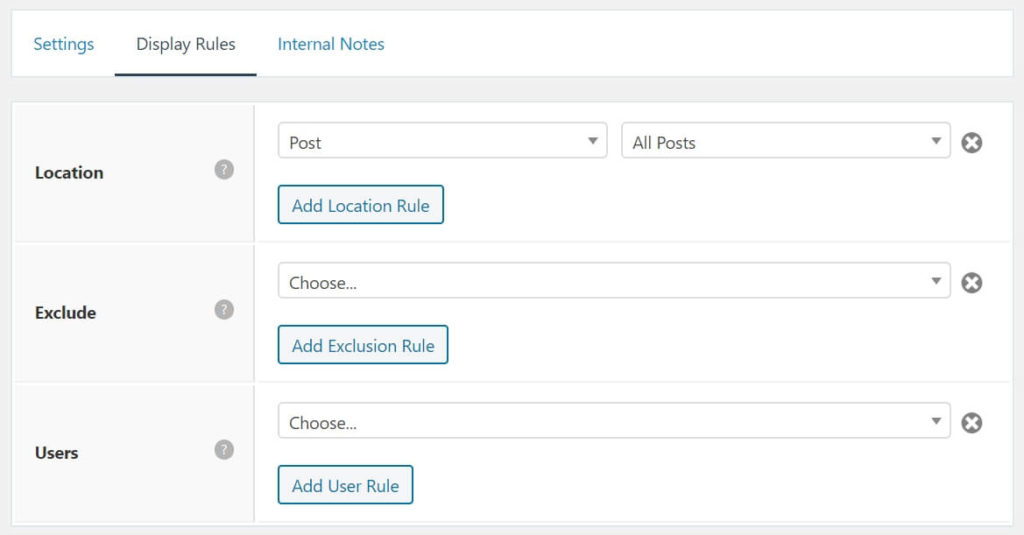
I'm currently trying to figure out a way to remove one ELEMENTS from a custom template file PHP code.
Is it possible to disable Elements based on a custom template?
The only solution I've found so far is to set an exclude for each page created with the custom template in the display rules.
Thanks in advance for your help
Hi there,
you could do this:
1. Create your Layout Element and DO NOT SET the display Rules and Publish that. Whilst your in the element editor grab the ID that will be in the browser URL.
2. Then add this PHP Snippet:
add_filter( 'generate_layout_element_display', function( $display, $element_id ) {
    if ( 10 === $element_id && is_page_template( 'your-template.php' ) ) {
        $display = true;
    }

    return $display;
}, 10, 2 );
In the code change the 10 to your elements ID and update the your-template.php slug
Awesome, it's working great!
In fact, your solution helped me figure out the one for my specific case which is regarding a HEADER ELEMENT. So I had to change the filter name to generate_header_element_display and the element_id with my header element id extracted from the url and it's just working great.
I ended up with this code:
add_filter( 'generate_header_element_display', function( $display, $element_id ) {
    if ( 557 === $element_id && is_page_template( 'page-templates/landing-page.php' ) ) {
        $display = false;
    }

    return $display;
}, 10, 2 );
Thanks a lot David, that will save me a lot of page exclusions. Cheers!
Glad to be of help!