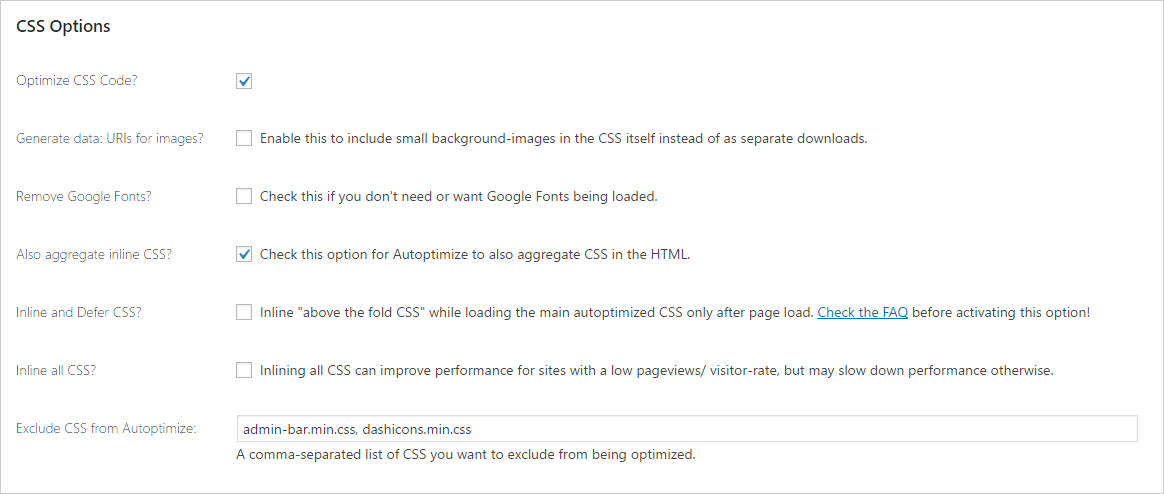
Home › Forums › Support › Different in customize- and normal-mode This topic has 10 replies, 3 voices, and was last updated 8 years, 9 months ago by Tom. Viewing 11 posts - 1 through 11 (of 11 total) Author Posts July 6, 2017 at 10:39 pm #345415 Mårten Hello! I have a problem with a website with Generatepress. It’s one page (that my customer have created) that looks fine in customize-mode but looks horrible in normal-mode. http://www.lidkopingenergi.se/startsida2test/ Do you know what the problem may be? July 6, 2017 at 11:18 pm #345427 LeoStaff Customer Support Hi there, Can you first try disabling Autoptimize and other caching plugin you maybe using? Thanks! July 6, 2017 at 11:43 pm #345438 Mårten Hi! Yes you where right, Autoptimize were the problem. I just thought it was strange that it worked fine on the other pages. If I don’t use this one, do you know any plugin I can use instead? The site is so slow! Thank you! July 6, 2017 at 11:45 pm #345441 LeoStaff Customer Support Autoptimize should work. Can you make sure all the settings are the same as suggested in the Installing Autoptimize section in the link below? https://generatepress.com/fastest-wordpress-theme/ July 6, 2017 at 11:55 pm #345443 Mårten Ok, I checked the guide you send and I have the same settings in Autoptimize! July 7, 2017 at 12:08 am #345445 Mårten What can I do to make it work then? July 7, 2017 at 1:01 am #345464 TomLead Developer Lead Developer If all the settings are identical, there should be no issues. You can try disabling all of the Autoptimize options, then enable them one by one until you narrow down the problem option. July 7, 2017 at 1:38 am #345474 Mårten Thanks! I found out it was the css. Do you think I can solve it or should I just leave the css unoptimized? July 7, 2017 at 9:35 am #345648 TomLead Developer Lead Developer Hmm, so your CSS options are identical to this?: https://generatepress.com/wp-content/uploads/2016/07/css-options.png July 9, 2017 at 10:28 pm #346774 Mårten Yes! July 10, 2017 at 12:27 am #346813 TomLead Developer Lead Developer Very strange, might be a conflict with one of the other plugins you’re using. Author Posts Viewing 11 posts - 1 through 11 (of 11 total) You must be logged in to reply to this topic. Log In Username: Password: Keep me signed in Log In