Archived topic
Customizing the look of a table of contents
5 replies · Started by Stefan on March 23, 2021
Hi GeneratePress,
I would like to customize the Table of Contents on all my blog posts. I currently use one of the Gutenberg blocks. I use H2 for all my blog post headings. However, whenever I have H3 headings, they show inconsistently below the H2.
I would like to achieve a consistent look (something like Wikipedia's table of contents). Please see the image as an example: https://www.bittbox.com/wp-content/uploads/2017/10/05-wikipedia-table-of-contents.png
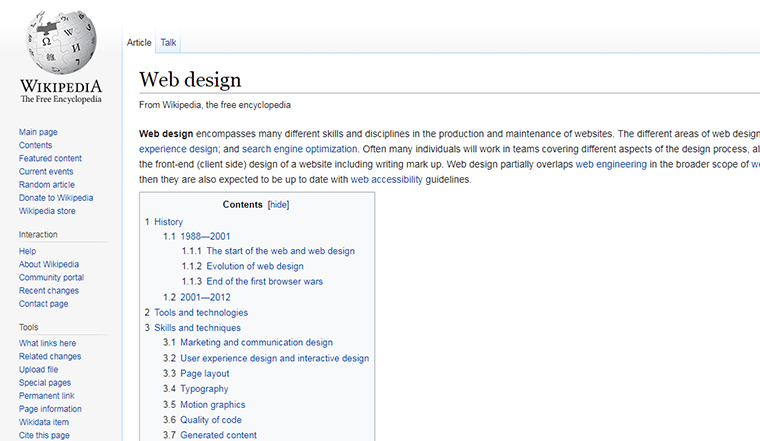
I would like the H2 to be the top level number (e.g. 1, 2, 3) and H3 and H4 to be sub-heading numbers (e.g. 1.1 and 1.1.1 respectively. I do not intend to use H4 (if at all), but I do intend to use H3.
Please check out the current table of contents on my site. I think it's in a need of a brush up. https://i.imgur.com/b1Np6If.png

I look forward to your help.
Stefan
Hi there,
Looks like you are using a plugin for it so have you checked with their support team?
Hi Leo,
I contacted their support, but I am waiting for their response.
I thought it was linked to GP.
I will check and see.
Regards,
Stefan
Definitely not. Everything is coming from the plugin from what I can see:
https://www.screencast.com/t/OnsiorK4Uj8
Hi Leo,
I figured it out. Thank you for your guidance.
Please note, I am a WP padawan. The journey to become a WP jedi like yourself is long and arduous. Apologies for my mistake.
I will focus only on challenging you on questions directly related to GeneratePress and GP plugins.
No problem at all! :)