Archived topic
Customize of author element
13 replies · Started by William on March 12, 2021
Hi there,
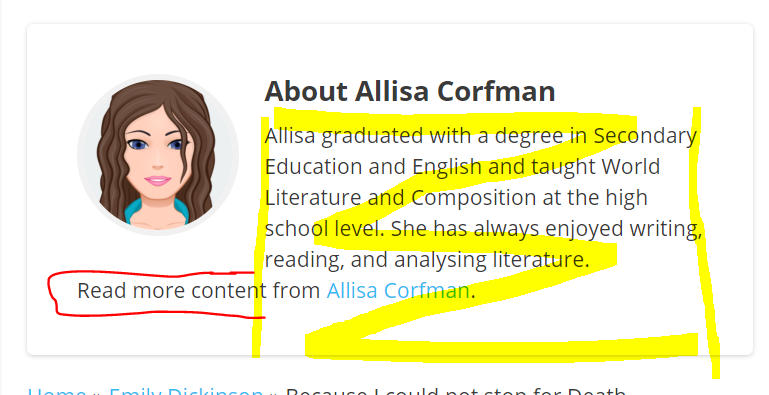
On pages like this where the author appears - is there a way to prevent the content from appearing below the author image but maintain the width of the content (in yellow, where content shouldn't spill into the red):
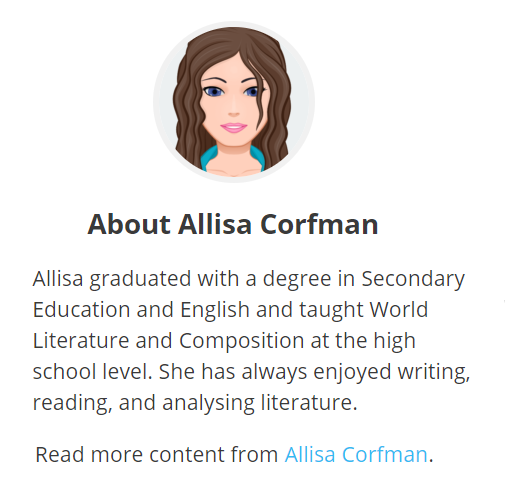
For mobile, to have the author box look like this, with the author image heading is centered about the content?
Hi William,
This doesn't seem like a theme-related issue.
It sort of depends on the content is set up.
I believe you can use overflow-x to fix that:
https://www.w3schools.com/cssref/css3_pr_overflow-x.asp
Or create two columns for your content - one for author image and one for description.
GPP 2.0 makes this super easy:
https://youtu.be/HMhUo91RjsE
Hope this helps :)
Thanks Leo - that is super useful! I was following the tutorial really well until the GP dynamic block - I don't see that block anywhere?
Did you make sure to check this part about the GPP version number?
https://youtu.be/HMhUo91RjsE?t=56
I currently don't have GP Premium beta (although just bought GP Blocks Pro) - is it recommended to update to GP 2.0 as I am worried if it is a beta there will be bugs and break the site etc.?
Yeah if it's a live site with traffic then I would say hold off until the official release.
CSS solution should do for now :)
Okay, when will it be released?
Also, are you able to guide with such CSS for this?
We are still in Alpha stage so at least another 3 weeks I'd say - it's a big release with lots of changes so we want to get it absolutely right :)
If you can link me to the page in question, I can try to point you in the right direction.
Sounds good - I presume as soon as its released there's a lot of elements that can be made a lot easier!
You can see the link here.
Have you already fixed it? I'm not seeing the issue here:
https://www.screencast.com/t/mPxXUhKR
I've migrated the site to live here now - when the width changes the issue still persists.
This should solve the issue:
.author-box {
    display: flex;
}
You will just need some CSS to resize the author image.
Awesome thanks!
No problem :)