
Archived topic
Change cart layout
3 replies · Started by mickael on June 14, 2022
Hello,
I allow myself to contact you because I would like to make some changes to the layout of the shopping cart in the mobile version.
I know that GeneratePress uses the Woocommerce layout but you may have some tips for me to achieve the desired result :)
Currently, the mobile version of the shopping cart is like this:
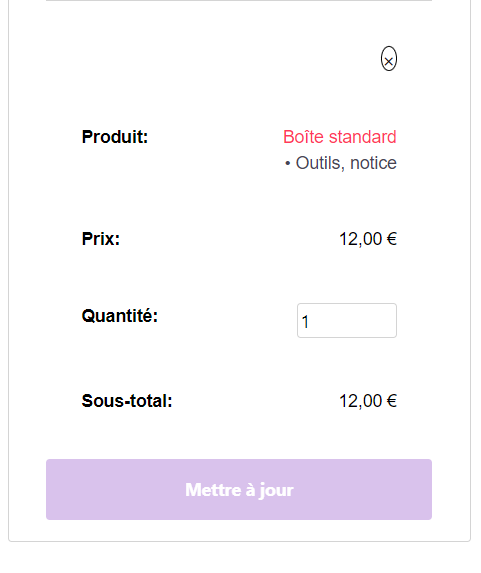
I would like to get this:
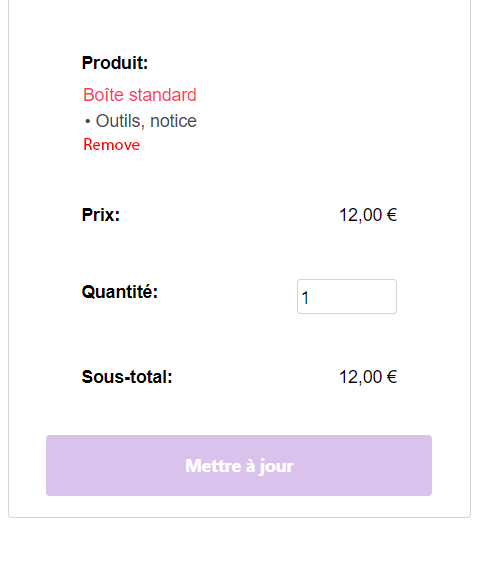
- The "Delete" button in the shape of a cross becomes textual "Delete" and is placed under the product description.
- The description of the product is placed under the title "Product".
Is this possible?
Thank you for your help :)
You can give this CSS a try, but to change thex to remove, it can not be done only with CSS.
You might need to contact Woocommerce's support.
@media (max-width: 768px) {
.woocommerce table.shop_table_responsive tr td.product-name {
    display: flex !important;
    flex-direction: column;
    align-items: flex-start;
}

.woocommerce table.shop_table_responsive tr.woocommerce-cart-form__cart-item.cart_item {
    display: flex !important;
    flex-direction: column;
}
.woocommerce table.shop_table_responsive tr td.product-name {
    order: -1;
}
.woocommerce table.shop_table_responsive tr td.product-remove {
    display: flex;
    justify-content: flex-start;
}
}Hi Ying,
Thanks for your help.
Thanks to you, I was able to get the desired layout :)
Great! You are welcome :)