
Archived topic
Always 'full' sized featured image shown in archive view
7 replies · Started by litesprint on May 4, 2021
Hi,
I've set the size of featured image in archive view as 'medium', yet full-sized images are being displayed instead of the medium-sized thumbnail.
This is happening across all my sites.
Hi there,
The post list on the site you've linked seems to be created within thrive editor (TAR/Thrive Architect).
The theme doesn't control how the plugin presents the images.
And since Thrive Architect is a third-party plugin outside of our scope of support, I recommend asking them the best practice on how to deal with this. :)
No, I didn't refer to those pages using TAr. Check archive pages (such as categories) which are populated by GP. Check the source code to be sure.
Ah I see.
By default, GeneratePress let's WordPress Core functions handle the serving of the images.
Tom added a filter that may help though, please see this
https://github.com/tomusborne/generatepress/blob/b60b853630da6d9015722da903e53c8064148b0a/inc/structure/featured-images.php#L35
You can modify the parameters of get_the_post_thumbnail() through the generate_featured_image_output filter.
You can then optimize how WP serves its srcset - example - https://developer.wordpress.org/reference/functions/get_the_post_thumbnail/#comment-2813
Note: Your srcset only has 2 images as opposed to WordPress default (thumbnail, medium, large, full). I'm not sure if this was intended but consider adding more image sizes incase needed.
Why should I spend my time on these things when there's a clear option within Customizer to specify the size of the thumbnails:
https://i.gyazo.com/51e0e27f70eddb9e57b0147283c5d57e.png
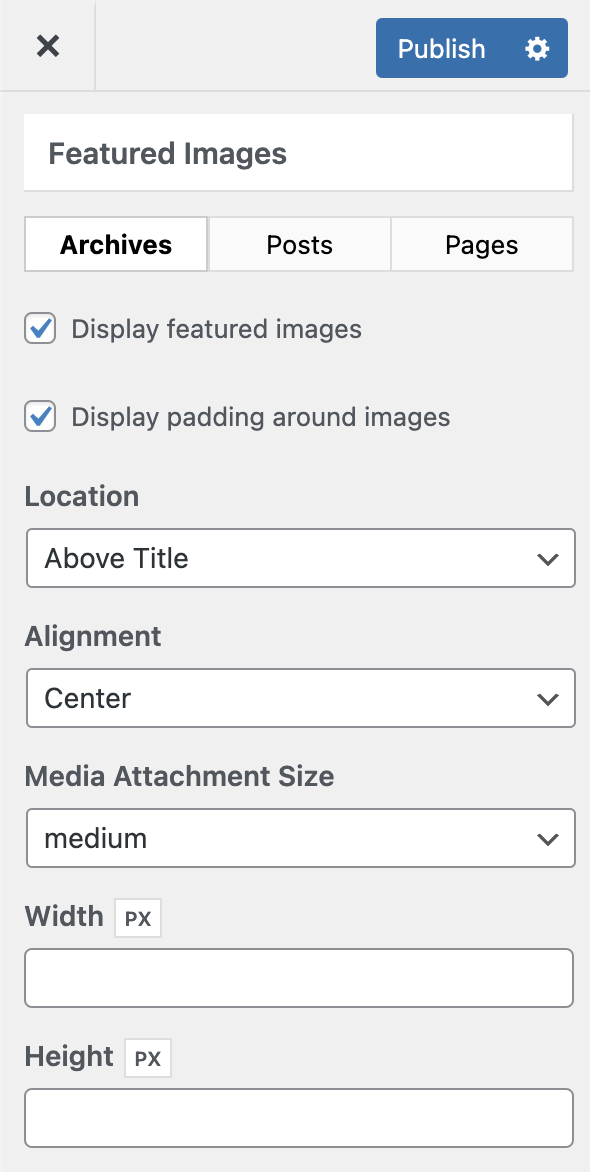
It's not working as intended, so either I'm doing something wrong or this functionality is buggy.
I knowingly disabled image sizes other than full and medium as I don't need the others. But why would it not work with medium sized images when those are indeed present?
Hi there,
that is the default behaviour of WordPress - its so as the Browser can select the most appropriate sized image - which when considering Retina / HD devices that image may need to be larger then the one specified.
If you want - you can try using adding this PHP Snippet to stop that from occurring:
function set_max_srcset_width( $max_width ) {
    $max_width = 300;
    return $max_width;
}
add_filter( 'max_srcset_image_width', 'set_max_srcset_width' );
I set the $max_width = 300; which is the default size of the Medium image. If that has been changed in Settings > Media then you should change the above value to match.
Oh, I see, it's happening because of srcset! Perhaps me using a high-res display is causing the browser to fetch the higher resolution photo.
That could be the very reason :)
Glad we could be of help.