Archived topic
Additional Links in Mobile Version of Primary Menu
7 replies · Started by Charles on April 11, 2023
Background. Kyle Van Deusen who knows Tom created this tips video
https://www.youtube.com/watch?v=0mNmf2Y8ZxA&t=2s
Spice Up Your Mobile Menu Designs
(use GenerateBlocks inside of your GeneratePress menu!)
I thought this looked pretty cool so today I gave it a go. On this site. https://realretreats.co.uk/ I have got it working as intended.
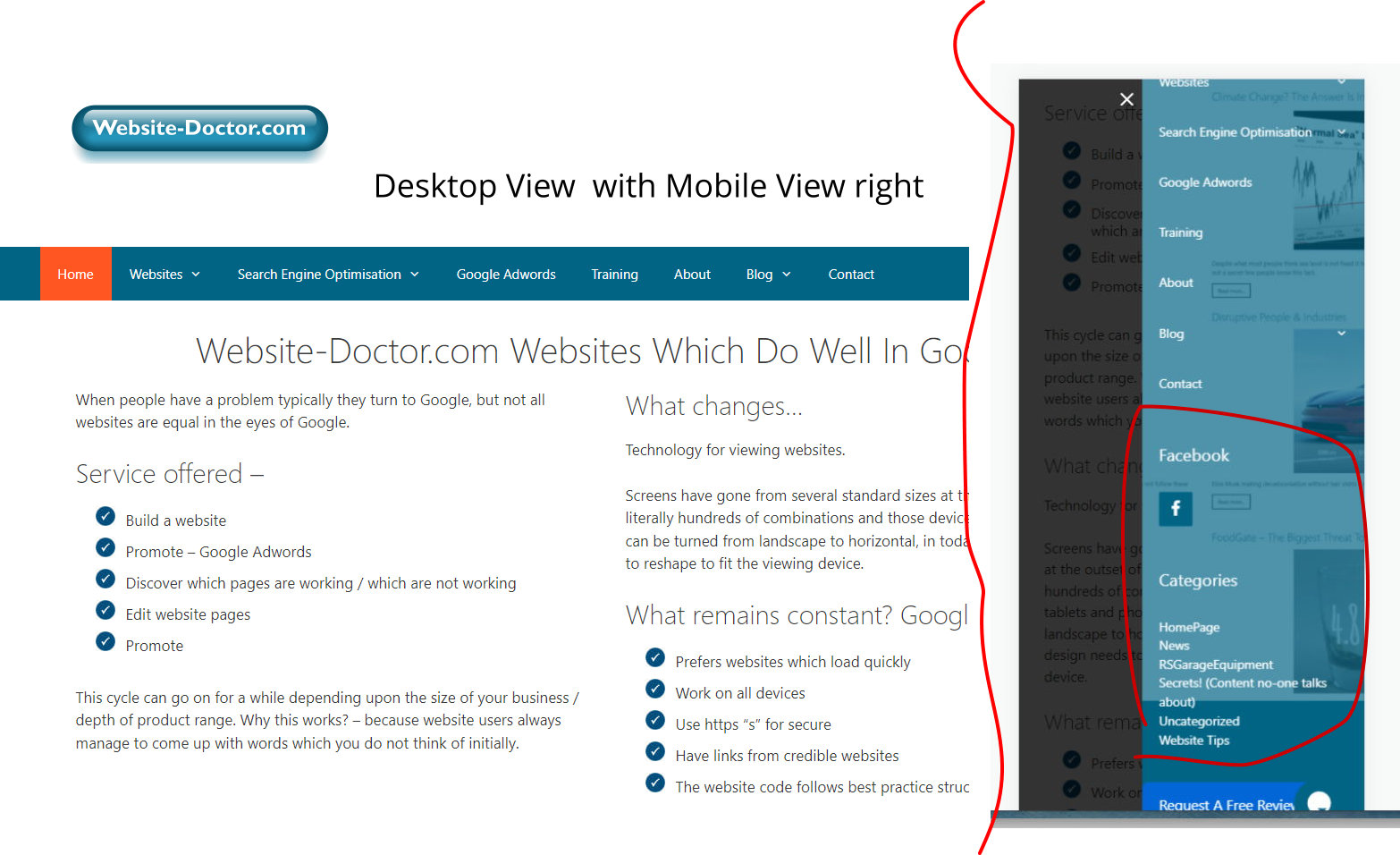
I then tried applying it to my site https://website-doctor.com/ but in the mobile version I get a number of extra links in the menu. I have been over the settings a few times but I cannot see why the menu does what it does, on a mobile phone.
I have given this a try on a third website https://a-history-of-rawdon.co.uk/ success.
As this effect on a mobile phone looks great I would like to apply this to more sites.
Any thoughts as to why / what I can do to the Website-Doctor.com mobile navigation would be much appreciated.
Many thanks
Charles
Hi there,
but in the mobile version I get a number of extra links in the menu.
Which links specifically are you referring to?
Hi Leo,
To understand the issue you need to look at https://website-doctor.com/ in a mobile phone emulator and when you click the hamburger menu to open it instead of going from Home to Contact it includes Facebook Categories etc.
https://website-doctor.com/wp-content/uploads/2023/04/desktop-and-then-mobile-view.jpg please view the picture link to see.
Kind regards
Charles
Hi Charles,
You have widgets added through Appearance > Widgets > Off Canvas Panel.
You may also have a Block Element - Hook hooked to the slideout navigation. Can you check?
Hi Fernando,
Many thanks - a great answer - that has fixed the issue.
Much appreciated.
Kind regards
Charles
You're welcome, Charles!
In the 30-years or more that I have used software / computers, Generatepress is the best supported product / service I have ever encountered by a huge margin.
We're very glad you're happy with our product! Thank you for the feedback!