Archived topic
Adding Google Japanese fonts via Appearance > Customize > Typography?
6 replies · Started by naisyo523 on February 3, 2023
Hi there,
I was wondering if you guys ever consider adding Japanese Google fonts like "Noto Sans JP" and/or "Noto Serif JP" etc so that I can select from the pulldown menu on Customize > Typography (on the menu).
What's the best way to add Google fonts that are not in the "Font Family" pulldown menu under "Customize"?
Thanks!
Hi there,
The font manager should be able to load any Google font.
Can you try searching for it like this?
https://www.screencast.com/t/vcVM4T4nK
Reference: https://docs.generatepress.com/article/dynamic-typography-overview/#font-manager
I do remember Font Manager, but on my admin site, I don't see it...it does not look like the Font Manager I remember...Am I missing something? BTW, typography under Generatepress Modules is "activated".
Here's the screenshot: https://dear-paws.com/wp-content/uploads/2023/02/Screen-Shot-2023-02-03-at-2.26.04-PM.png
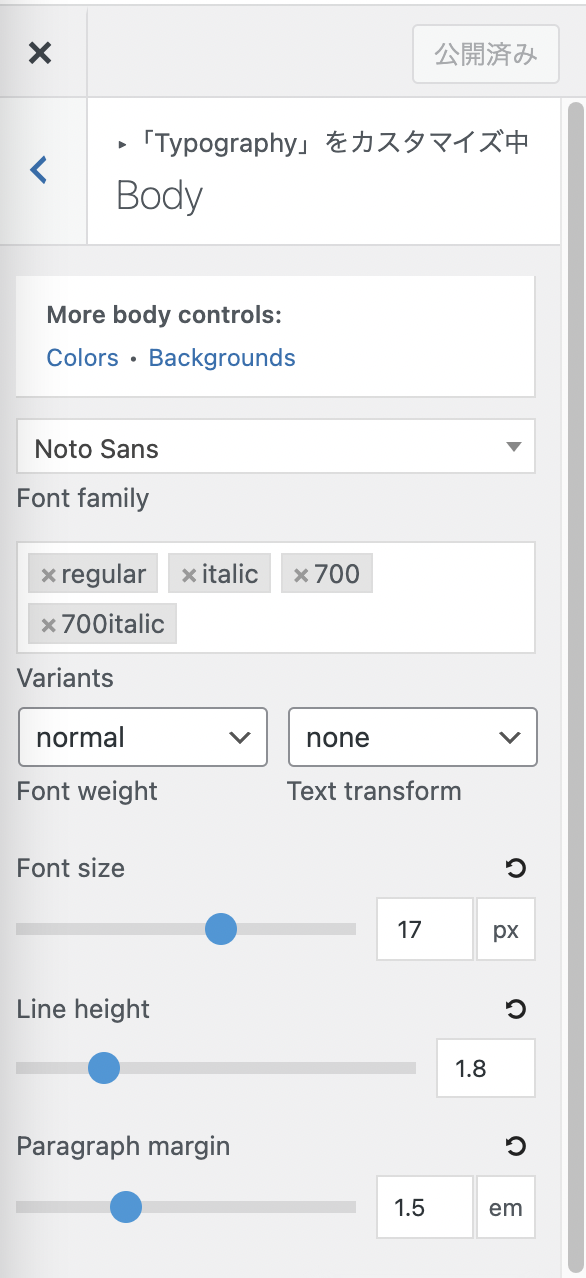
Hi there,
If you are still using the old typography system, you can switch to the dynamic typography system at customizer > general.
Here's the documentation for your reference: https://docs.generatepress.com/article/switching-to-dynamic-typography/
Ahhhh! Thank you so much, Ying! Thanks Leo as well :)
It's now resolved!
Glad to hear that :)