
Archived topic
Add Links to Footer Section
6 replies · Started by Ravi Saive on November 28, 2022
Hi Team,
I want to have a similar footer like yours - https://i.postimg.cc/MGPPpnVK/Screenshot-2022-11-28-12-33-15.png

How to create it?
Hi Ravi,
A site footer like this is created through a Block Element - Site Footer. Reference: https://docs.generatepress.com/article/block-element-site-footer/
In this link, you'll also find an instructional video showing how to create one.
Hi Fernando,
Is there any we can do it without using the block editor?
It's possible.
You can go to Customize > Layout > Footer, and set the Footer Widget section number you want.
Then, add the links through Appearance > Widgets.
You can then set the colors through Customize > Colors.
Hi Fernando,
I want to display links in the footer bar widget...
Hi Fernando,
I already displaying three footer widgets with posts, I can't change this...
I want to change the footer section as shown here - https://i.postimg.cc/fW2rzZJ5/Screenshot-2022-11-28-14-04-35-1.png
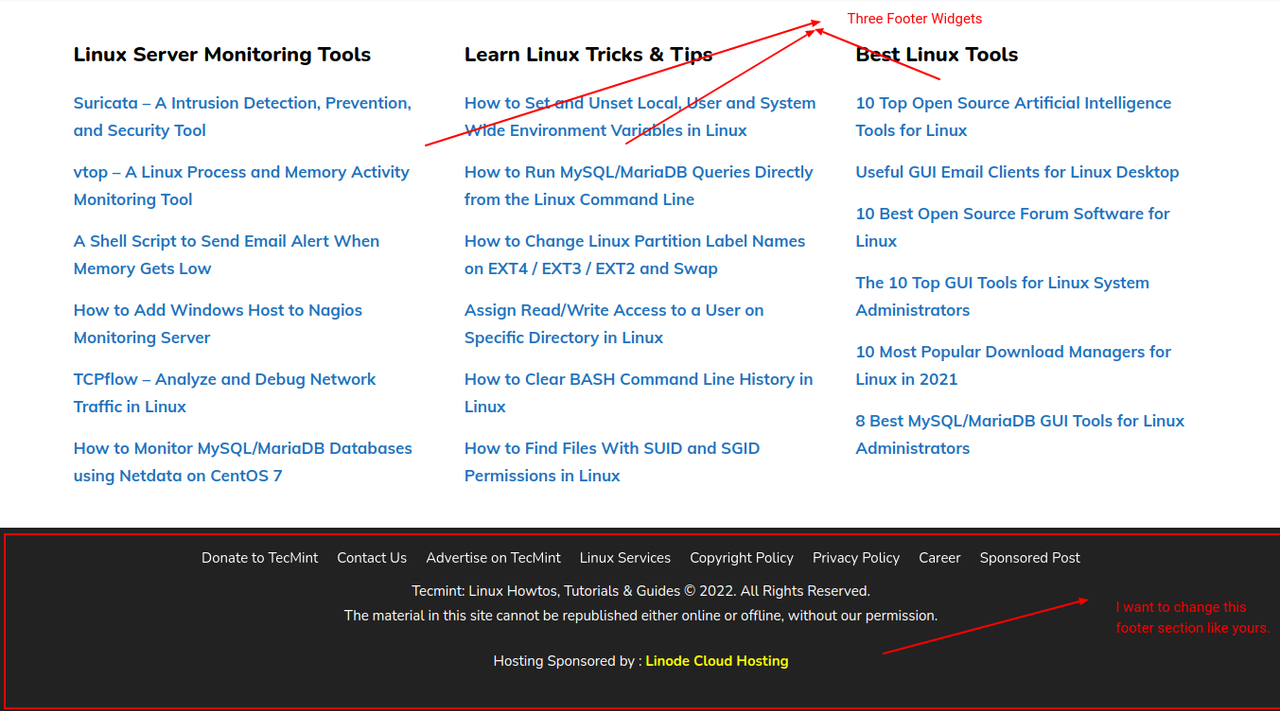
Website link in the private section.
Are you not able to add links in the Footer Widgets? This should be possible even with the Classic editor.
If you're using the Classic Editor, you'll need multiple CSS codes and custom HTML to turn it exactly like the one you're going for. This would be out of our scope of support.
There should be a way to disable the Classic editor for Elements. See here for instance: https://gutenberghub.com/how-to-switch-between-wordpress-classic-editor-and-gutenberg/
Our primary advice would be to use the Block Editor so you can style it easily.