
Archived topic
Add items to menus, mobile
22 replies · Started by Charles on November 22, 2021
My mobile menus are wasted real estate. Can I get at least some icons onto them?
https://gettysburgconnection.org
Thanks.
Hi there,
this article explains how to add icons to menus:
https://docs.generatepress.com/article/adding-icons-to-menu-items/
Unless you use the Off Canvas panels specifically for your mobile menu, then the menus on desktop and mobile will be the same - so it may require some CSS to remove the icons on desktop. This will vary depending on the method you use to add the icons.
On mobile, can I get icons to show on the menu bar itself rather than only from the dropdown?
You can use a Hook Element ( or Block Element if you're using Block Editor ).
Theres a Hook named: genereate_inside_mobile_menu_bar which you can use to add your HTML for icons/buttons etc.
Thank you, this is new to me.
Do I put this code inside a hook element?
add_action( 'generate_inside_mobile_menu_bar','gimmb' );
function gimmb() { ?>
<i class="fa fa-home fa-lg"></i>
<?php }
Thanks
Hi Charles,
You can add the code in to code snippet plugin or funcstions.php file of your child theme if you are using one.
But the easiest way is to add <i class="fa fa-home fa-lg"></i> to a hook element (appearance > elements), then choose generate_inside_mobile_menu_bar as the hook name, choose entire site as location.
For more info: https://docs.generatepress.com/article/hooks-element-overview/
Yes, right... sorry.
But I'm seeing this: Unable to execute PHP as DISALLOW_FILE_EDIT is defined.
Which way are you going to use?
If you go with the hook element way, you should NOT need to tick the Execute PHP box since the code <i class="fa fa-home fa-lg"></i>is just html not PHP.
Let me know :)
Doesn't seem to show anything on the mobile menu bar.
https://gettysburgconnection.org/wp-content/uploads/2021/11/Capture.png
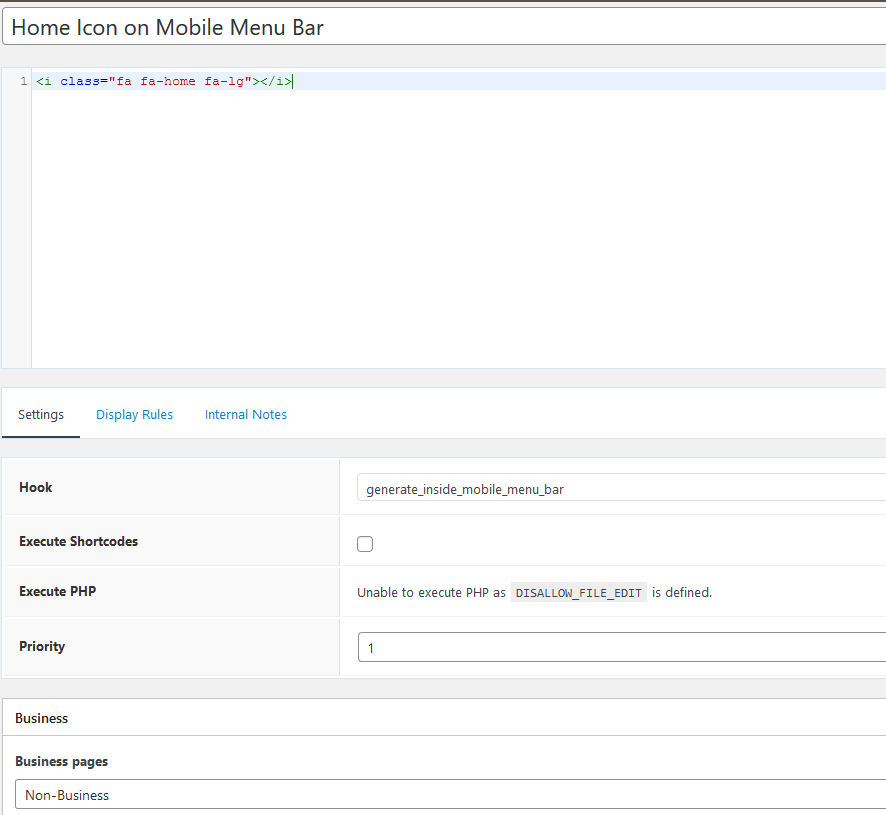
Do you have Fontawsome plugin installed?
https://docs.generatepress.com/article/font-awesome/
If not, the html won't work since the theme no longer includes Font Awesome.
Let me know if this helps :)
Yes, fontawesome is installed. But I still don't see the icon. THanks.
In order to use generate_inside_mobile_menu_bar hook, mobile header needs to be activated at customizer > layout > header.
If that's not what you want, then trygenerate_menu_bar_item hook instead, then change this html <i class="fa fa-home fa-lg"></i> to <i class="fa fa-home fa-lg hide-on-desktop"></i>
Let me know :)
I don't see generate_menu_bar_item hook.
Hi Charles,
For Hook Element - https://share.getcloudapp.com/4guP8DLl
For Block Element:
The generate_ prefix is omitted. It's menu_bar_items https://share.getcloudapp.com/12uPlqmB
Just don't see generate_menu_bar_item in the hooks.
Also when I choose a block element I don't see block type of hook.