

Over the last 18 months, GenerateBlocks Pro has evolved at an incredible pace.
Users have gained a growing set of powerful site-building capabilities, including Overlay Panels, Conditions, Forms, and Editor Access. And, with the release of GenerateBlocks Pro 2.8, we have introduced Design Systems.
GenerateBlocks Design Systems is the ultimate evolution of Global Styles, bringing Design Tokens and a more systematic approach to managing design across an entire site. With the latest release, you can now see what GenerateBlocks Design Tokens can do.
These updates are transformative in the way people build WordPress sites.
Individually, each feature addresses a common requirement that would traditionally have meant installing and managing another plugin. Together, however, they represent something much more significant: a growing, unified ecosystem for building, managing, and handing over complete websites.
- Overlay Panels enable users to build sophisticated interfaces directly with GenerateBlocks, from pop-ups and slide-outs to complex mega menus and custom application-style UIs.
- Conditions give users control over where and when content is displayed, providing a flexible way to control the visibility of content throughout a site.
- Forms bring form building into the same familiar GenerateBlocks interface users already understand, removing the need for a separate plugin, interface, and workflow.
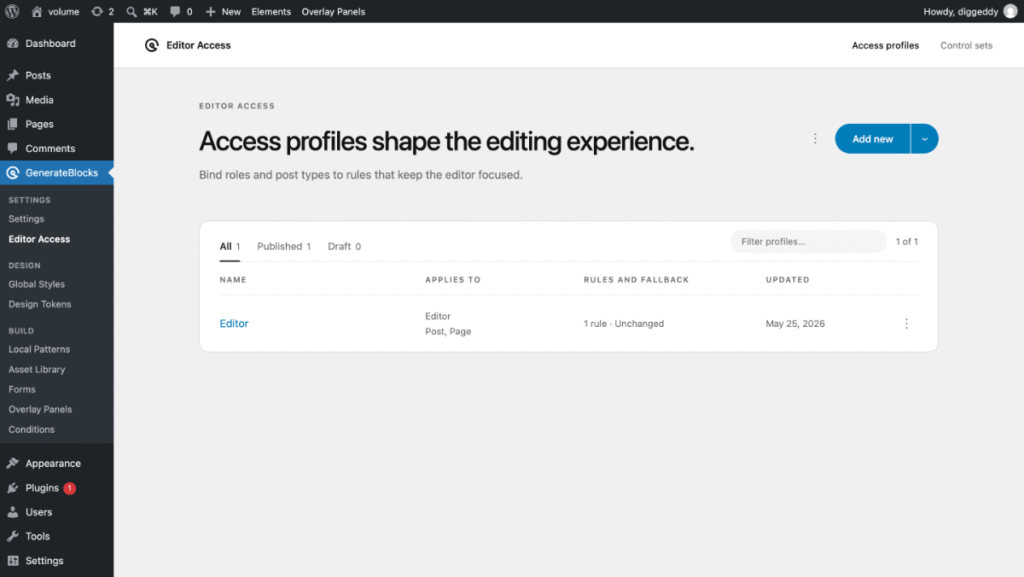
- Editor Access takes GenerateBlocks beyond design and into day-to-day site management, allowing developers to create focused editing experiences for clients and content editors.
Design Systems takes this evolution another step further. By introducing Design Tokens, we’re moving from just class based Global Styles to a complete, structured, and scalable approach to managing design across an entire website.
The result is not simply a collection of new features. Site owners, developers, and designers now have an increasingly cohesive system where different parts of the site-building process work together through a common interface, common design language, and common set of tools.
A Growing Product Needs a Better Interface
This rapid expansion has also highlighted an important challenge.
The GenerateBlocks UI and dashboards haven’t evolved at the same pace as the product itself.
Many of the interfaces users interact with today were designed when GenerateBlocks was a much smaller and more focused tool. At the time, the existing dashboards and settings made sense because there were fewer features, fewer concepts, and fewer decisions for users to make.
That’s no longer the case.
Feedback from our community made it clear that those dashboards couldn’t keep up with what the product had become. As we expanded the product to meet those needs, the dashboards and GenerateBlocks UI required an evolution.
That’s why we’ve built a new generation of GenerateBlocks dashboards and refreshed the main UI.
Introducing the Dashboards
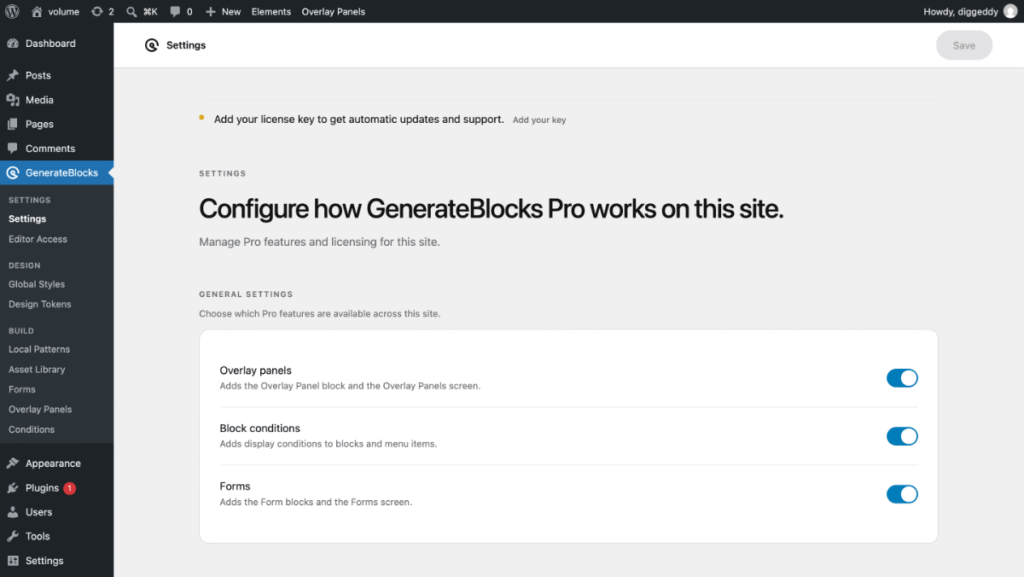
The new dashboards are designed to bring the GenerateBlocks experience in line with what the product has become.
This isn’t simply a visual refresh. The new dashboards provide a clearer way to understand, navigate, and manage the growing range of capabilities within GenerateBlocks Pro.
They bring the major areas of the product together into a more cohesive experience, starting with a new persistent dashboard navigation, making it easier to discover and manage things like Design Systems, Elements, Conditions, Forms, Overlay Panels, Editor Access, and more.
Built as a System, Not a Collection of Screens
An important part of the new dashboard experience is how it has been developed.
Rather than building each dashboard as a standalone screen, we’ve created a componentised dashboard system. Common UI patterns, navigation, layouts, controls, and functionality are built as reusable components that can be assembled and configured as new features are introduced.
This has a significant impact on how we can develop GenerateBlocks going forward.
New features no longer need to start with the creation of an entirely new dashboard experience. Instead, they can make use of the existing system and components, allowing new dashboards to largely self-assemble from the building blocks we’ve already created.
This means future development becomes faster and more consistent, while also reducing the amount of bespoke code and UI that needs to be created and maintained.
It also means improvements to the underlying system can benefit multiple dashboards at once. As the component library evolves, the dashboards built from it can easily evolve with it.
We’re not just building better dashboards; we’re building a system that makes future dashboards faster and easier to build and maintain.
The UI Refresh
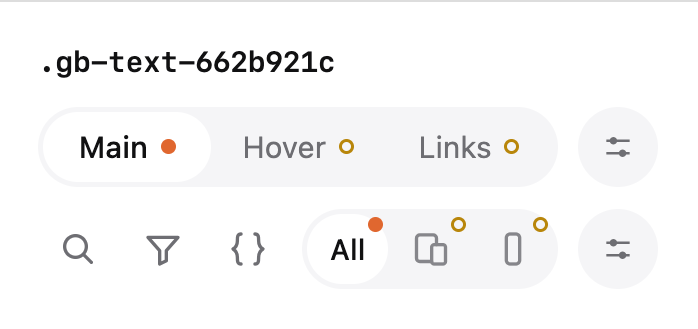
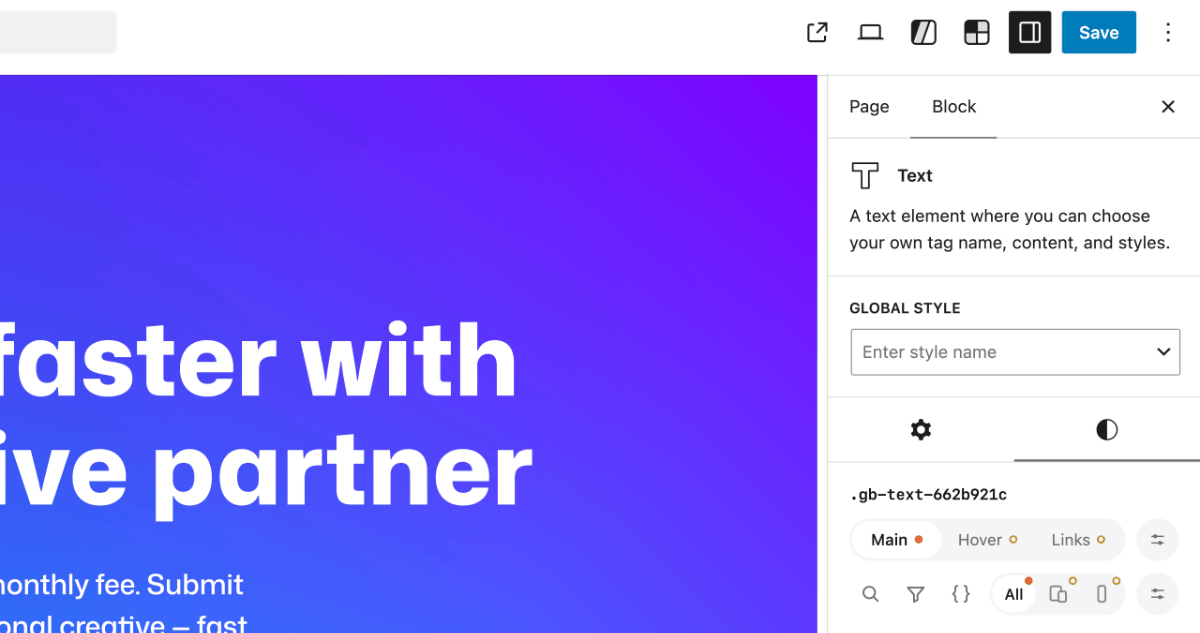
With the release of the new Design Systems, built on Design Tokens and dashboard updates, it was only right for us to address some legacy issues with the Styles Builder UI and give it a clean new look.
Styles Builder Icon Refresh brings new rounded edge icon set to the styles builder bringing them in line with the new dashboard whilst delivering a more friendly feeling.

Styles Builder Header introduces a new cleaner interface for choosing selectors and at-media queries. We have also added improved search and filter and a more prominent CSS Editor mode toggle.
New Top Bar Buttons for the Pattern Library and New Design System have also been treated to the new design language.
What’s to Come
Taken together, these updates are so much more than a fresh coat of paint. The GenerateBlocks UI is catching up to everything it’s grown into.
If you’ve been building with GenerateBlocks Pro over the last 18 months, you’ll recognize the individual pieces. What’s new is how they now live together: one navigation, one visual language, one system that gets stronger every time we add to it.
This is also just the start. We’ll be adding future features soon, including the GeneratePress Premium Template Engine.
Update GenerateBlocks Pro to 2.8 (and GenerateBlocks 2.5) to see the new dashboards and Styles Builder. You can find the downloads in your account dashboard. If you have questions or encounter issues, please let us know.
Looks beautiful! Excited to try it out! Thanks for the hard work on this!