- This topic has 4 replies, 2 voices, and was last updated 9 years, 2 months ago by
Tom.
-
AuthorPosts
-
January 26, 2017 at 2:32 pm #269395
John
Hi Please help.
I had 2 different clients purchase this theme-
Great theme- but I experienced 1 issue on the parent menu.
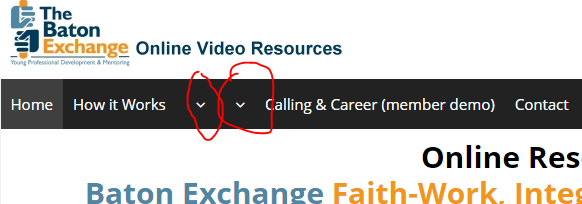
Please see the site here https://thebatonexchange.org/
Notice the arrows in the menu – they are supposed to be full parent menu buttons like the rest, but when I placed submenu items under them, the text collapsed / disappeared and all that shows are drop down carrot or arrows.
Is this a setting issue or conflict with CSS or something?
Please help.
Thanks,
AaronJanuary 26, 2017 at 3:13 pm #269414Tom
Lead DeveloperLead DeveloperHmm, that’s strange. So there is text in there if you check the navigation label in “Appearance > Menus”?
Do you have any menu related plugins? Can you try #1 on this page?: https://docs.generatepress.com/article/debugging-tips/
January 27, 2017 at 2:35 pm #270075Hi Tom,
Thanks for your reply.
The GP premium theme was the first plugin (I have used it on 1 other site and it’s a great theme!!)
The issue came up as I was just making pages and decided to nest a bunch of items under the 1 navigation item.
I have no other menu plugins and am not sure how to debug this.
This occurred before I added other plugins.
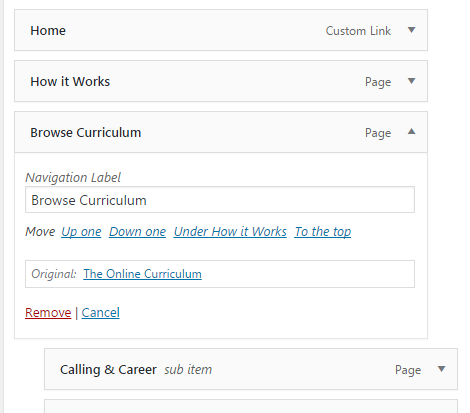
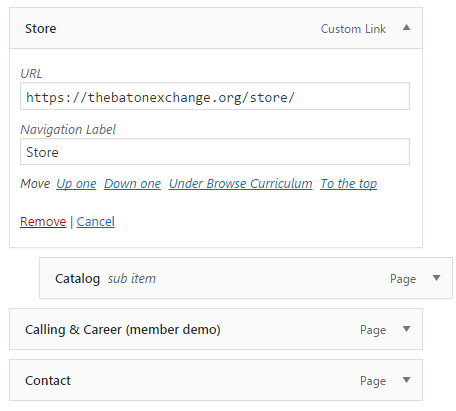
Please see screen shots at these links and let me know if you can help in any way.
Appreciate your time!
https://thebatonexchange.org/wp-content/uploads/2017/01/Generate-press-menu-navigtion-label-1.png
https://thebatonexchange.org/wp-content/uploads/2017/01/Generate-press-menu-navigtion-label-2.png
You will see from the screen shots, the labels are in tact, and they are not showing up in the main menu.
Have cleared cache and looked at the elements in Firebug but cannot see an error (but I am not 100% sure how to find code errors that way)
Is there anything you can do?
Thanks again!
Aaron
January 27, 2017 at 3:00 pm #270081Thanks Tom- also- installing Debug-this https://wordpress.org/plugins/debug-this/
The changes in the wp-config.php file are not in that file based on the tutorial link you posted. . . (to turn debug mode on)
I could not find them to set to “true” perhaps it was moved in newer WP versions
We are on latest WP – 4.7.2
Thanks for any help!
January 27, 2017 at 3:55 pm #270100Lead DeveloperLead DeveloperHi John,
So you have no other plugins activated at all?
I ask because the navigation you see on this site has a dropdown and is using the same structure you are in your screenshots.
The dropdown arrow is appended to the title, but in your case it seems to be replacing the title. This can happen if another plugin is using the same title filter or something else to do with the menu item title.
-
AuthorPosts
- You must be logged in to reply to this topic.