Home › Forums › Support › How to move or remove automatic H1 page title that appears top left on pages?
- This topic has 18 replies, 4 voices, and was last updated 8 years, 7 months ago by
Leo.
-
AuthorPosts
-
January 8, 2017 at 1:25 pm #261978
Silver
Hi,
here is my problem. I use GeneratePress Premium and Beaver Builder.
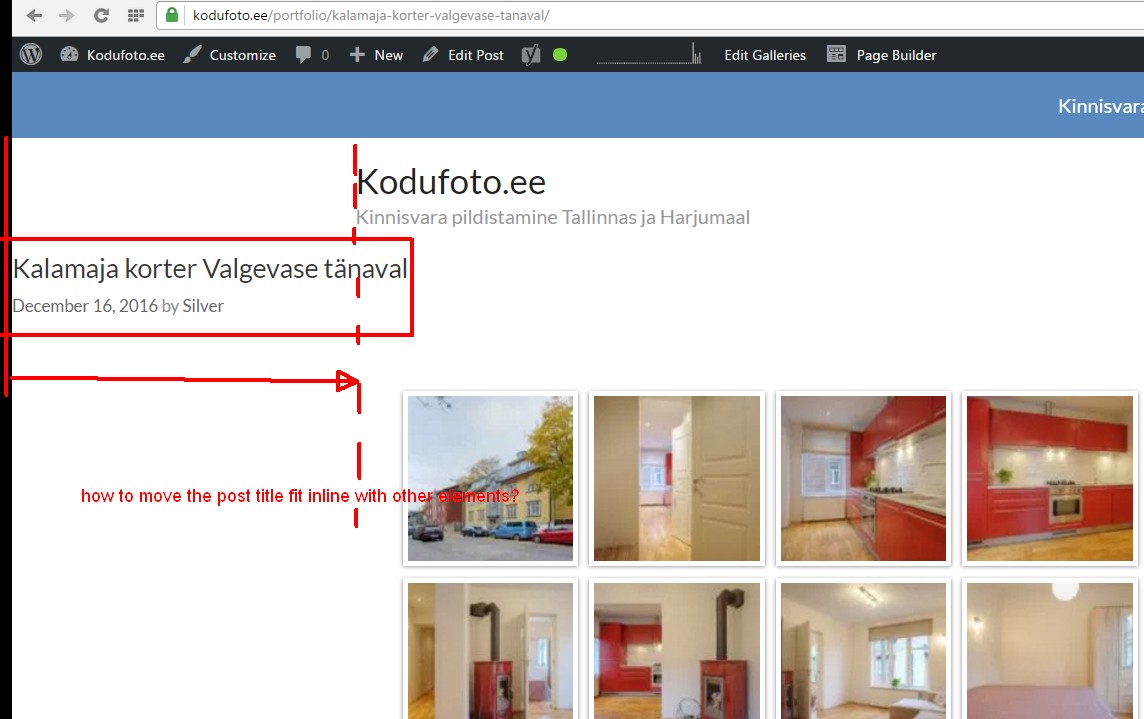
Every time I create a new page or a post, an H1 title is appears top left on every page. I would like to move it in-line with the left side of other elements, otherwise it looks out of place.I suspect the problem is on the GeneratePress side but not sure. Please advise how to fix.
January 8, 2017 at 1:26 pm #261979January 8, 2017 at 1:54 pm #261983Leo
StaffCustomer SupportHi there,
Give this CSS a shot:
.fl-builder.no-sidebar .container.grid-container {
    max-width: 1100px;
}
Adding CSS: https://docs.generatepress.com/article/adding-css/
Let me know.
January 9, 2017 at 12:35 am #262062Hi Leo,
thank you, that worked. It looks better now.
Can you tell me which CSS line I need to move the title itself a bit left or righh within the container? Tge site will look even better if that h1 header is in line with the post title and left side of the post.
January 9, 2017 at 12:54 am #262064Let me rephrase the question. How to make that title stay in the middle, both on desktop and mobile view?
January 9, 2017 at 7:29 am #262179StaffCustomer SupportTry this CSS:
header.entry-header {
    text-align: center;
}
Let me know.
January 9, 2017 at 8:10 am #262197Tom
Lead DeveloperLead DeveloperYour Beaver Builder section has about 40px of padding, so you could also do this:
.entry-header {
    padding-left: 40px;
}
January 14, 2017 at 2:19 am #263956Superb, thank you.
January 14, 2017 at 8:19 am #264032StaffCustomer SupportGlad we can help!
January 22, 2017 at 1:15 pm #266857How to hide that title altogether?
January 22, 2017 at 1:18 pm #266859StaffCustomer SupportTry the Disable Elements add-on.
https://docs.generatepress.com/article/disable-elements-overview/Let me know.
January 22, 2017 at 11:42 pm #266942Thanks, it works.
January 23, 2017 at 8:14 am #267079StaffCustomer SupportGlad I can help!
July 29, 2017 at 8:00 am #356661Bump for a new issue.
How can I move “related posts” part in blog posts in line with page container?
Currently things are off on the left side, as seen here. https://kodufoto.ee/portfolio/uhetoaline-korter-paldiskis/
July 29, 2017 at 9:20 am #356704StaffCustomer SupportTry using Contained in Page Builder Container: https://docs.generatepress.com/article/page-builder-container/
-
AuthorPosts
- You must be logged in to reply to this topic.