Site logo

[Resolved] how to auto populate LATEST ARTICLES

Home Forums Support [Resolved] how to auto populate LATEST ARTICLES

Home Forums Support how to auto populate LATEST ARTICLES

Viewing 9 posts - 1 through 9 (of 9 total)
  • Author
    Posts
  • #2525185
    SARAH

    How do we auto populate latest articles in the Explore template? We can see the sample ones have loaded. fine, but our new ones are not populating. Is there a box we need to check or something else we should do? We’ve included our URL below.

    #2525213
    Ying
    Staff
    Customer Support

    Hi Sarah,

    Which section are you referring to?

    #2525244
    SARAH

    The section mid-way down on the HOME page that has the title, “LATEST ARTICLES”.

    #2525278
    Ying
    Staff
    Customer Support

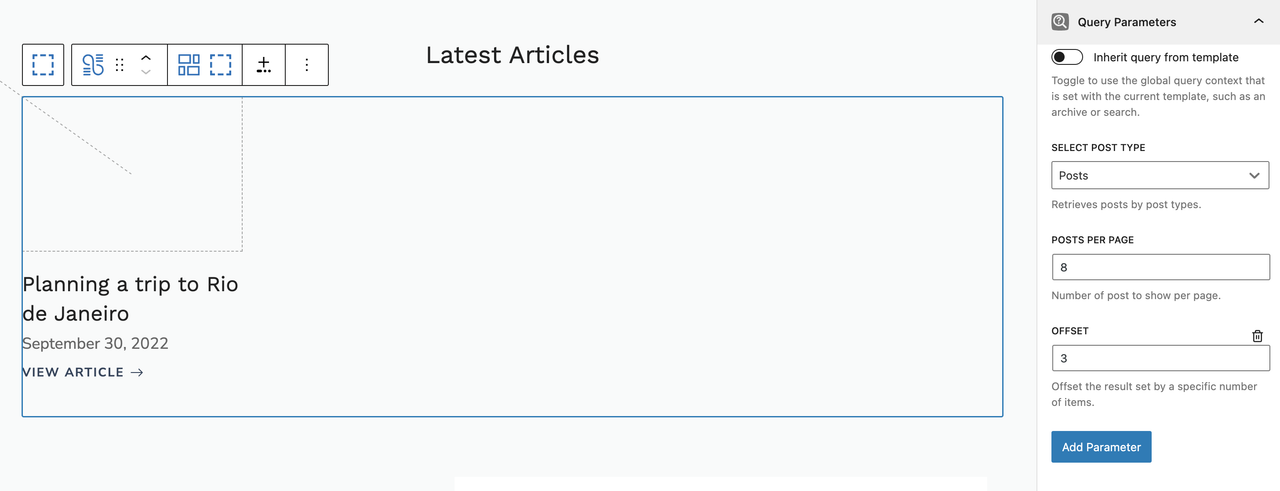
    I can see one post is being outputted, can you take a screenshot of the query loop block’s parameters?

    You can upload screenshot to https://postimages.org/ and share the link with us.

    #2525284
    SARAH
    #2525298
    Fernando
    Customer Support

    Hi Sarah,

    Can you provide admin login credentials so we can take a closer look at your setup?

    Please use the Private Information field for this: https://docs.generatepress.com/article/using-the-premium-support-forum/#private-information

    #2525308
    Ying
    Staff
    Customer Support

    How many published posts do you have?

    If you remove the offset parameter, it should show 4 posts which I assume are the total published posts you have.

    Let me know!

    #2526498
    SARAH

    removing the offset parameter did it. thank you.

    #2526612
    Ying
    Staff
    Customer Support

    No problem 🙂

Viewing 9 posts - 1 through 9 (of 9 total)
  • You must be logged in to reply to this topic.