
- This topic has 17 replies, 3 voices, and was last updated 3 years, 5 months ago by
Leo.
-
AuthorPosts
-
February 3, 2023 at 6:41 am #2520014
aik
Good afternoon.
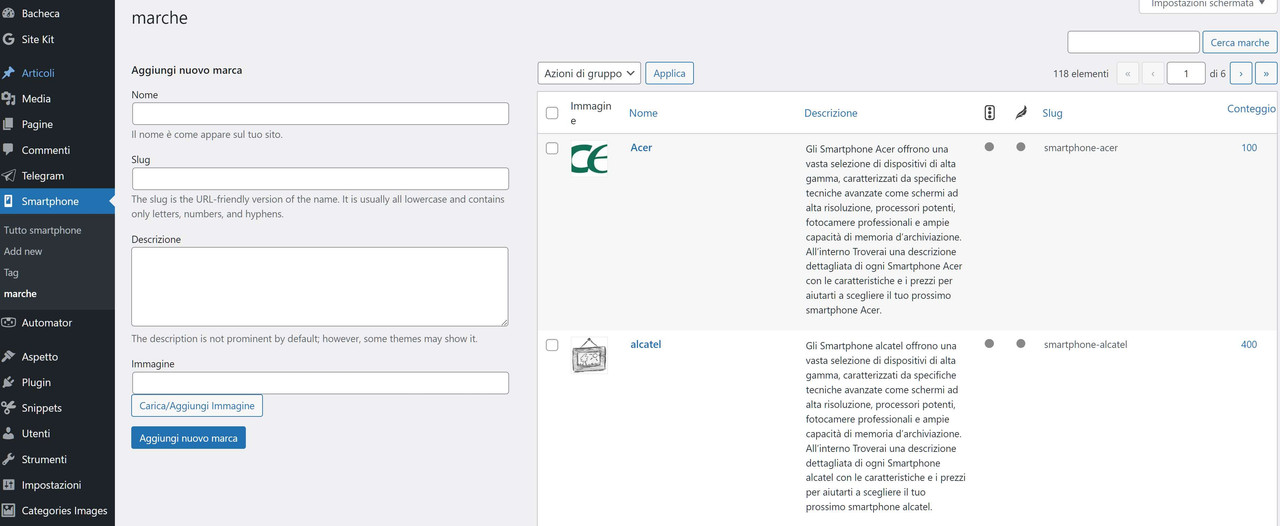
I created custom posts for the smartphone section. these have brands in the form of categories
I created the list of categories or brands of smartphones,
I would like to be able to make the list of brands appear on the home page with an image and the name of the category
 February 3, 2023 at 7:25 am #2520092
David
StaffCustomer SupportHi there,
is this a Custom Taxonomy ? and does it have support for an image ?
February 3, 2023 at 7:30 am #2520099yes I have support for category image for my custom posts
 February 3, 2023 at 7:55 am #2520218
to create the custom posts and the custom categories related to the posts I used the Custom Post Type UI plugin
February 3, 2023 at 8:30 am #2520279StaffCustomer SupportYou would need to create a custom function eg.
function show_custom_tax_terms($html) {
    $taxonomy = 'your_custom_tax';
    $terms = get_terms([
        'taxonomy' => $taxonomy,
        'hide_empty' => false,
    ]);
    if ( $terms ) {
        $html = '<ul class="custom-terms">';
        foreach( $terms as $term ) {
            $thumbnail_id = get_term_meta( $term->term_id, 'thumbnail_id', true );
            $image = wp_get_attachment_url( $thumbnail_id );
            $html .= sprintf(
                '<li><a href="%1$s">
                    <img src="%2$s" alt="%3$s" width="100" height="100" />
                    <span class="title">%3$s<span class="count">%4$</span></span>
                </a>
                </li>',
                get_term_link( $term->slug ),
                $image,
                $term->name,
                $term->count
            );
        }
        $html .= '</ul>';
    }
    return $html;
}
add_shortcode('show_terms', 'show_custom_tax_terms' );
Change the
$taxonomy = 'your_custom_tax';to your taxonomy.It will create the
[show_terms]shortcode you can add to your page.It will need soem CSS to style.
February 3, 2023 at 8:44 am #2520302do I have to insert the function on the function.php in the theme editor?
if so, it generated an error, in any case reading the code I don’t understand how it should extrapolate the image relating to the cartegoryerror:
Uncaught Error: Object of class WP_Error could not be converted to string in wp-content/themes/generatepress/functions.php:148
Stack trace:
get_term_link( $term->slug ), $image, $term->name, line 148: $term->countFebruary 3, 2023 at 8:50 am #2520316StaffCustomer SupportI made an edit to the code above to fix that.
This doc explains how to add PHP:
https://docs.generatepress.com/article/adding-php/If you’re not using a Child Theme, then DO NOT add it to the parent theme functions.php
February 3, 2023 at 8:58 am #2520321I proceeded to insert your code with Code Snippets unfortunately it generates an error.
maybe I explained myself wrong.
more than a taxonomy what I want to list are the categories related to the custom post
I currently have 118 brands in the form of categories
I called the categories “marche”
so following your guide i should replace the code like this:
$taxonomy = 'marche';February 3, 2023 at 10:16 am #2520410
i found the method to list the brands list of my smart phones using tag cloud.
the background image is missing from this selection.
also could you suggest me how to change the default css of tag cloud?
February 3, 2023 at 10:49 am #2520440Leo
StaffCustomer Supportthe background image is missing from this selection.
That is a WP core block that does not offer a background image option.
also could you suggest me how to change the default css of tag cloud?
What would you like to change? Can you link us to the page in question?
February 3, 2023 at 11:20 am #2520490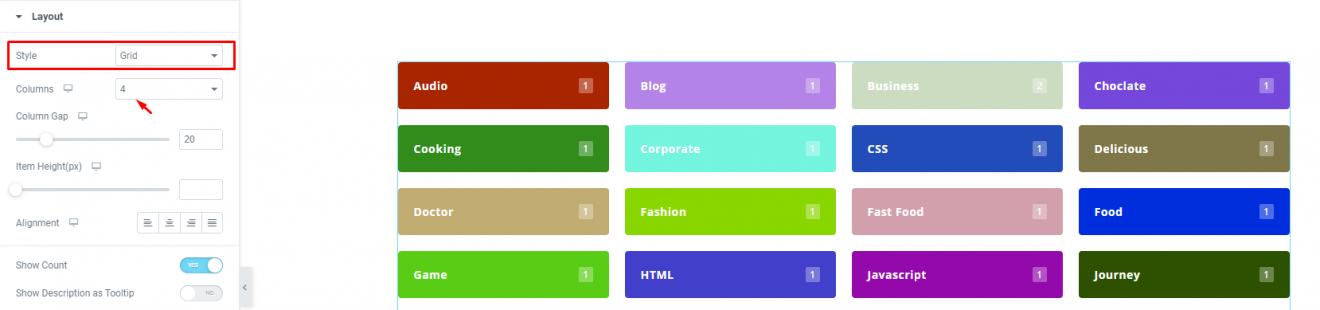
I was planning on doing something similar, with the category image inside
February 3, 2023 at 11:24 am #2520492StaffCustomer SupportThe core tag cloud block won’t be able to support this without some substantial custom coding unfortunately.
Is your screenshot taken from a plugin? If so that might still be your best bet.
February 3, 2023 at 11:38 am #2520514Yes, it’s Elementor Pro, I abandoned Elementor for your splendid theme, definitely more performing.
anyway, if i give up the image could i find a method to format the clod tags? or create post archive style formatting for custom categories?
February 3, 2023 at 11:41 am #2520520StaffCustomer SupportYou could try formatting the core cloud tag block with CSS for sure.
February 3, 2023 at 11:45 am #2520522do you think i can manage to replicate such a thing with only css?
-
AuthorPosts
- You must be logged in to reply to this topic.
