Site logo

[Resolved] Problem with mobile view for 2 menus

Home Forums Support [Resolved] Problem with mobile view for 2 menus

Home Forums Support Problem with mobile view for 2 menus

Viewing 6 posts - 1 through 6 (of 6 total)
  • Author
    Posts
  • #2465963
    Yolanda

    Hello great support,

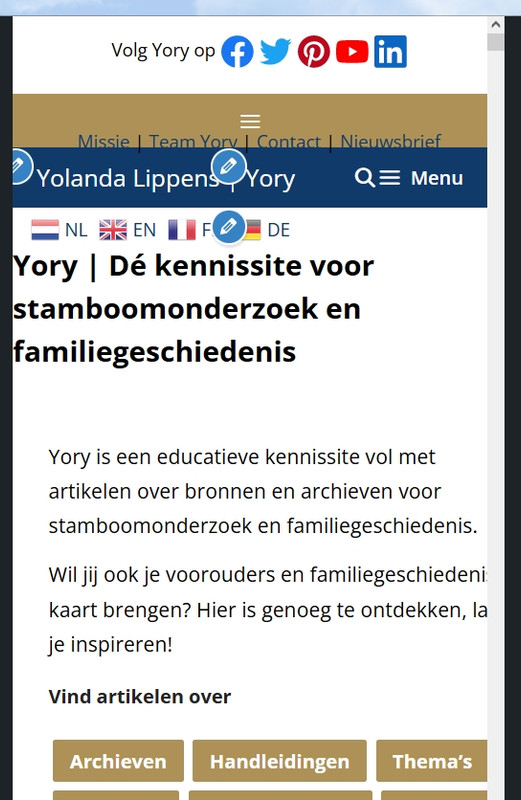
    I’m struggling with the layout for mobile view.
    On these devides I only want to show the blue header/logo with the (blue) menu.
    But now the blue menu is overlapping the brown, and it looks very ugly, and other menu’s are showing which is not necessary.

    How can I only show the blue one?

    See the original view for a laptop/pc in a browser on https://www.yory.nl/

    Thank you!
    Yolanda, NL

    #2466249
    Leo
    Staff
    Customer Support

    Hi there,

    Try this CSS:

    @media (max-width: 768px) {
        .secondary-navigation {
            display: none;
        }
    }

    Adding CSS: https://docs.generatepress.com/article/adding-css/

    #2466695
    Yolanda

    Hi Leo,

    Thank you, that worked! But the box with translate icons still shows behind the text.
    I’ve tried to catch the CSS, but without success.
    What do I need to add to the code to hide the Translate box as well?

    Thank you!
    Yolanda

    #2466808
    David
    Staff
    Customer Support

    The problem is that the Core Columns Block has no responsive settings, so on Mobile all Columns stack with 100% width. Which for this design is no good.

    Do you use GenerateBlocks ? As its Grid Block has full responsive controls ?

    #2467363
    Yolanda

    Hi David,

    I kind of solved it to move the translate block to another place.

    Thanks again!
    Yolanda

    #2467886
    David
    Staff
    Customer Support

    Glad to hear that

Viewing 6 posts - 1 through 6 (of 6 total)
  • You must be logged in to reply to this topic.