- This topic has 11 replies, 2 voices, and was last updated 3 years, 5 months ago by
Fernando.
-
AuthorPosts
-
November 15, 2022 at 5:52 pm #2417346
Daniele
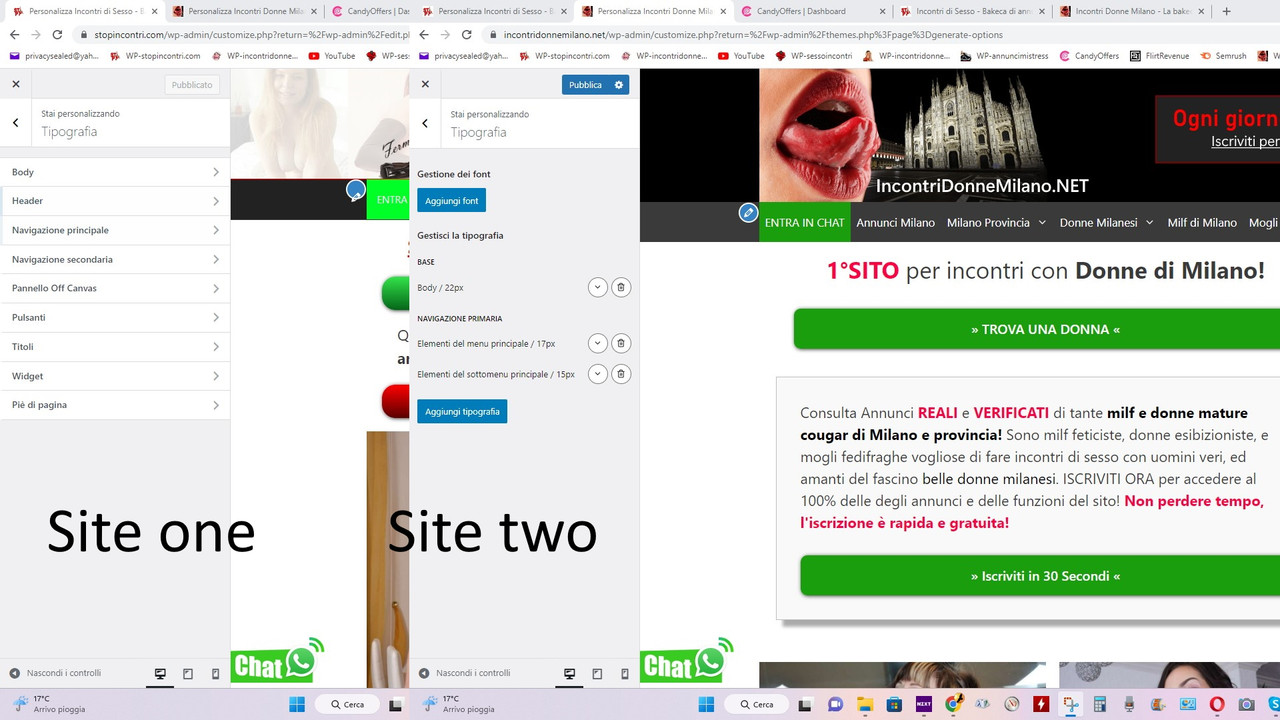
Hi, I have several sites where I use your theme. But in the last one I created, regarding the font settings things have changed, and it doesn’t work well.
For example, I can’t change the font size of the buttons without the text in the body also getting bigger.
I am attaching a screen shot of the area for setting text formatting, which as I said, looks different on my last site:
https://i.postimg.cc/MZLPzmKT/siteonetwo.jpg
Thanks, Daniele.
November 15, 2022 at 6:10 pm #2417354Fernando Customer Support
Hi Daniele,
That’s the Dynamic Typography system. It’s the current and default typography system in later versions of GeneratePress.
See here for reference: https://docs.generatepress.com/article/dynamic-typography-overview/
To clarify, have you created a new Typography with target element –
Buttons. If it’s not working as expected, can you provide admin login credentials so we can test your site’s Typography module from our end?Please use the Private Information field for this: https://docs.generatepress.com/article/using-the-premium-support-forum/#private-information
November 15, 2022 at 6:34 pm #2417362Hi Ferdinando, I can provide you with the login credentials. But first I would like to know, if it is possible to go back to the previous version, since four other sites are working with that and I don’t need anything else..
Thanks, Daniele.
November 15, 2022 at 6:49 pm #2417366Sorry, but there isn’t a way to downgrade to the old typography system.
You would need to uninstall your current GeneratePress, and install an older version (older the GeneratePress 3.1.0). For instance, version 3.0.4 – https://github.com/tomusborne/generatepress/releases/tag/3.0.4
We advise all our customers however to use the dynamic typography system since it’s faster, and it introduces more features for ease of use.
November 15, 2022 at 7:07 pm #2417381Alright Ferdinando. As I said, the problem is that I can’t change the font size of the buttons, without also resetting the font size of the Body.
I have sent you the login credentials for the site, which is a sexy site, I hope you are over 18 🙂
Thanks, Daniele.
November 15, 2022 at 7:23 pm #2417394I see. Can you share the username as well?
November 15, 2022 at 7:25 pm #2417396Sorry, username is [removed – not safe] 🙂
November 15, 2022 at 7:31 pm #2417402Thank you! Can you point me to a specific Button you’re trying to alter the font of?
November 15, 2022 at 7:42 pm #2417411The “read more” button below the article previews..
ThanksNovember 15, 2022 at 7:48 pm #2417413I see. It seems to be working as expected from my end.
Specifically, I added a new Typography and set the Target element to
Buttons.See: https://share.getcloudapp.com/geuOvJz9
Can you test this as well and see how it goes?
November 15, 2022 at 8:09 pm #2417423Ok I succeeded, but I had to act from:
aggiungi tipografia > target > pulsanti
While if I try from:
base > target > pulsanti
Continue editing the entire body 🙂
Anyway that’s fine, the important thing is to have succeeded in some way! Thanks Ferdinand!
Daniele
November 15, 2022 at 8:24 pm #2417434You’re welcome Daniele! 🙂
-
AuthorPosts
- You must be logged in to reply to this topic.