- This topic has 21 replies, 3 voices, and was last updated 3 years, 7 months ago by
Fernando.
-
AuthorPosts
-
August 24, 2022 at 12:17 am #2321968
Ravi Saive
Hi Support,
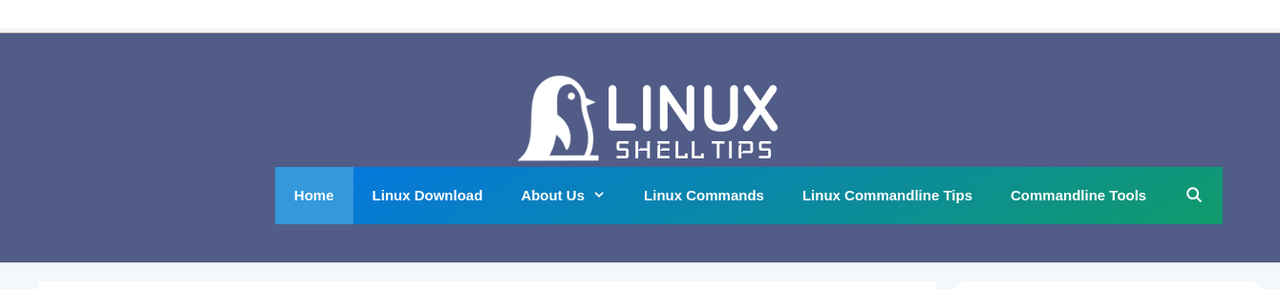
I need a menu like this – https://i.postimg.cc/638VpPF1/menu.png
Could you help with this…
August 24, 2022 at 12:25 am #2321973Fernando Customer Support
Hi Ravi,
Try setting the Primary Nav location to float right first, then we’ll move it closer to the logo through CSS.
August 24, 2022 at 12:35 am #2321981Hi Fernando,
I am using secondary navigation on the site…
August 24, 2022 at 12:48 am #2322001Are you planning to add the toggle hamburger – possibly for an off canvas menu as well? If so, it’s more ideal to use the Primary Nav.
August 24, 2022 at 1:11 am #2322022I switched to the Primary Navigation menu now, see the image – https://i.postimg.cc/8kF7cdD7/linuxshelltipsmenu.png
August 24, 2022 at 1:14 am #2322026It’s not reflecting on my end yet. Can you try clearing cache?
August 24, 2022 at 1:31 am #2322054I am doing it on the local staging server and can’t give you access as it is on the local network..
August 24, 2022 at 1:35 am #2322061Also, I can’t see the “Use Navigation as Header” option in the Layout – Header window…
August 24, 2022 at 1:48 am #2322077Can you check if you have the latest version of GeneratePress Premium? The current version is 2.1.2.
August 24, 2022 at 1:52 am #2322087I have Generatepress 3.1.3 and GP Premium 2.1.2.
August 24, 2022 at 3:09 am #2322156David
StaffCustomer SupportHi there,
1. in Customizer > Layout > Primary Navigation can you set the Location to Float Right.
2. in Customizer > Site Identity, reduce the size of the logo so it can accommodate the navigation to its right.August 25, 2022 at 12:12 am #2323144Hi,
Also, I can’t import Typography settings from GP version 2.4.2 to version 3.1.3.
This messed up my fonts on the site…
August 25, 2022 at 1:05 am #2323193I don’t want to show meta tags on the homepage below post see – https://www.linkpicture.com/q/metatag_1.png
August 25, 2022 at 1:49 am #2323222Viewing your site, I’m not seeing that from my end. Is this only visible in your local staging sever?
Normally, you should be able to disable meta items in Appearance > Customize > Layout > Blog > Content
As for the Typography, may we know what exactly is occurring? Are you experiencing any errors?
August 25, 2022 at 2:27 am #2323260Hi Fernanod,
Thanks, everything working as you told me, but the only thing remaining is I need the menu like this – https://www.linkpicture.com/q/menu_3.png
My site is on the local network, so it can’t be viewed online, so sharing screenshot of my site menu – https://www.linkpicture.com/q/sitemenu.png
-
AuthorPosts
- You must be logged in to reply to this topic.