
- This topic has 22 replies, 4 voices, and was last updated 4 years, 6 months ago by
Leo.
-
AuthorPosts
-
October 2, 2021 at 7:52 am #1950533
Anna
Hello. How I can add text area before footer for tags and categories? For example: here I mean
I need create simple classifieds and need text area how like here I mean hereIf possible write me step by step guide how to create this is…
Sorry for my poor English
Best Regards
AlenaOctober 2, 2021 at 8:44 am #1950589David
StaffCustomer SupportHi there,
you can use a Block Element:
https://docs.generatepress.com/article/block-element-overview/
Add your content in the Block Element editor.
Then set the Hook to:
after_main_content
See here for reference: https://docs.generatepress.com/article/hooks-visual-guide/#posts-pageThen set the Display Rules to the Locations you want it displayed. If its for the whole site then use the
Entire SiteOctober 2, 2021 at 9:23 am #1950614Dont work…. Check pls where I was wrong?


Thanks
October 3, 2021 at 3:31 am #1951028StaffCustomer SupportTry these locations:
October 20, 2021 at 7:43 am #1969607Thanks. Done!

What now wrong?
October 20, 2021 at 8:03 am #1969809StaffCustomer SupportYou need to add the content you want displayed where it says ‘Type / to choose a Block’.
If you want that to be the Category Description then choose the GP Dynamic Content Block, and set it to Term Description.October 20, 2021 at 8:16 am #1969823I found my mistakes:
1. I was wrong and create Hook (now change on Loyalot)
2. Customize sidebars and put widgets/All work! This is fantastic! https://rabotnica.tempurl.host/zimbabve/ Thanks
Still one issue. Now Description category in top before posts.

But I want after posts and before footer.
October 20, 2021 at 9:35 am #1969870StaffCustomer SupportWhich Hook are you using in the Element ?
October 20, 2021 at 5:27 pm #1970199Maybe will easy if you check? pls
[redacted for user’s security.]
This is test site, you can do any you wanted, if you need.
Sorry for my poor English
October 20, 2021 at 8:11 pm #1970254Elvin
StaffCustomer SupportHi Anna,
Still one issue. Now Description category in top before posts.
That part you’re pointing to is the default layout for archive page title and description.
It’s this one – https://github.com/tomusborne/generatepress/blob/2c7c8a76d3b58b0b97e82b3a7a5ebf022a1ddfbe/inc/structure/archives.php#L94-L117
https://share.getcloudapp.com/xQujvBzlAre you trying to remove it? Or perhaps move it elsewhere? Let us know.
October 21, 2021 at 7:40 pm #1971406Not delete. I wanted move this is text area down page, after posts.
October 21, 2021 at 8:09 pm #1971418StaffCustomer SupportI see,
Try adding this PHP snippet.
add_action( 'wp', function() {
    remove_action( 'generate_after_archive_title', 'generate_do_archive_description' );

    if ( is_archive() ) {
    add_action( 'generate_after_main_content', 'generate_do_archive_description' );
    }
} );
This PHP snippet removes the taxonomy description from its default position and adds it back to the bottom of the content area.
Here’s how to add PHP snippet – https://docs.generatepress.com/article/adding-php/
October 22, 2021 at 9:00 am #1972059added as mu-plugin

https://rabotnica.tempurl.host/category/zimbabve/ description down. this is good. But I found two issues:
1. Old posts urls are broken/ You can click on everyone post and check.
2. How I can add here text editor?
How like this is
 October 22, 2021 at 12:12 pm #1972227
Leo
StaffCustomer SupportIs the original topic resolved?
If so can you open topics for the new questions?
Thanks.
October 27, 2021 at 11:55 am #1979139Not resolved. Not adaptive for mobile. Not have title and author place not nice.
https://rabotnica.tempurl.host/category/zimbabve/
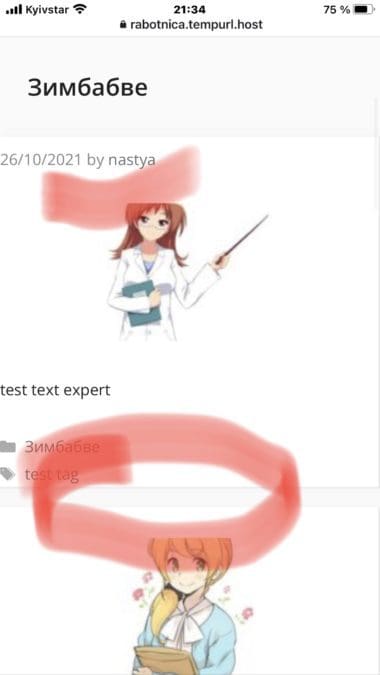
You have different authors who created themes for sites library. Maybe someone can created simple theme jobposting? I need how like this is theme https://rabotnica.tempurl.host/ but category and have text area in down page for SEO texts.
And simple form for create classified http://ddo.com.ua/addmsg/nedv/80/
Not more.
-
AuthorPosts
- You must be logged in to reply to this topic.
