
- This topic has 7 replies, 2 voices, and was last updated 4 years, 6 months ago by
David.
-
AuthorPosts
-
September 21, 2021 at 5:48 am #1937734
Karen
I am using the basic GeneratePress theme. website https://karenshanley.com
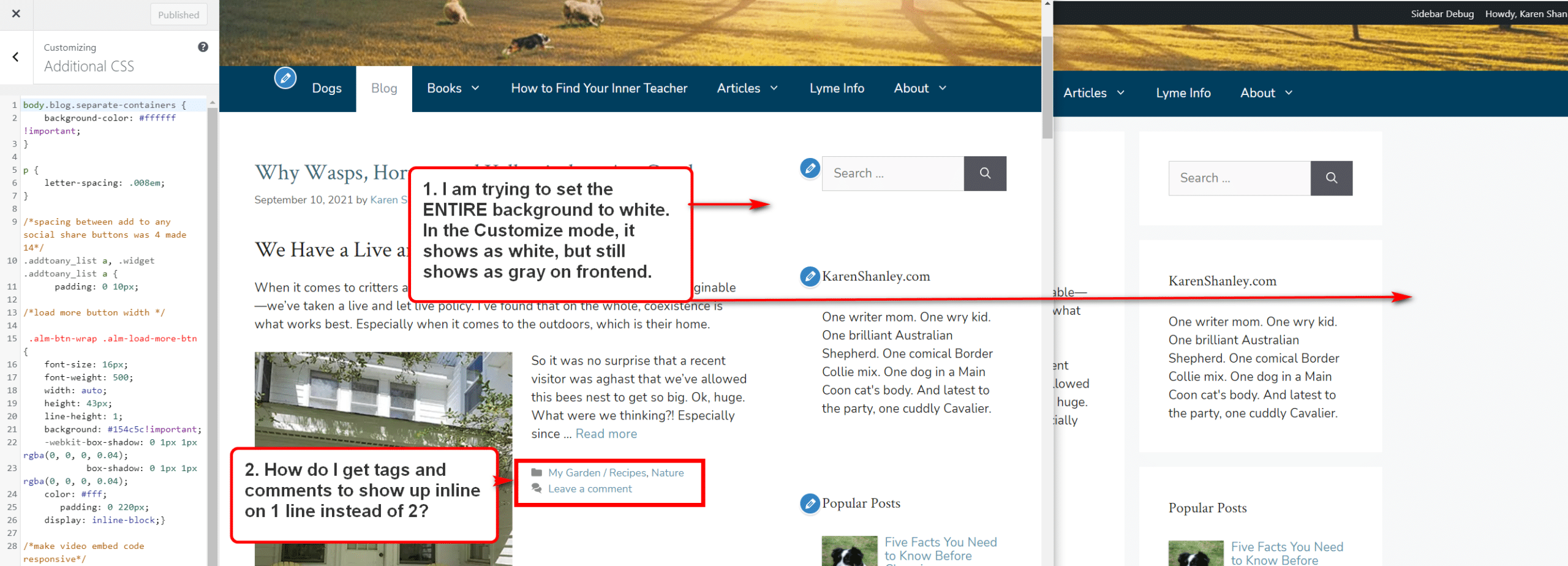
1. I am trying to set the ENTIRE background to white. In the Customize mode, it shows as white, but still shows as gray on frontend. I’ve added custom css which shows as white in the customizer, but still shows as gray on frontend. I have also changed in COLORS >CONTENT > BACKGROUND set color to white. Has no effect. Where is the setting to make the entire background white?
2. On the blog posts page, I want the category and comments to be on one line, not two. How/where do I edit that?
 September 21, 2021 at 7:36 am #1937851
David
StaffCustomer SupportHi there,
can you clear the autoptimize cache ( or temporarily disable the plugin ) and then clear your browser caches to see if the customizer changes take affect.
To inline the footer meta ( Cat terms and comments ) you can add this CSS:
footer.entry-meta {
    display: flex;
    flex-wrap: wrap;
}
footer.entry-meta span {
    margin-right: 10px;
}
September 21, 2021 at 8:01 am #1938076Thanks so much, David. The inline footer meta css worked. Deactivating, clearing cache (for the millionth time: ) worked on the blog page, but all of the other pages still show the boxed with gray background.
How do I set ALL pages to all white background?
September 21, 2021 at 8:27 am #1938112StaffCustomer SupportCan you disable the Autoptimize plugin so i can see whats going on?
September 21, 2021 at 8:42 am #1938132Done
September 21, 2021 at 9:07 am #1938166StaffCustomer SupportHmmm… that color is coming from the Customizer.
Can you double check the Customizer > Colors > Body > Background.
And make sure the customizer changes are Published and NOT saved as draft ?
September 21, 2021 at 9:28 am #1938181Oh my goodness! I must have changed that 5x and saved. But now it’s working. 🙂
I guess auto-optimize really isn’t compatible with this theme…
September 21, 2021 at 9:32 am #1938188StaffCustomer SupportGlad to hear that!
Its not an incompatibility issue.
Autoptimize combines CSS files and other stuff and then saves them in a combined cached file. Which sometimes needs clearing before you see the updates. Its the same for all Optimization/Caching plugins. And we use Autoptimize on our own site 🙂My general rule is to disable cache/optim plugins whenever i am making changes to the Theme Customizer. And only enable them when i am done.
-
AuthorPosts
- You must be logged in to reply to this topic.
