
- This topic has 14 replies, 3 voices, and was last updated 5 years, 6 months ago by
David.
-
AuthorPosts
-
July 8, 2020 at 12:17 pm #1356984
Futte
I use a secondary menu on several pages, and have put theese menus in the left sidebar.
I would like the secomdary menu to be opened (expanded) all the time. Is that possible.
As it is now, I can not get into the parent pages. The only thing that happens when I click on the parentpage is, that it opens the summenu.
You can see an example on my page if you go to Foreninger>Frøslev & Omegn
I hope you can help me with this issue.Kindly Futte
July 8, 2020 at 3:56 pm #1357134Leo
StaffCustomer SupportHi there,
Can you give David’s CSS here a shot?
https://generatepress.com/forums/topic/secondary-navigation-submenu/#post-581584Adding CSS: https://docs.generatepress.com/article/adding-css/
July 9, 2020 at 2:58 am #1357603Hi Leo
I have put in Davids code, but its not really right jet. (I have made som temporary color adjustments just to be able to see what happens)
If you go to Foreninger>Frøslev & Omegn You can see, that I still have to click on the parent item to get the submenenu. And it still doesn’t get the parentpage, when I click at that. It just opens the submenu.In the red box in the left sidebar, I have shown you, how I would like it to look and work. I hope that makes sense!
July 9, 2020 at 6:05 am #1357826David
StaffCustomer SupportHi there,
can you change the Customizer > Layout > Primary Navigation –> Navigation Dropdown to hover. Then let me know and ill look at the right CSS.
July 9, 2020 at 6:57 am #1357883Great to have you back David!
Its done!July 9, 2020 at 7:22 am #1357898StaffCustomer SupportRemove the current CSS. And try this:
.secondary-navigation ul li ul {
    display: block;
    float: none;
    position: static !important;
    left: unset;
    opacity: 1;
    width: 200px;
    pointer-events: auto;
    height: auto;
    overflow: initial;
    margin-left: 2em;
    box-shadow: none;
}

.secondary-navigation .main-nav .menu-item .dropdown-menu-toggle {
	display: none;
}
July 9, 2020 at 7:25 am #1357900THANKS!!!!
July 9, 2020 at 7:26 am #1357902StaffCustomer SupportYou’re welcome
October 7, 2020 at 3:01 am #1476086I need a little help with the look of my conditional menus. I am reopening this topic for the problem.
I wonder, if I can make some adjustments to my conditional menus, so they would look something like this:
I use the menus on
Fællesskaber>Frøslev Skole
Fællesskaber> Frøslev & Omegn
Aktuelt> OmrådefornyelseI hope David is able to help me with this
FutteOctober 7, 2020 at 4:41 am #1476225StaffCustomer SupportHi there,
try this CSS:
.sidebar .inside-navigation {
    padding: 20px;
    box-sizing: border-box;
}

.widget-area .secondary-navigation li {
    background-color: #f5f5f5;
    border-top: 1px solid #d1d1d1;
}

#left-sidebar {
    background-color: #ededed;
}

@media(min-width: 769px) {
    .site-content {
        display: flex;
    }
}
October 7, 2020 at 5:30 am #1476313That looks really great, thanks. I just would like the grey area to fill out the sidebar – right now it just fills the menu… Is that possible?
October 7, 2020 at 6:54 am #1476452StaffCustomer SupportEdited the CSS above 🙂
October 7, 2020 at 11:53 am #1477197It looks a little funny now 😉
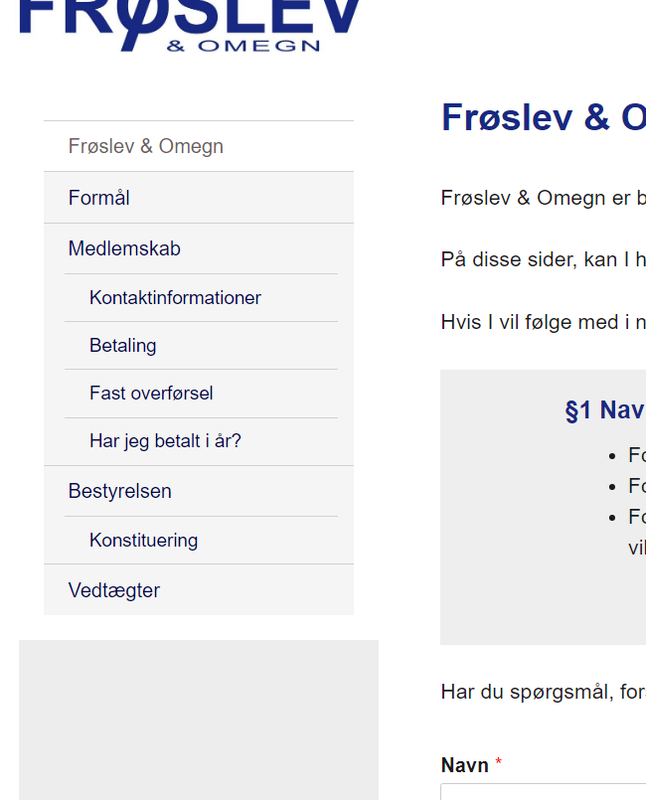
But the idea is right!
October 7, 2020 at 12:08 pm #1477240But I have changed the backgroundcolor in the customizer, and it looks great now!
October 8, 2020 at 1:00 am #1477943StaffCustomer SupportGlad to hear that!
-
AuthorPosts
- You must be logged in to reply to this topic.
