Archived topic
Woocommerce Checkout page in 2 columns
7 replies · Started by Frank Noack on July 6, 2020
Hello GeneratePress Team,
is it possible to arrange the checkout in two columns (like in the picture)?
So that the 2 column slides up and the heading Order left-aligned?
Thank you very much for your answer
Frank
https://dl.dropbox.com/s/tk53a98o4rixq9h/woo.nerdies24.de_checkout_1.png
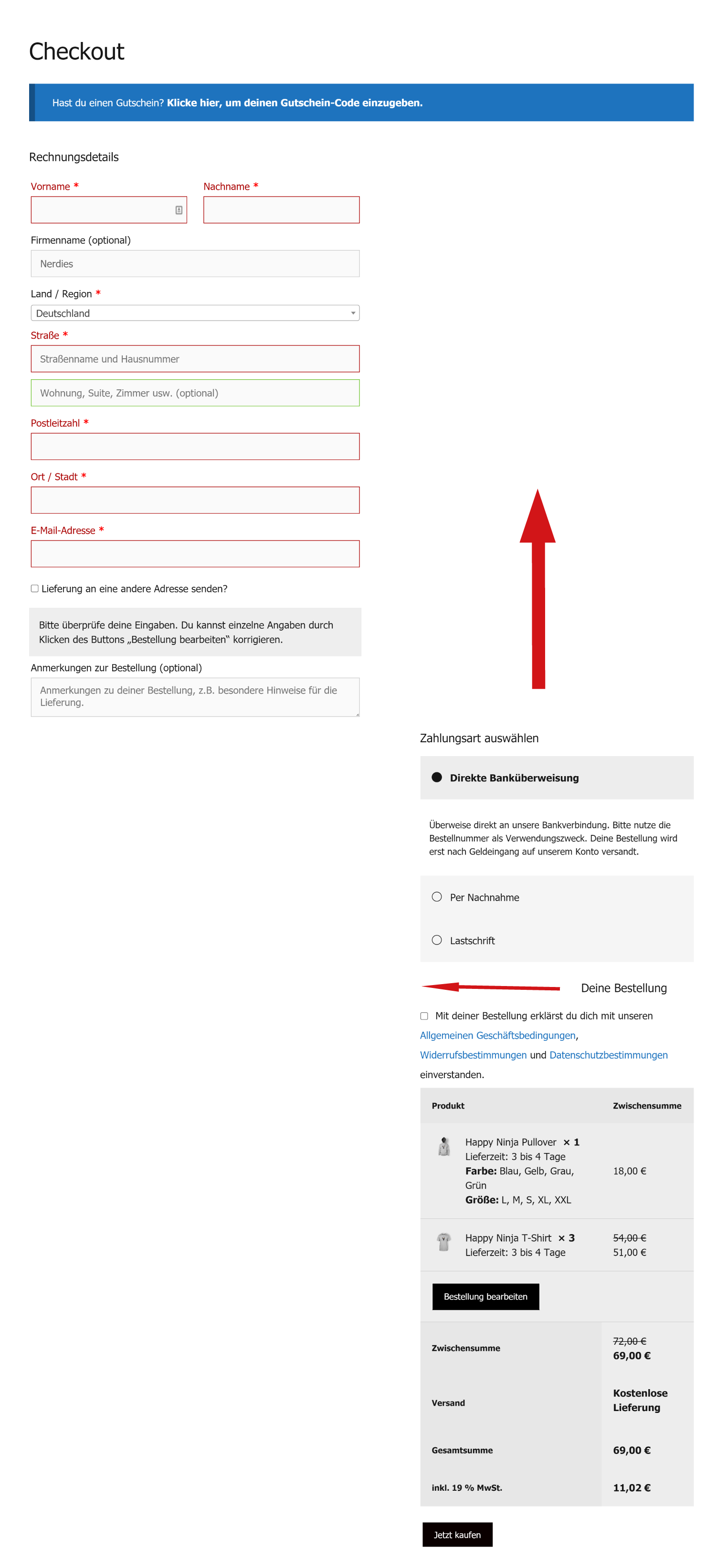
Hi there,
thats how they display by default.
In Simple CSS you have this code:
/*Woocommerce Checkout Layout*/
.woocommerce-checkout .col2-set {
    width: 50% !important;
    float: none !important;
}

.woocommerce-checkout .col1-set {
    width: 50% !important;
    float: none !important;
}
and this code:
#customer_details+#wc_checkout_add_ons,
#order_review,
#order_review_heading {
    width: 100%;
    float: right;
    margin-right: 0;
}
You need to remove them all to resolve the issue.
Many Thanks
Works fine
Glad to hear that
Hello, David,
just one quick question. Is there anything else I need to consider for the mobile display? It is not yet displayed correctly.
Thank you very much
Frank
Aah - there is also this CSS that needs removing:
#customer_details+#wc_checkout_add_ons,
#order_review,
#order_review_heading {
    width: 41.1764705882%;
    float: left;
    margin-right: 0;
}Hello, David,
Thanks for your great help.
Best regards
Frank
Glad to be of help