
Archived topic
Weird symbol in search box when not logged in
14 replies · Started by Héctor on June 16, 2021
Hi again,
I've notized that if I'm not logged on my site there's a character near the search magnifying glass.
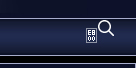
Do you know how could I fix it?
My website: https://pcgamia.com/
Thanks in advance.
Hi there,
its is being added by this CSS:
.icon-search::before {
    content: '\e800';
}
Can you try clearing your Cache Plugin as it may be legacy CSS stuck in the cache.
If not can you temporarily disable the cache so i can see where the CSS is coming from.
Sorry for the late answer. I was focused on another issue and totally forgot about this one.
I've tried disabling both my cache plugin and CDN and the problem persists.
The weird symbol disappears if I change the icon type from SVG to font.
If you want to re-enable the SVG ill give you some CSS to overwrite the other CSS thats adding the broken icon.
That would be awesome, thanks :)
Try this:
#site-navigation .icon-search::before {
    display: none;
}Solved! As always, great support. :D
Glad to hear that!
Hi again. The weird icon is still showing on mobile navigation. :/
Did you change something as i can't see that ?
Yes, sorry. I just used the same code you gave me using #mobile-header before and it worked.
I'm not sure if it's the best way to fix it.
#mobile-header .icon-search::before {
    display: none;
}Yep that would do - you can combine the two rules into one like so:
#mobile-header .icon-search::before,
#site-navigation .icon-search::before {
    display: none;
}
Saves a couple of lines of CSS.
Thank you!
You're welcome