
Archived topic
Trying to change the color of link text when it's a post title
9 replies · Started by Rob on October 21, 2021
Hi, I have set the link text color to brick red, but for some reason when the link text is a post title (as shown in the image below) it is the standard hyperlink blue. Can you please explain to me where I can change this? Thanks.
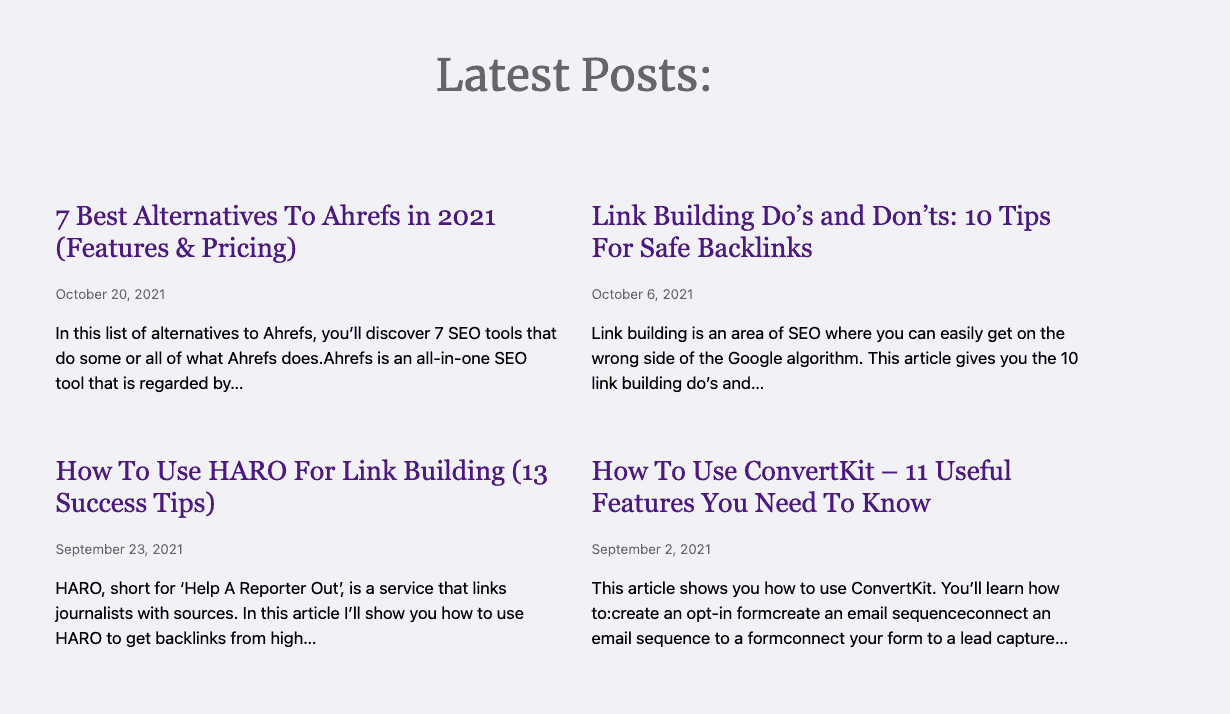
Hi there,
can you share a link to the page so i can see whats going on there.
Sorry about that, the page is: https://robpowellbizblog.com/
Thanks.
Hi Rob,
I've checked the page you've linked but I didn't find any "Latest posts:" section on the home page.
I've checked the other pages as well and the closest thing I found was the titles on the /blog page and they're all in brick red as shown here - https://share.getcloudapp.com/E0uKEQ2p
Perhaps I'm missing something. Or maybe you've already sorted it out? Let us know.
That's definitely the right page: https://robpowellbizblog.com/
If you scroll 3/4 down the page, you'll see a section titled: 'Latest Posts'.
Your browser might have cached the previous version of my home page.
Can you please check again (after clearing your browser cache).
Thanks.
Here's what I see on my end - https://share.getcloudapp.com/z8u1n0mZ
Browser cache wiped (as always) viewed on chrome, firefox and edge.
Perhaps its something only visible to logged in users? Can you confirm and verify? Let us know.
Note: We can help you check things from the backend if you want. You can use the private information text field to provide the details. :D
I just cleared the WP Rocket cache on my website: I think that was causing the problem.
Could you have another look?
Thanks
I just cleared the WP Rocket cache on my website: I think that was causing the problem.
That was it. I can see the post list now.
It's from this CSS:
a:-webkit-any-link {
    color: -webkit-link;
    cursor: pointer;
    text-decoration: underline;
}
Which is the browser default. It's applied when there's no styling found for the link which is the case for your WPSP h2 > a titles.
Try adding this CSS to add color to the titles.
h2.wp-show-posts-entry-title a {
color: red !important;
}

h2.wp-show-posts-entry-title a:hover {
color: blue !important;
}
Or better yet, add it through WPSP's settings. :)
That fixed it, awesome!
Thanks.
No problem. :D