
Archived topic
Some Questions about Volume Site
25 replies · Started by Marius on July 4, 2021
Maybe David can answer me some questions about his Volume Site:
1. On Desktop View the Hero Image is right, on Tablet it is in the middle, but on Mobile it is under the black area with title in it. This is not ideal and steals a lot of space. Why on mobile, the Image is not in the middle like on Tablet? And can we do this?
2. Is it possible, to delete the manual excerpt and the author name and date? And if so, can we make then the Hero a bit smaller?
3. Is it possible, that on archive view the first sentences of text are shown, instead of the manual excerpt?
4. Can we use it with system font stack?
5. Is it possible, to put the author box not in the sidebar, but under the post?
6. Can we use a real logo, instead of a text logo?
Thanks in advance.
Hi there,
1. It was an intentional design to display just the Title and entry meta/excerpt on mobile. And it comes with certain performance benefits by moving the Featured Image outside of the Above The Fold to minimise LCP timings. But for sure you can do the following:
a. Edit the Element titled: Single Post Hero and delete the GP Dynamic Image Block from the element.
b. Go to Customizer > Additional CSS and change this:
@media(max-width: 768px) {
    .page-hero-block:before {
        background: none;
    }
}
to:
@media(max-width: 768px) {
    .page-hero-block:before {
        background-size: cover;
    }
}
2. Whilst doing point #1 above you can delete any of the elements you don't require.
3. The Archives will display an auto excerpt if a manual excerpt does not exist.
4. For sure - its not limited to the fonts that it was designed with but it may not look the same.
5. Edit the Block Element titled: Author Box, and change the hook name to: after_content
6. Yep - just edit the Customizer > Site Identity - disable the Site Title and Tag line and add your logo.
Hi David,
Thanks, sounds good.
It is also possible, to not show the featured image on mobile? I mean one can put it in the post like a normal image, if it is needed.
And can you tell me, which style i need to download for the Mulish Font? I want to use local font, so I have to download it.
Regarding the mobile Image - follow #1 step A only. ie. don't change the CSS. Then no mobile image will be displayed. And you can add the same image to your content using an image block.
For the font you can download it from fonts.google here:
Hi David,
Thanks, I know where to download it. But I would like to know, which styles i need to download for the font?
Hi Sonja,
Thanks, I know where to download it. But I would like to know, which styles i need to download for the font?
Not exactly sure what you mean. Did you mean the necessary importation CSS for the font? Google provides that as well.
If it's the actual styling of the texts on your site, you can do that on the customizer's typography settings.
No, as I said, I mean the styles. Which do I need to select and download?
https://docs.generatepress.com/wp-content/uploads/2017/10/open-sans.png
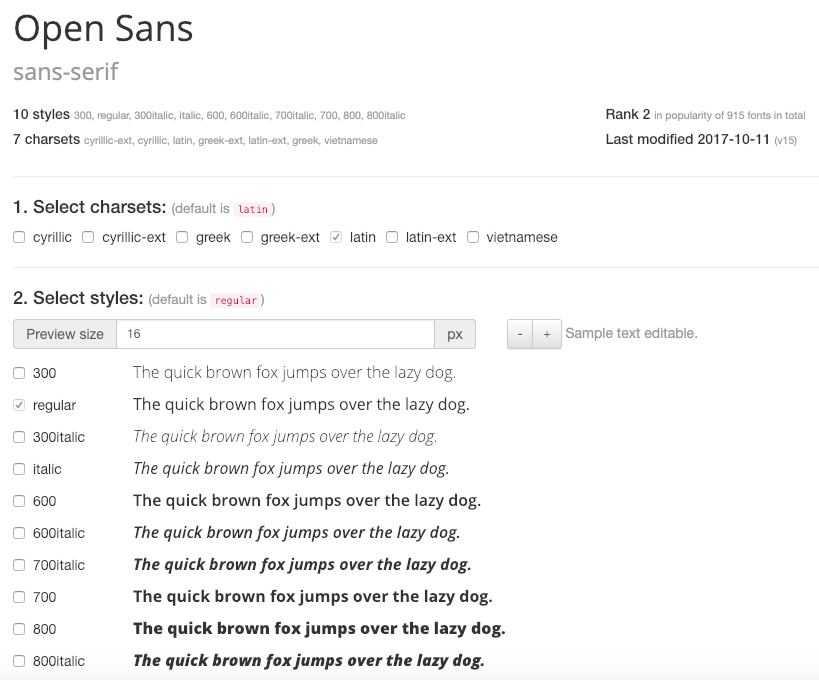
The site uses: 300, 600, 800 and 900. You may want to include 300 italic for your text or any other weight if you intend to use it.
Thanks David, this is what I wanted to know.
Glad to be of help.
Hi David,
sorry, but I have forgotten a question:
You wrote "And it comes with certain performance benefits by moving the Featured Image outside of the Above The Fold to minimise LCP timings."
Does that mean, that the Volume Site is, in general, a bit problematic regarding page speed, Web Vitals or LCP?
I ask this, because I want my new site as fast as possible.
Hi Sonja,
Does that mean, that the Volume Site is, in general, a bit problematic regarding page speed, Web Vitals or LCP?
Yes, that part of "Volume" can be problematic.
But it's not just the Volume template. Any site with a significantly large image above the fold will encounter LCP, regardless of which theme it came from.
It's really minimal though. Check this - https://developers.google.com/speed/pagespeed/insights/?url=https%3A%2F%2Fgpsites.co%2Fvolume%2F&tab=desktop
But what is the point, checking the Homepage, if there is no such an Image? If I check a post, then I get 89 Points and it is no more green.
I thought, that the hero images aren´t that large in volume. Because of the dark space to the left.
Heres an example post of the original Volume site:
Note - GP Sites server has no optimizations as this would mess up the Library Importer process.
The important part to note is the difference between FCP and LCP times which is 0.1secs. Which is great.
With simple optimizations like autoptimize enabled that post returns sub 1.5 / 1.6s times on a reasonable server.
With an image above the fold the FCP to LCP time increases - as it now has an image to load. And if that image is set as background the time increases further as the image isn't requested until the CSS has been loaded.
The original design ethos wasn't primarily performance based, although with web dev metrics being the ( hellishly ) hot topic of the day it was considered but not the main driver.
My style is generally less orthodox then other site designers, i choose a hero background image for larger screens where the extra pixels make them more visible. On smaller screens i didn't want to obscure the entire image with text. It makes the image pretty pointless and introduces problems for the user; if a lower contrast featured image is displayed it can make the text harder to read.
And the performance benefits were:
a. It removes the CSS background image, improving LCP times.
b. displays a HTML Image below the fold so it has no impact on LCP times and can also be lazy loaded by the browser.
By changing the design to the more common hero background image, you will need to combat LCP issues by ensuring the images you use and site optimizations are at there very peak.
Hi David,
Thanks for the detailed explanation. Very interesting.
So then I guess that all Themes with a Hero Image have the same problems, and not only the Volume Site?
I wonder about the following: The docs say that it useses 1024 by 576 pixel images for Volume. On my Websites with the Marketer Theme, I also use this exact image size for all my images. Before I upload an image, i compress them on the shortpixel website, so they are not that big in file size.
So if I have the same Image, one in a Marketer Site Website, and one in a Volume Site Website as Hero Image, then only the Volume Website will have the problems with FCP and LCP, because the image is shown as background image?
And if so, it is not possible to show this image as a normal image and not as background image? I guess not, otherwise you would have done this, right?