
Archived topic
Primary Menu Not Showing on Mobile...
10 replies · Started by Roland on July 4, 2022
I've been playing with the primary and secondary menus and they're working great on desktop. The mobile version isn't showing menu items. I've adjusted colors and I can see the items in the inspector, but they're not visible. It's like the background and the text are the same white color. I've adjusted the colors in the customizer, but the menu looks like it's white on white. I'm sure there's a setting somewhere I've missed, like horizontal/vertical or something.
https://sgp-gp.duanebentzen.com/
Credentials below...
Thanks!
Hi Roland,
You are using Off canvas menu on mobile, can you go to appearance > menus, check if there's a menu assigned to the off canvas menu?
Thank you Ying, I set one of my menus to Off Canvas and now I can see the mobile!
Can you tell me where the setting is that tells the theme/menus to use an Off Canvas menu? It must be in the theme somewhere. I'm using the Capital theme, is there a setting in the theme?
Hi Roland,
You may activate or deactivate the Off Canvas Panel through Appearance > Customize > Layout > Off Canvas Panel.
Hope this clarifies!
Hmm... The menu text hover is not showing now. In Appearance -> Customize my menu hover is red, but not in the live site. I'm not having much luck with my double menu. At least the mobile is working now.
Thank you!
Which menu are you referring to, and what responsive view are you at - desktop, tablet or mobile?
From my end, viewing your site, I can’t seem to locate a menu item that isn’t showing on hover.
Kindly let us know.
Primary Menu on Desktop view. The a hover on each menu item was red, like the Secondary menu. After setting the Off Canvas, the Desktop menu no longer hovers red. It's odd because in the Appearance ->; Customize its working fine.
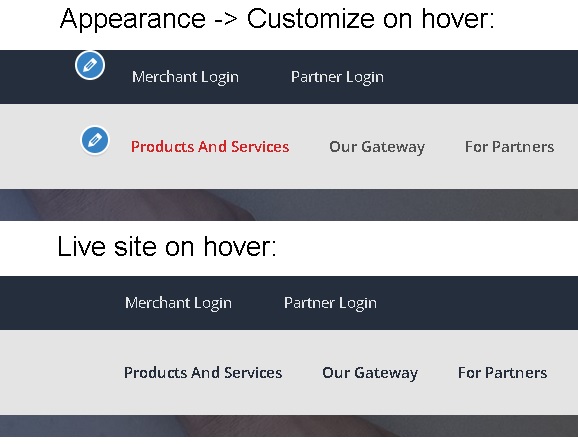
I see. On hover, from my end, they’re visible but they aren’t red. See: https://share.getcloudapp.com/yAu1Ko0w
First, can you try clearing your browser’s cache? Try using a different browser/device as well.
Then, can you try reaching out to your hosting provider and check if you have server side caching? If there is, ask them to clear it.
Kindly let us know how it goes.
It's strange. I see in your screen video the secondary menu is working, and I see the red hover on the primary menu in the Appearance -> Customize, but not in Chrome, Firefox, Brave and Edge with all browser cache cleared. There are no caching plugins, as a matter of fact, the only plugins installed are Generate blocks and GP Premium. I am my own hosting company; there's no caching in any of my WHM or cPanel. I'll play around with the menu's a little more and see if I can make the hover show red again. The secondary menu works fine, just not the primary. I'll see if I can manipulate it with some CSS. I've included credentials below so you can log in if you wish.
Thanks for all your help, you guys have great support. I'll check back tomorrow.
I see. Thank you for clarifying.
The issue may be coming from how you’ve set up your links. By default, if you set the link to /#, the menu item will be set to current-menu-item which has it’s own color on hover.
See: https://share.getcloudapp.com/kpu8JmEq
Try setting it to just # without the /.
Hope this clarifies.
