
Archived topic
My block settings are not saved
18 replies · Started by Yolanda on August 11, 2021
Hello,
I've been struggling for a few days now: Everytime I login to my website my (block) settings are not saved. Today I've been testing it over and over again, disabling plugins, log in/out/in/out, restart browser to clear cache... but nothing helps.
Everytime I have to set my settings again, even the blocks I de-activated are back in the block list.
Even my hostingprovider says it can't find anything on the server that may causes this.
What can be the cause of this?
My website is http://www.yory.nl
Hi there,
which settings are not saving? Are these the settings applied to individual blocks ? Or are these general editor settings ?
Hi David,
Thanks for the quick respons!
It's about the settings at the right top, plus the option 'Block beheer' (in English Manager?) in that list
see my screenshot
https://i.postimg.cc/sXjrQrD2/Screenshot-8.jpg
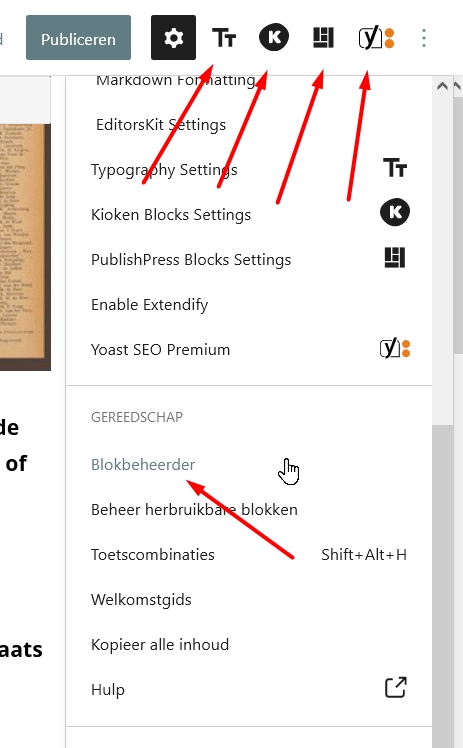
Btw: I changed it again (log out/in/out/in), but still the same....
I now see I have 2 functions.php:
one in the root of the theme folder, and one in the child folder.
Does that might cause the issue?
Its normal to have a functions.php in the parent theme and in the child theme.
To check to see if there is a problem with the child theme ( although i doubt that is the issue ), temporarily disable it by activating the parent theme.
If the issue persists:
1. Make sure you're logging in as the same user ( i assume yes ) as those settings can be user specific,
2. Check for a plugin conflict, you have quite a few plugins that are adding 'stuff' to the editor, i would begin by disabling them one at a time to see if they are conflicting.
Hi David,
I only have 1 admin user, and that's me.
I switched the theme from Child to Normal, logged out/in, but still the same problem.
I've disabled many plugins, but also that didn't work out.
It's a lot of work to log-out and -in after I've made a change, but I've done it to see if I could find a reason.
Is there a way I can give you/your team a login access to check things? I'm willing to pay for it!
Thank you,
Yolanda, NL
You can create a temporary admin user, and provide us with the login url, name and password in the Private Information field. We can then login and take a quick look :)
Hi David, thank you for that offer!
I will use the private info field below to send you the login details.
Can you disable all plugins to test?
Does the issue exist in a Twenty series default theme?
Hi Leo,
I haven't disabled all plugins, but most of them (which where many).
No, I haven't tried another theme yet.
I gave David a login account, I don't know when he's going to take a look. I don't want to do similar changes, so I prefer to wait for his respons.
Thank you!
We will need to go through some debugging tips first to narrow down the issue.
There hasn't been any other reports on this I don't believe it's a theme related issue.
Can you start a staging site?
Then the steps that need to be taken is as follows:
1. Disable all plugins and activate the GP parent theme - does the issue still exist?
2. If the issue still exists in #1, activate a Twenty series WP theme to test.
Hello Leo,
I'm in more trouble: I have the same issue with my subsite http://www.yolandalooptdoor.yory.nl
That subsite wasn't updated yet with the latest GP version, so I clicked to update, and then I got a white screen.
Wordpress just sent me an automatic error-message with a recovery link, but I'm stuck.
This site isn't as big as the Yory site, and is using less plugins.
Right now I'm in FTP to transfer my backup files.
I will disable all plugins and try another theme. But now that I'm having issues with 2 different sites, both with GP, I think there's more going on.
@David, did you already have the change to take a look?
Hi Yolanda,
the user login you provided didn't work for me. Can you re-confirm the details?
Hello David,
This afternoon I contacted a professional (paid) Wordpress consultant, and after 2 hours of struggling, we found out that the problem is Firefox.
It all works fine in Chrome, but the latest beta version of FF doesn't work well. I can't even add a new user as it's giving an error because you didn't enter 2 passwords? I'm not the only one with that problem.
But now the weird things comes; I was very happy we found the source of the issue. So I've enabled all my FF add-ons and started to test which one was the cause. And now - back at the settings I was happy - it AGAIN doesn't work.
I've tried all kinds of combination of add-ons, disabled them ALL, but still the problem stays: I change the (block)settings (hide some blocks and favorites in the topbar), and after logging out/in the blocks and favorites are still there.
So I don't know if it's still necessary for you to login to my site, as we now know it's a Firefox issue.
What do you think?
I'll leave the inlog details in the field below.
Thank you!!!!
Aah ok - WP editor preferences are stored in the Browser localStorage. See a related issue here:
Problem looks like FF Beta or an extension is flushing the storage on login / logout.
https://github.com/WordPress/gutenberg/issues/15105
Unfortunately not much momentum with the potential fix. The topics are open but getting quite stale ( 2 years old - but has some recent activity ). You could add your comments to the Issue