Archived topic
Mobile responsive featured image causing issues causing GSC coverage issues
13 replies · Started by Robert on June 3, 2021
Hi,
I have been trying to work out why I'm having coverage issues in GSC on some of my pages, when I run a live URL inspection test I am having errors of "text too small" and "elements too close together".
I believe it may be caused by the mobile featured image - When I run the "test live URL" on GSC I get the above issues. The image that shows the problem on test view is of my mobile view, There seems to be a problem with the mobile featured image, it appears to be, my desktop-sized featured image.
I have inspected the page for the above issues and I am sure the issues are with the featured image not being mobile responsive
Any help would be welcomed - Thank you
Hi there,
have a read of this doc regarding 'text too small' and 'clickable elements too close together':
If theres still an issue provide a link to the site
Hi, Thank you for the reply!
I have read through the article and it doesn't help, unfortunately.
I have already used lighthouse to examine and I've inspected the page and can't see any errors. The robots.txt seems normal.
The only indication of an error is when I do a live URL inspection test - This is where I get the text too small and elements error and it also displays a screenshot of the page which clearly displays the featured image too large for the mobile screen. But this doesn't seem to be the case when I actually use a mobile in incognito mode to view the page.
What is strange is bing seems to index with no issues, but google doesn't - Also it seems completely random when I get the errors on the google inspection - sometimes there are errors, and other times it's mobile friendly.
I have also ran it through bing and googles mobile friendly tests and both pass.
If you could take a look I would really appreciate it as I am at a complete loss as what to do :( As i said, sometimes when I inspect a URL in GSC it displays an error and other times there is no error - but as an example, this page is currently displaying an error
https://gardenprojectsadvice.com/outbuildings/outdoor-shed/does-a-shed-increase-home-value/
Thank you once again
I cannot see any issue with the HTML for the Image, and aside from the Custom CSS for the border/shadow there is no CSS interfering with its display or optimization. And all Mobile Friendly tests i performed passed the test.
So there must be something else conflicting with the GSC tests, which could be another script or function running.
First test is to temporarily disable all other plugins aside from GP Premium and reinspect the URL to see if there is a conflict.
One thing that did get flagged in my tools is that there multiple Google Analytics tags added to the page. Can't see that would cause a conflict but its google search related - so temporarily disabling all methods of adding those scripts would be something else to be tested.
Thank you for taking a look.
I am at a loss really.
I will look into the multiple GA and see if I can resolve that.
IF I can inspect the page and there are mobile issues and the next inspection is fine, how could I troubleshoot by switching off all plugins? there doesn't seem to be a page where the error is consistent. :(
I would begin with testing the site with ALL plugins ( and those GA scripts ) disabled - and retest a few times to see if there is a conflict. If the issue still arises and its sporadic it may be worth talking to your host as there could be some 'blockages' at the server level.
Thank you David for your advice
I shall disable everything - except GP and see what happens
Do you suggest also disableing rankmath?
Thanks
Yep - i would go back to the very minimum you can to check for conflicts. You need to keep GPP installed as that is defining the layout and featured image position.
I have deactivated all the plugins and ran the live UTL test and I get the same sporadic error messages.
When I click on "text too small" for example I get the screenshot where the featured image is too big for mobile. This looks like it could be the issue but I can't figure it out.
I also asked in the google webmasters forum the other day and included some images if needed for reference.
I just spoke with my host and they say there are no issues on their end - I will keep trying to fix it over the next few days but if I can't the next step will probably try a new theme :(
If you can think of anything I can check I would be happy to try.
Thanks
Can you share a screenshot of the GSC console showing the oversized image ?
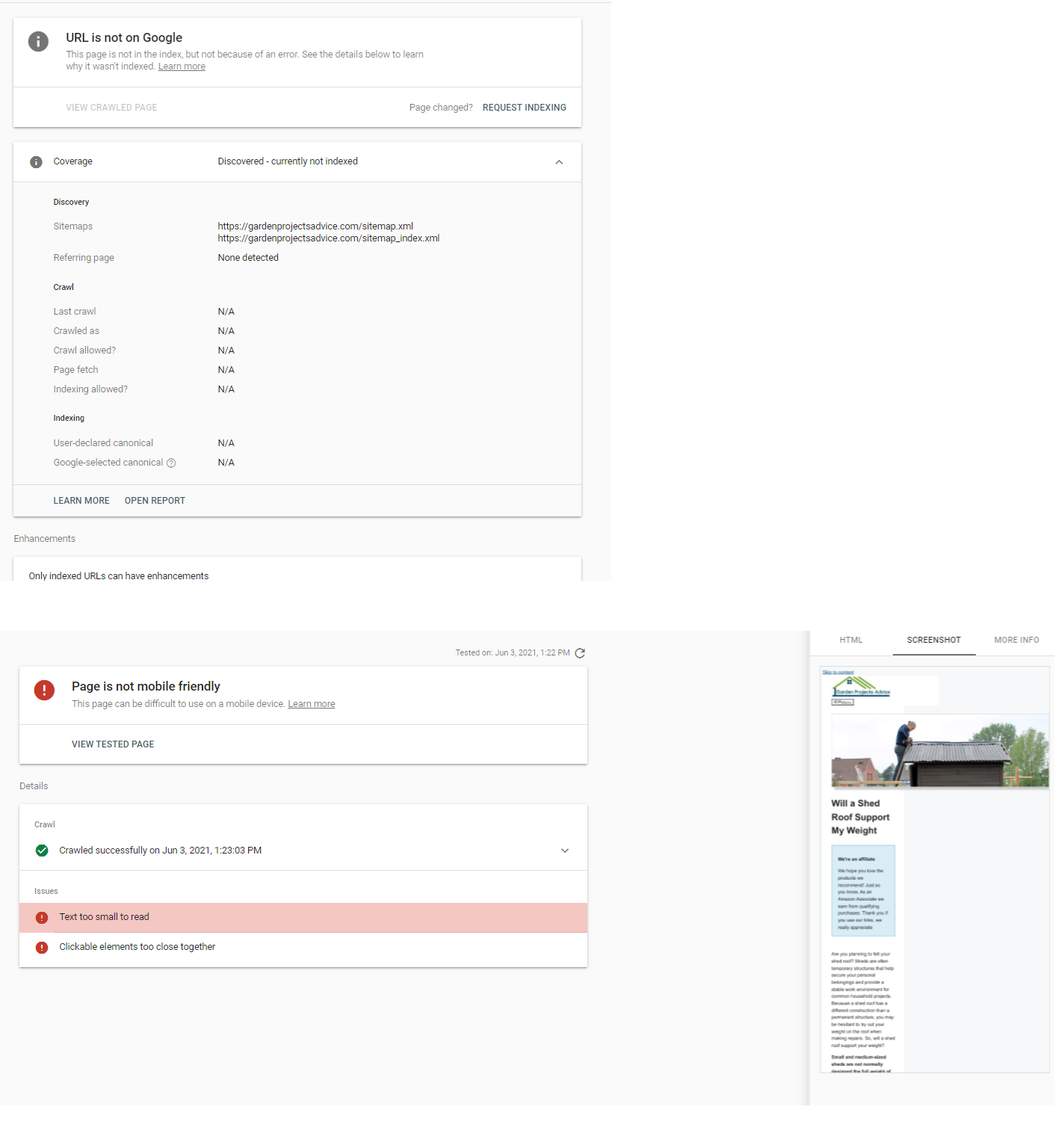
This shows that GSC finds issues with my featured image on mobile - but on an actual mobile device it seems fine.
I did some more testing and I noticed that the featured image will pull up this error and Ultimate Addons for Gutenberg plugin will pull up a similar error.
I tested with only a featured image and with only Ultimate Addons for Gutenberg plugin and these both seem to show the error in GSC live URL inspect.
I only use Ultimate Addons for Gutenberg for a recent posts block at the end of the post but it still displays a similar error in the GSC live test image - just without the featured image.
Using my limited knowledge on this I have tested everything and I cant see why they would pull errors - I will enable both the plugin and featured image for now.
Thanks
Looking at the screenshot - no stylesheets are being loaded, which is why the Skip to Content ( screenreader ) link is visible and none of the styles ( apart from the inline CSS via Customizer Additional CSS ) are being correctly displayed.
So the issue isn't with the featured image - its just a symptom of the missing styles.
Problem is i cannot see any explainable reason as to why Google is not loading them. The only issue i do see is the multiple Google Analytics tags that are also in the wrong places, and i wonder if Google is tripping out over them.
I looked into the CSS options on the customize settings (as you mentioned) and I set it to Dynamic CSS Print Method "External file". It was on "internal embedding" - after I cleared the site and server cache everything seems to be working ok - I've tested a few times with the live URL test and so far no spontaneous errors have come up - I can only do so many tests per day but so far it's all looking promising.
I'm not really sure what the settings do that I changed - my guess is Dynamic CSS Print Method:"external file" (my new setting) is loading the stylesheets from the URL and Dynamic CSS Print Method:"inline embedding" is embedding the CSS scripts
If that's how it works, I'm not sure why it was causing such an issue - but so far it seems to be working, ill keep testing but so far so good.
Thank you for your time and expertise on this - I owe you a few beers :D Thanks
External File option can enhance performance as it removes the majority of inline CSS ( CSS is in the HTML ) and moves it to a file that the browser can cache. Which means the CSS only gets loaded on first visit.
Google can be a pain here, it sets a finite limit on the number of resources its bots can use on testing a site. That limit is variable depending on how busy their servers are. And if you trip over that limit then it just avoids loading any styles. Sounds like that little improvement was enough to keep it under that limit when google is busy.
Glad to hear you got it resolved.