
Archived topic
Mobile bar items and menu toggle are invisible on some devices
6 replies · Started by Trent Weber on October 26, 2021
I am setting up an eCommerce site for a client using GP + child theme, GP Premium, Elementor Pro and WooCommerce. I am using the mobile header with mobile bar items for WooCommerce Cart, GP Search icon and menu toggle. For some bizarre reason, when I view the site in Google Chrome on one of my testing devices (Oppo smartphone using latest Google Chrome), the mobile bar items and menu toggle are invisible. If I tap on where they should be, the menu links work (almost as if they are white). I can't replicate the issue on any other device. I have another phone which is the exact same model and the same problem is present there too. If I use Opera browser instead on the offending 2 Oppo devices, the issue does not present at all.
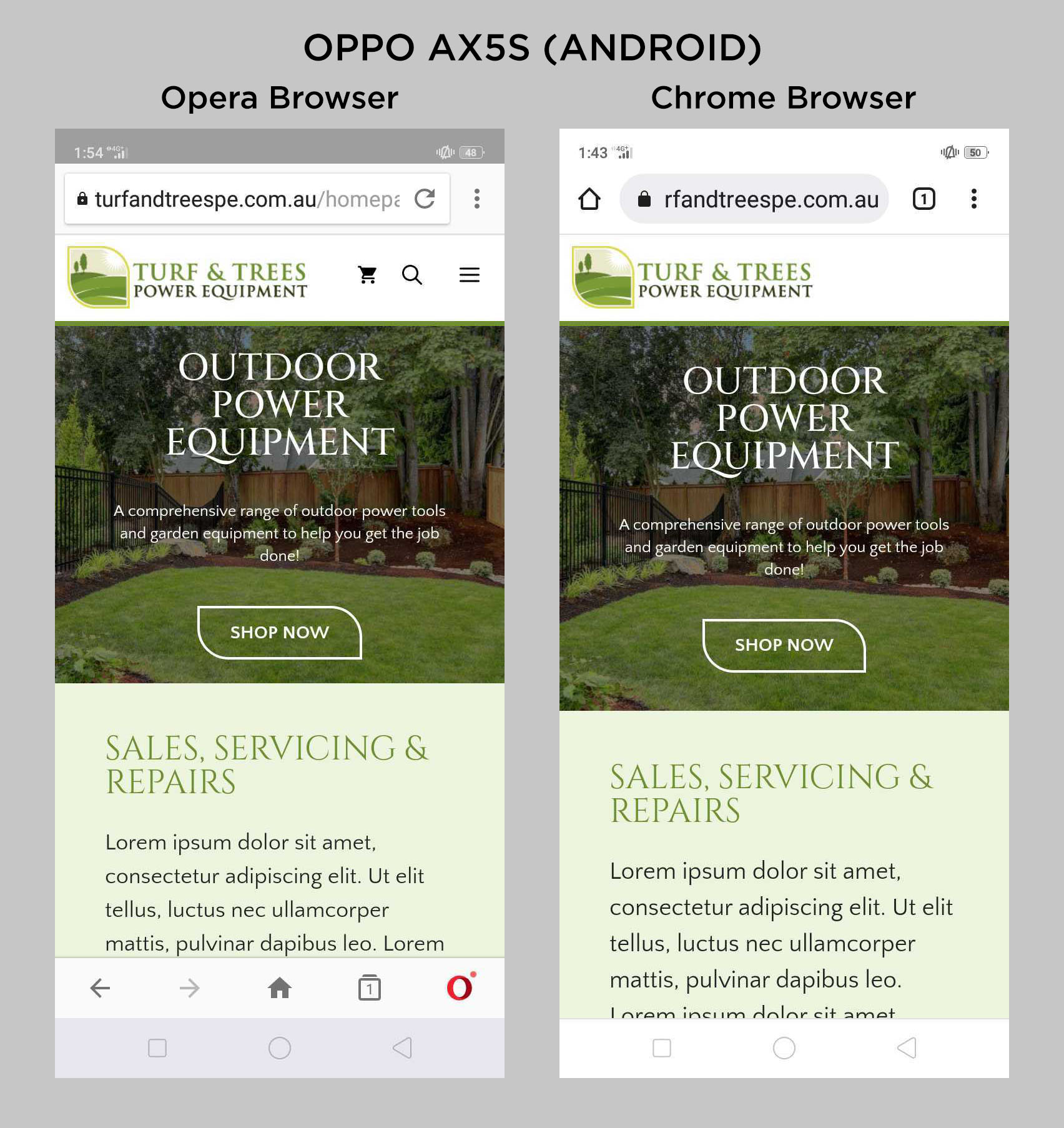
I have checked my site on 3 desktop browsers (Chrome, Firefox and Opera) using mobile preview tools. I also tested on a Samsung Galaxy Note 10 and another android smartphone (Huawei) and the issue does not occur on any of them. It looks exactly how it should. I tried adding some additional CSS to force the link colour in case of a conflict but it made no change. I even disabled all other plugins except for GP Premium. The issue persists on the same Oppo device.
Interestingly, I have an almost identical site that I built with the same mobile header and that works fine on the device that is currently not playing nicely.
Hoping you can help! Thanks in advance.
Hi there,
It's quite tricky to deal with this as it only occurs on a specific device.
I've checked w/ a Redmi Note 9s and a POCO NFC X3 on Chrome and I didn't encounter the said issue.
It may be just a visual bug on the device but to be sure, I suggest plugging your phone through a usb port and check it on Chrome through - chrome://inspect
When your device has USB debugging on, your device's browser view should display on chrome://inspect. From there, you can inspect the structure of the site on why it isn't working on that specific device.
Hi Elvin,
Thanks for your reply. Yes it is very tricky to troubleshoot! I hadn't thought to use USB debugging with inspect tools. I tried that just now and there is nothing obvious I can see in the code that would make it invisible or be overriding the colour of those links.
I have attached some screenshots below of the inspector console:


It definitely would appear to be a device-specific bug but I am completely stumped on how to fix it.
I should mention also that I have cleared all browser caches/history etc. on the problem device.
Quick update. I found the source of the problem.
I noticed that the close "X" icon for my off canvas mobile menu also doesn't display. Looking at it closer, there is one common feature to the the mobile bar menu items, menu toggle and X. The icon type for All GP icons was set to SVG. I switched this back to "Font" in Customizer > General Settings and the menu now works on all devices.
It appears that the device isn't rendering SVGs properly.
Seems more like a Chrome Browser bug on Android since it works fine with SVGs on Opera browser on the same device. It is a slightly older device running Android 8.
It appears that the device isn’t rendering SVGs properly.
I don't want to sound dismissive but that means it's an issue with the device and not the site itself.
In this case, considering the context of the device, consider checking if it has an OS update to at least android 10 and download the latest Chrome browser for it.
I noticed that the close “X” icon for my off canvas mobile menu also doesn’t display. Looking at it closer, there is one common feature to the the mobile bar menu items, menu toggle and X. The icon type for All GP icons was set to SVG. I switched this back to “Font” in Customizer > General Settings and the menu now works on all devices.
Reminder: While this is a workaround, the site may suffer a bit of a performance hit. :D
Note: I understand that we can't ask all site visitors to update their phones hence the workaround but this will eventually be a pain to maintain. Like how some devs try to keep support for Internet Explorer but takes a performance hit because of it.
Thanks Elvin. Unfortunately, there are no available OS/firmware updates for the "problem" device. As you say, it's going to be a similar case to the age-old issues with Internet Explorer backwards compatibility. I'm going to chalk this one up to a device related bug with Chrome on Android 8. It's an old software version and an old device. At least I now know that my site itself is working just fine. As a workaround, I've installed Firefox browser instead on the OPPO and that seems to work.
Appreciate your assistance!
No problem. Glad to be of any help. :D