
Archived topic
Missing elements in header setting
11 replies · Started by Pierre Robert on December 10, 2021
Hello!
I just installed GP Premium on a new website, and some elements in the header settings are missing. In "More header controls", there should be "Colors Typography Backgrounds", but I only see "Backgrounds".
Can you help?
Best regards,
Pierre
Hi there,
can you share a screen shot so i can see the issue ?
Hi David.
Thanks for your quick reply. Where can I insert a screen shot?
Pierre
Save the screenshot to a share drive like google drive or another or in your WordPress Media Library and then provide us the URL to the image.
can you check that URL as that link requires a login.
If you select the image in the Media Library you should see its URL in the sidebar details.
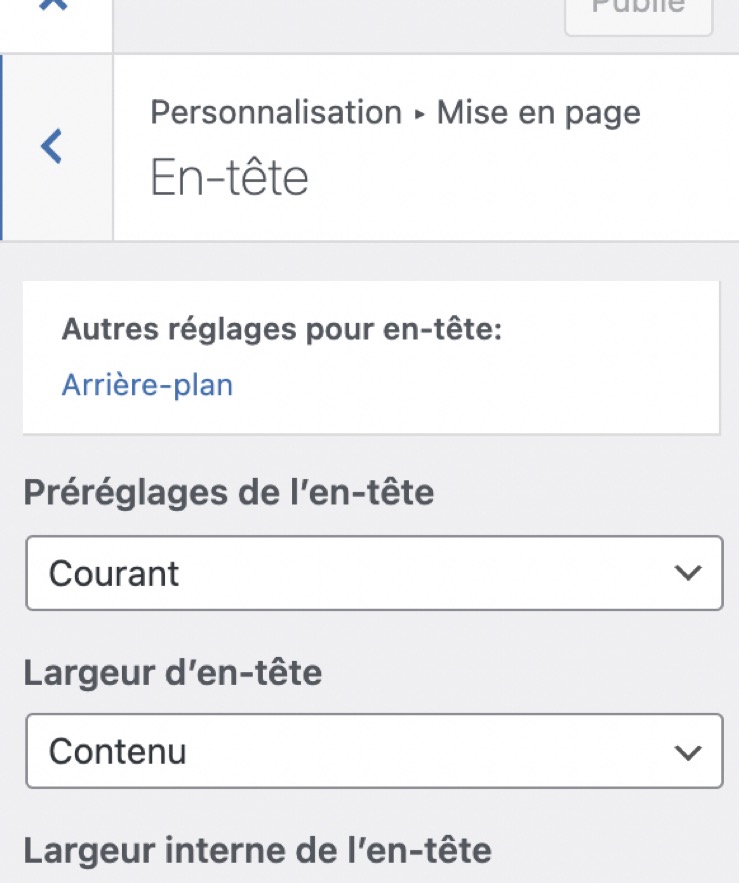
Hi Pierre,
There're NO colors or typography options in layout > header, as its under the layout section.
You'll find the colors option at customizer > colors, and you can find typography option at customizer > typography.
Let me know if you need further assistance :)
Got it! Strange though because on my other website, I see 3 options.
https://livre.saticomm.ca/wp-content/uploads/2021/12/Typography-Other-site.jpg

Again, many thanks to the team.
Pierre
Ah I see what you mean :)
What's the GP and GP Premium version you are using on this site?
Make sure they are all up to date. Latest GP theme version is 3.1.0 and GP Premium plugin is at 2.1.1.
Hi Ying.
Yes, they are both the same and up to date.
As long as it works, I'm OK.
Many thanks again for your quick responses.
Best regards,
Pierre
You are welcome Pierre :)