
Archived topic
Massive amount of CSS files - what is recommended Caching solution?
5 replies · Started by steven on April 6, 2022
Hi!
I recently installed a caching plugin to replace another. All seemed OK but then I checked my Google search console crawl stats, and there is a huge spike in CSS file crawls:
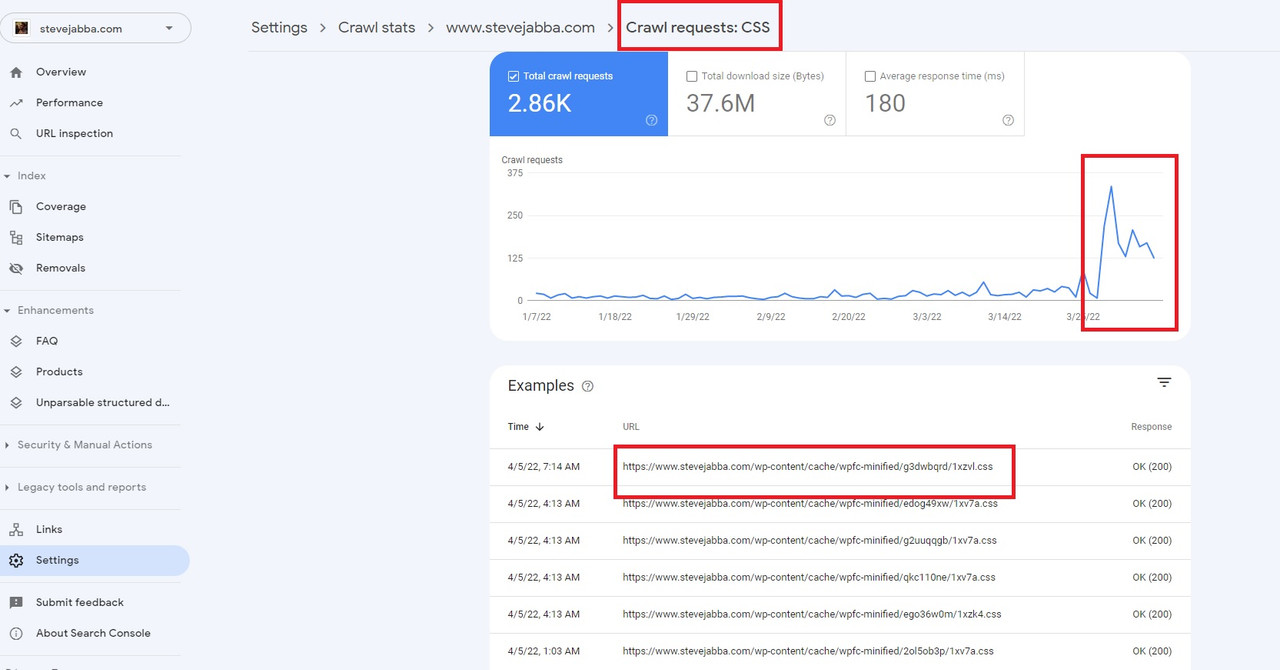
This coincides with less HTML crawl on my site.
I don't know the precise crawl budget I am allocated, but I know it's a real thing. It cannot be optimal to have a bunch of extra CSS files that are being crawled. These files are all being generated by this plugin (WP Fastest Cache)
Can you advise what is the recommended caching plugin for your theme?
I am also using cloudflare so there are caching options there.
Thanks so much.
Hi Steven,
Are you combining CSS files through your Caching plugin?
It could be that the CSS file detected by Google from your Caching plugin is the combined CSS file or just simply the cached file of you website's CSS.
There are perks and cons to combining CSS files. One perk would be the it relatively lessens the requests your site will be making. Here is an article with regards to its cons: https://wpjohnny.com/why-you-shouldnt-combine-css-js-performance-reasons/#:~:text=older%20webhosting%20technology.-,But%20(rebuttals)%E2%80%A6,-%E2%80%9CDoesn%E2%80%99t%20combining%20CSS
From experience, most functionalities of caching plugins are the same. They just seem to vary in presentation.
In any case, here is an article I found with regards to the “best” caching plugins for WordPress.
Hope this clarifies. :)
I've turned off combining CSS and JS.
I will monitor to see if this stops the issue.
Please keep the thread open and I'll report back.
Thanks!
Noted. You’re welcome Steven. Kindly let us know how it goes. :)
If I may add my 2 cents regarding this topic: Most page speed tools still don't take into account that HTTPS/2 is now widely available. The number of server requests is not THAT crucial anymore. In other words: combining CSS and JS might even harm a site and makes the user experience worse. The striving for a 100 points score is more often than not pretty futile.
I think what the OP is experiencing here is an 'error' with the caching software. There should be no reason for 100's of those files. If the issue persists Steven i would recommends speaking to the cache plugin developer.