
Archived topic
Leave the "letters" and "images" smaller after a search?
5 replies · Started by Eduardo on September 13, 2017
Hi!
Please:
How Can I Leave the "letters" and "images" smaller after a search, using the widget's search own GP theme?
please see: http://www.evigg.com.br/how_make_smaller.png
my site: http://www.idealbrindes.com.br/catalogoprodutos
BR
Eduardo Viggiano
What do you want it to look like? Any examples?
Hi Tom,
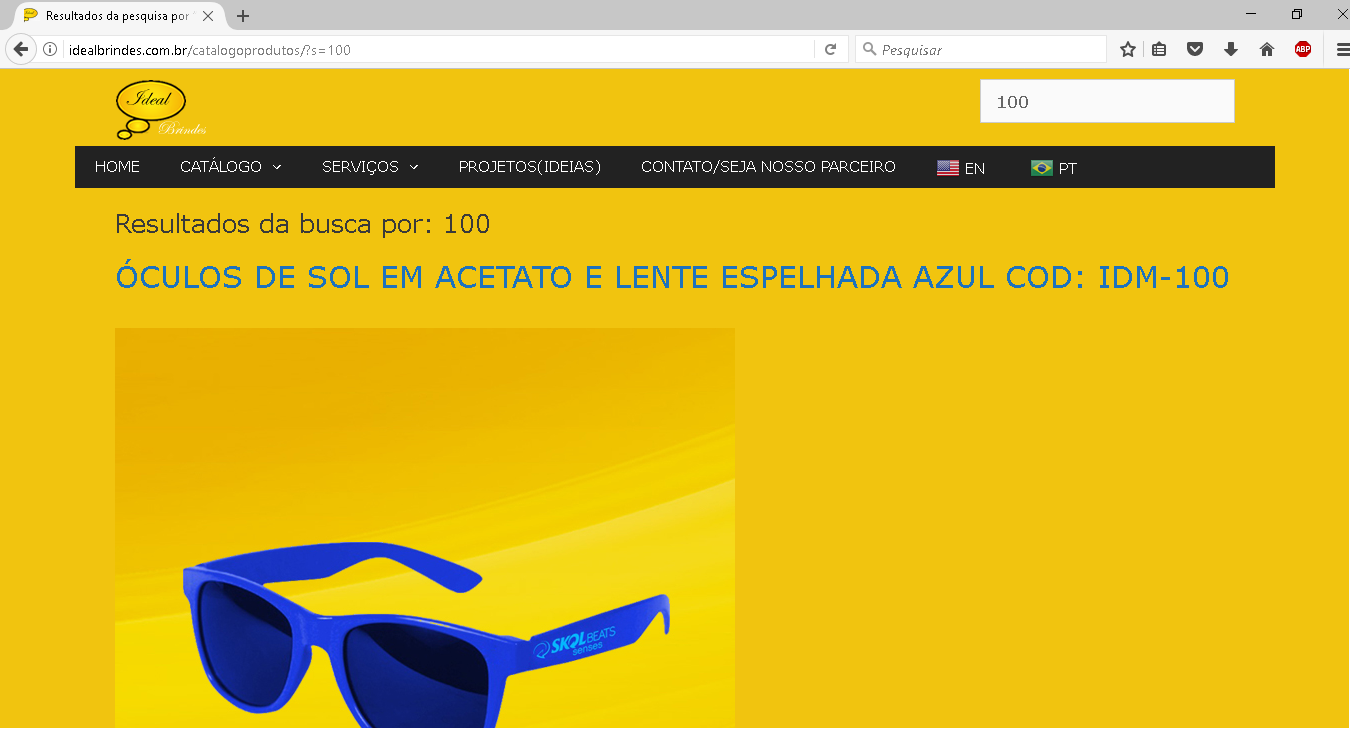
Look this: http://idealbrindes.com.br/catalogoprodutos/?s=100
Note, that the images result of the search (http://idealbrindes.com.br/catalogoprodutos/?s=100), is very large, and the texts too.
I want to reduce the text and images resulting from this search by 50%. This gives you a better view, as there is more information on the screen.
as it currently stands:
how I wish you to stay:

Because of the way it is currently: http://idealbrindes.com.br/catalogoprodutos/?s=100, the image and texts are very large.
Did I explain? :)
Try this CSS:
.search .entry-title {
    font-size: 15px;
}
.search .post-image img {
    max-width: 300px;
}
Adding CSS: https://docs.generatepress.com/article/adding-css/
Leo!! P-E-R-F-E-C-T !
Thanks!!!
BR
Eduardo Viggiano.
Glad we could help!