
Archived topic
Layout metabox floating over editor...
15 replies · Started by Brad on January 22, 2019
WP 5.0.3
GP 2.2.1
GP Premium 1.7.7
Basically, the Layout metabox is not where it should be. Instead of being in the settings in the right column, it's floating over the top of the editor, and it's very distracting! I've tried disabling plugins, including GP Premium, switching templates and then switching back to GP, creating new pages from scratch, etc... Nothing seems to work. I can't seem to figure out how to get the Layout metabox to move into the right sidebar.
Any thoughts?

Hi there,
that is very odd. Have you tried disabling any plugins to see if there is a conflict?
If not the issue - can you drag the layout meta over the sidebar?
For it lock into place you have to point it to just above an existing meta box in the sidebar, a border marquee should appear at the right spot.
If you don't have any meta boxes in there activate the GP Sections module that will ( should appear ) in the sidebar.
Well, I tried dragging and dropping the metabox into the sidebar numerous times, but it only expanded the width of the editor window continually and drew an increasingly smaller horizontal scrollbar as I dragged right. I would not 'jump' over into the right sidebar.
I only have 6 plugins but I went ahead and deactivated all of them at the same time, and the problem went away. Oddly enough, though, I reactivated each plugin one at a time, and the problem did not return. So... meh.
I have multiple sites doing this. At least I know how to fix them now.
Thanks for the help.
how very odd - the new editor does seem to throw up a few oddities. i think in the next update the layout meta will start in the sidebar so hope that keeps things a little less cumbersome.
Just to follow up on this in case anyone else experiences the same issue with the Layout metabox not staying in the right sidebar.
I was able to get the Layout metabox to move to the right sidebar on one of my sites, and I assumed deactivating and reactivating the plugins is what corrected it. However, the same problem appeared on another site, and the same steps did not make any difference.
This site only has 3 plugins and one of those is GP Premium (1.7.7), and I'm not even using a child theme with GP.
I tried switching themes then switching back, converting old pages to blocks, dragging and dropping the Layout metabox to the right sidebar, deactivating all plugins and hard refreshing the editor page with each change, but the metabox still floated over the top of the editor toward the middle to bottom of the page.
Finally, the fix turned out to be deactivating and reactivating the Sections module in Appearance > GeneratePress. I assume this somehow triggers the metaboxes created by GeneratePress to render within the sidebar instead of below the editor as they did prior to Gutenberg. This is probably only likely to occur on sites that updated to Gutenberg after already running GP, and probably does not affect new installations. That's my best guess. Hope it helps others with the same or similar problem.
Very strange - I'll try to replicate it.
Does this consistently happen to you if the Layout metabox is below the content?
Hi Tom,
Not sure exactly how to answer your question because I'm not 100% sure I understand what you're asking. The problem has got to have something to do with old pages being loaded into Gutenburg. I don't manage pages too often, so don't have a good grasp on Gutenberg yet, but I assumed when it was introduced all metaboxes had to move to the right sidebar. Is there a way to position any metabox below the content?
It does seem that the Layout metabox cannot be dragged into the sidebar unless the Sections module is turned on. Afterwards, Sections can be turned off, and it will stay in the sidebar.
Another thing I have noticed (in case this helps somehow) is that the various GP metaboxes aren't styled the same as others when in the sidebar. For example, the metabox label is slightly lighter in color (grey) than the labels on the other drop downs, the down arrow is actually a down 'triangle' and the cursor turns into the 4-way, directional cursor on hover instead of the hand cursor I get when hovering over any of the other dropdowns in the sidebar. Here's a screenshot showing the Layout metabox. I have the Sections module disabled at the moment so it doesn't show up in this screenshot, but the styling is identical to the Layout metabox when turned on.
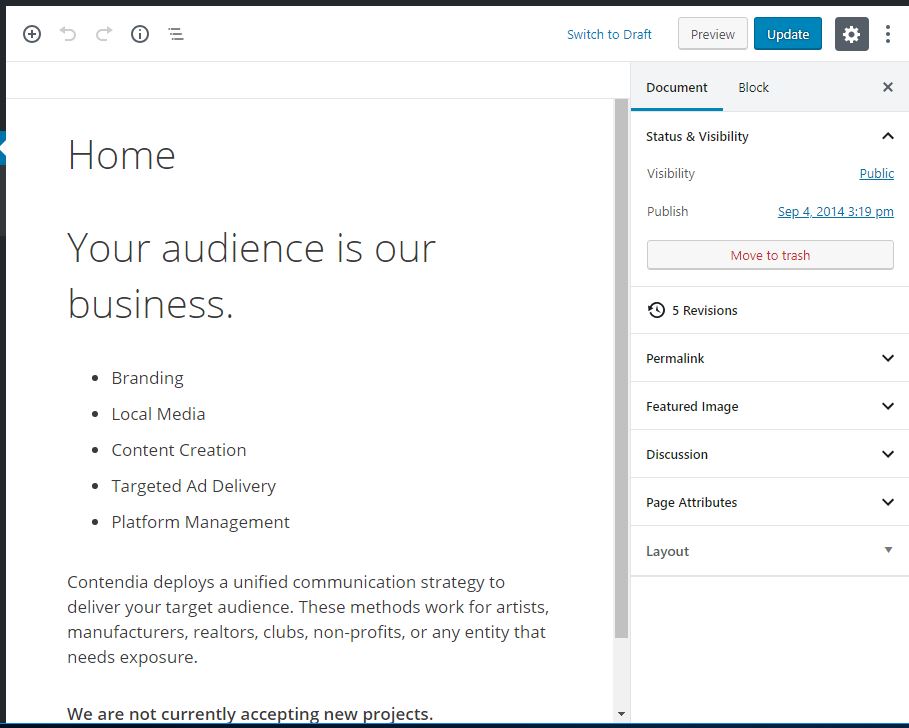
Hope this helps.
BTW, Thanks for an awesome template and plugin and even more awesome support! You guys have made my WordPress life soooo much easier!
Is there a way to position any metabox below the content?
Gutenberg allows metaboxes to appear in the right sidebar or down below the content.
It does seem that the Layout metabox cannot be dragged into the sidebar unless the Sections module is turned on.
Metaboxes should have the ability to drag below the content or in the sidebar, but it's still somewhat buggy in Gutenberg.
That different styling is just how Gutenberg styles metaboxes.
As for the initial issue - are you able to consistently get the metabox to float in the middle of the editor like your screenshot? I can't get it to happen, so it's hard to debug.
I do remember seeing this as a general Gutenberg bug, but I thought they fixed it.
I can't say I can consistently get the metabox to float over the editor. It happened in some of my sites, but didn't in others. Really, I'm at a loss as to both the cause and cure.
I'm beginning to wonder if it has something to do with old pages that had not been converted to blocks yet. I'm sure I still have lots of those around, but like I said, I just don't edit pages too often.
I can say for certain that I cannot get the metaboxes to drag back under the editor after they've moved to the right sidebar. They just won't make the jump when dragging. That's why I assumed metaboxes were not supposed to be under the new Gutenberg editor.
Anyway, I can't seem to find any other references to anyone else experiencing this same issue, so maybe it's just a fluke for me. I'm sure it's just a wrinkle that will get ironed out in time.
Sorry I couldn't be any more help than that, but thanks for the follow-ups. And thanks again for an excellent product.
Regards,
Brad
No problem! I'll keep an eye out for it :)
Sorry to reopen this topic but the same thing is happening to me on a page and I can't solve it.
Do you know why? Thanks
Hi there,
are you running the latest version of WordPress and GP / GP Premium ?
Yes, David. Both are the latest version
Is it floating over the editor ( like in the screenshot at the top of this topic ) or just below the editor ?
Is it floating over the editor
like in the screenshot