
Archived topic
is now below page hero Header Element
9 replies · Started by boaz on July 21, 2021
using this code created a secondary navigation section on the right of the main navigation, which is what i wanted.
<?php

add_action( 'generate_after_header','after_navigation_element' );
function after_navigation_element() { ?>
    <header id="masthead-second" class="after-nav"><div class="inside-header"><?php dynamic_sidebar( 'header-archive-2' ); ?></div></header>
<?php }
Now, After adding a Page Hero Header element, the "masthead-second" appears below the header.
How can i fix this and make it go to the right of the masthead like before ?
Thanks
Hi there,
in this line of your code:
add_action( 'generate_after_header','after_navigation_element' );
you can set a priority to the hook - try changing that line to:
add_action( 'generate_after_header','after_navigation_element', 9 );
very nice. thanks David.
BTW, and perhaps off-topic.
Adding this DOM element using this hook is creating a Negative "Cumulative Layout Shift" in my GTMETRIX score.
do you know of a way to avoid this ?
First thing to fix is the Logo image is not loading, the retina image is requesting over HTTP. So the browser is blocking it. Worth fixing that first as that could be the first part to reflow.
Once thats done i can take a closer look
Hi David, i fix the logo issue,
when disabling the code to generate the element after the navigation
<?php

add_action( 'generate_after_header','after_navigation_element' );
function after_navigation_element() { ?>
    <header id="masthead-second" class="after-nav"><div class="inside-header"><?php dynamic_sidebar( 'header-archive-2' ); ?></div></header>
<?php }
The CLS score went back to normal. i think its definitely related. perhaps the associated CSS code is also contributing.
@media only screen and (max-width: 1366em)
#masthead {
    width: 76%;
}

#masthead {
    display: inline-block;
    width: 82%;
}

#masthead-second {
    width: 23.7%;
}

#masthead-second {
    display: inline-block;
    width: 17.7%;
    background-color: #e6e6e6;
}
.after-nav {
    order: 1;
    margin-left: auto;
}Theres a few things moving around but on initial load it looks like your #masthead CSS is first loading the 82% width, which forces the secondary nav to the next line, then the media query size shifts it to 76%.
I would run it the other way around. ie. set it as standard to 76% and then use a min-width media query to make it larger.
Hi David, good idea. i tried it but there is no change to the CLS score.
(BTW, it doesnt help to turn on cache)
Is there some other way to create the same header structure without the hook ? or some other solution you can think of ?
Hmm.. might be better to Hook it inside_header - then it will at least stay within the header container, and you can take advantage of Flexbox to align those elements.
I couldnt find the inside_header hook.
https://docs.generatepress.com/collection/hooks/
https://docs.generatepress.com/wp-content/uploads/2018/07/hooks-postspage.png
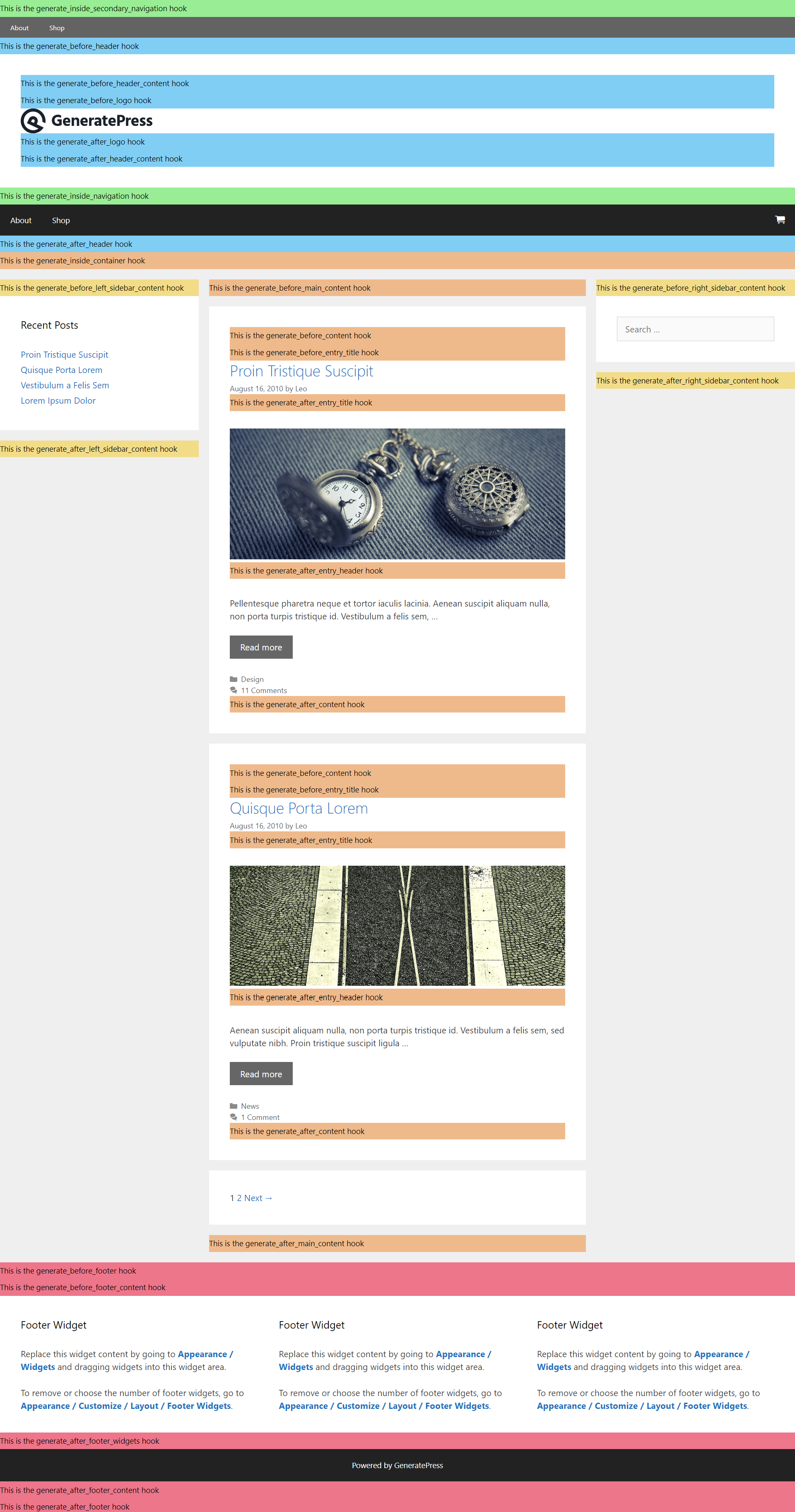
Doh... sorry having a silly moment.
The after_header_content hook should put it inside and in the right place.