
Archived topic
Insert element at the end IMMEDIATELY AFTER the text of an article
9 replies · Started by Daniele on July 11, 2021
Hi, I've tried 1000 times, but I can't insert an element right at the end of each article, i.e. after the end of the text, not after the links at the end of tags and categories. How can I view an item IMMEDIATELY AFTER the last word of an article text?
Thanks, Daniele.
Hi there,
You would need to use the priority option.
See the detailed explanation here with the exact example you need here:
https://youtu.be/VdoWGOsvDMk?t=203
Yes, I tried to put priority 10, 20, 30 etc .. starting from several positions, but it is not possible to insert anything after the last word of an article! I have made a lot of attempts! If you think there is a solution, tell me which position to use, and with what priority, because I can't find it :(
The video I linked should show you the exact hook and priority you needed.
Are you sure you've tried generate_after_entry_content hook with a priority of less than 10?
Thanks Leo,
I had already tried this solution, but the item is displayed too low, after the links to tags and categories. I would like it to be higher, right after the content. As indicated by the arrows in the screen shot. The element is the large writing in red.
https://i.postimg.cc/CxzMkSvQ/SHOT.jpg
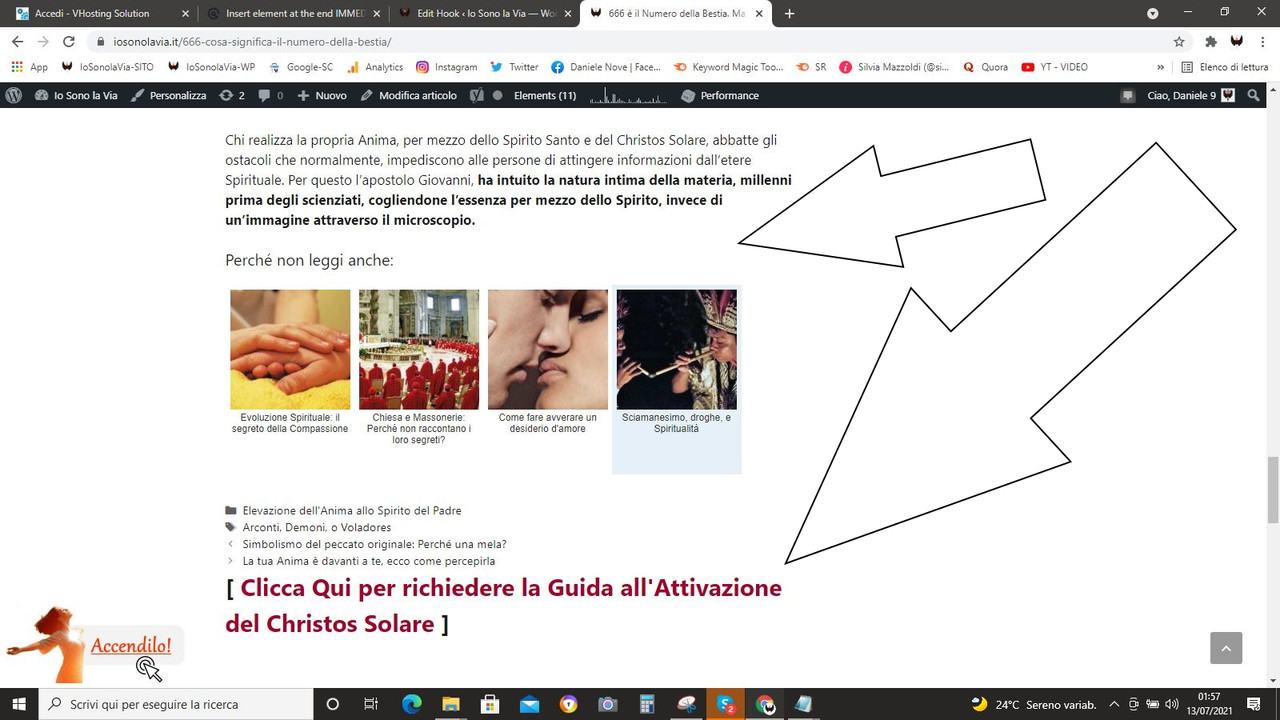
Daniele
Hi Daniele,
Can you try setting the priority to 1?
Check my sample page here - https://dev-generate-press.pantheonsite.io/hello-world/
The text "This text is hooked on generate_after_entry_content with a priority of 1." is hooked to generate_after_entry_content with priority value of 1.
This appears directly after the content.
Thank you Elvin! Now the element has gone up, but a problem remains, the recent posts plugin that keeps hanging over! This plugin is good, but it doesn't offer repositioning possibilities. So I ask you, do you have an idea to solve this problem?
From the screen shot you will understand better what I mean.
Thanks!
Daniele
Unfortunately the plugin would need to offer a shortcode solution so it can be inserted via hook and use the priority method.
Worth checking with the plugin's support team.
Sure Leo, I'll see what can be done, you have given me the information necessary to reposition the element, and in this we have succeeded.
Thank you guys!
Daniele
No problem :)