Archived topic
How to know the Width
5 replies · Started by Sanu Kumar on June 19, 2021
How do I know the width of any site. Like this site: https://www.monsterinsights.com/how-to-track-and-view-file-downloads-in-google-analytics/
Only post, not sidebar.
Hi there,
right click and inspect the element - in the developers tools Elements tab, select the main article element - and the browser it will display the width of the element - that example site it is 620px
As a non-technical background, I'm not able to see where it is. Could you help me with a screenshot?
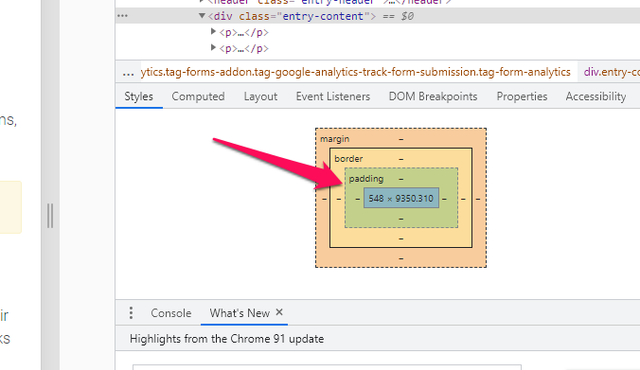 <br />mysql to geojson<br />
See here:
https://www.screencast.com/t/7timt53gIX
With the Elements tab selected, select the Element, in this case its the Article, in the elements list. This will highlight the element in the browser view. And above it will provide some style details including its dimensions ie. 620 x .....
ohh super awesome.
Thank you very much
Glad to be of help