
Archived topic
How to display post date/revision date in generateblocks
20 replies · Started by robchanoi on July 26, 2021
Lets start over.
1. Create a new Block Elememt.
2. Select the Element Type > Page Hero.
3. Add a Container Block, set its background color, and a minimum height.
4. Inside the Container Block add a Headline Block
4.1 Set the Headline Block, and set it to a H1
4.2 In the Block Toolbar - click the Dynamic Data option, and select Dynamic Text Type: Title
5. Below the Title Headline Block and another Headline block
5.1 Set the new headline block to a Paragraph.
5.2 In the Block Toolbar - click the Dynamic Data option, and select Dynamic Text Type: Post Date
6. Set the Display Rule Locations to: Posts > All Posts and Products > All Products.
This will now display on all single posts and products, and will dynamically display the Title and the Date.
So now you don't need to this to your post content.
Thanks David but with respect this is what I tried before and showed you how it appeared in the ss.
This is what I am trying to achieve:
https://menspleasures.com/wp-content/uploads/2021/08/Updated-date-position.png
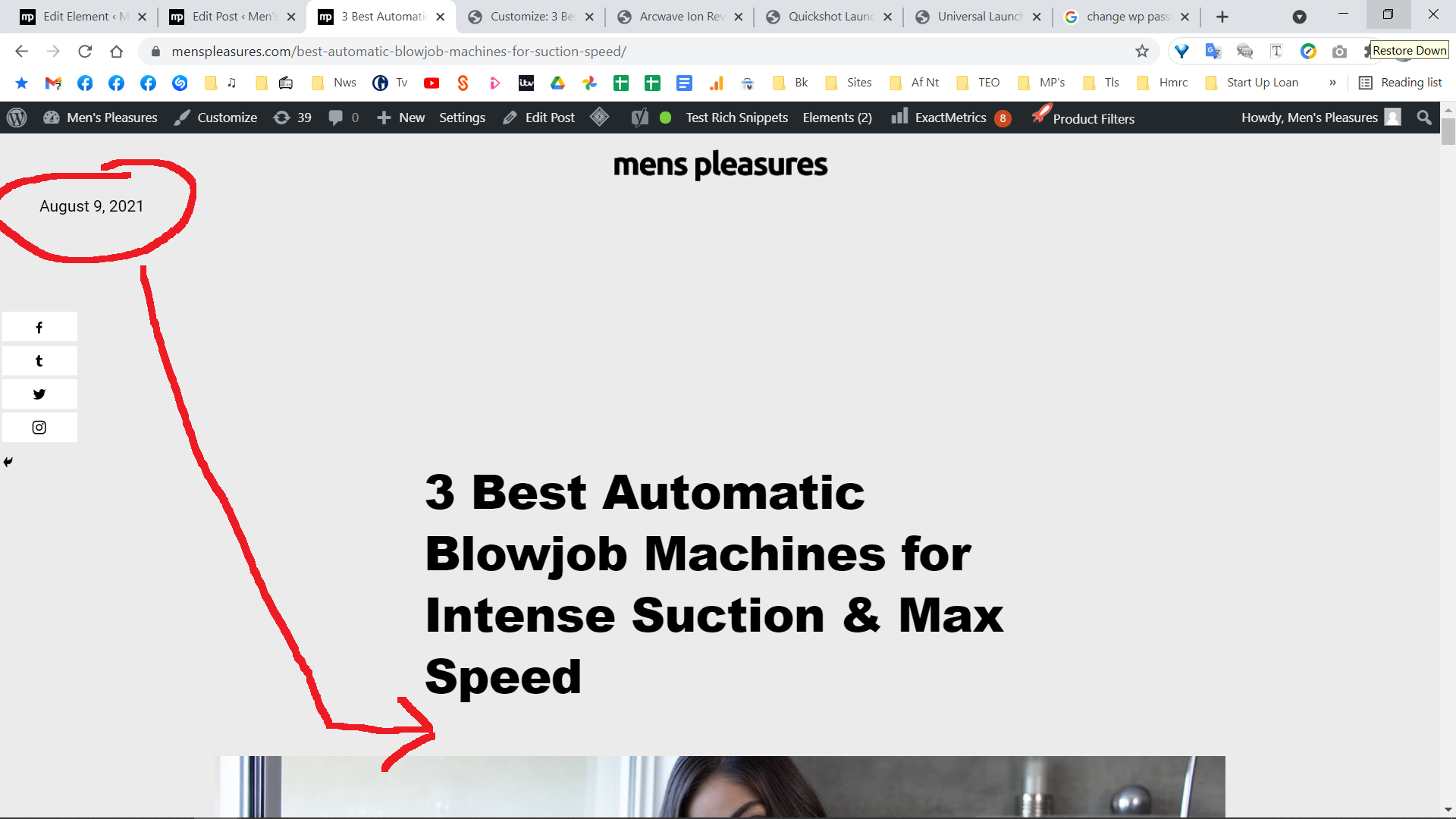
https://menspleasures.com/wp-content/uploads/2021/08/how-about-here.jpg
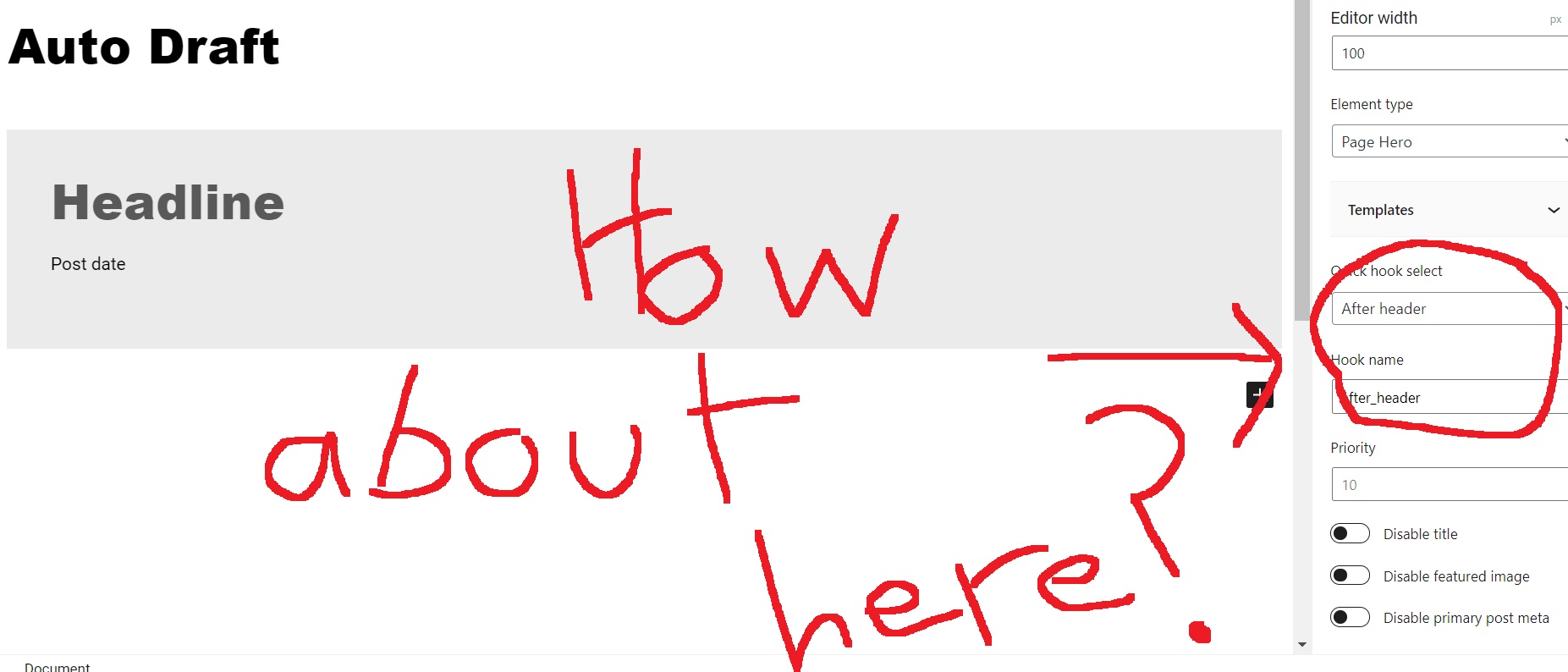
I have the titles already in place. Titles are not the concern. I am trying to have the "updated date" feature below the title or elsewhere - anywhere but in the header.
If this is not possible - no worries - will leave as is for now. Cheers.
When you add the Title in the Post Editor, it becomes part of your post content, its no longer a Theme element that can have content hooked in before or after it. They're are other methods, but that would rely on either a) creating a custom shortcode that you manually add to every post to display the date, or b) using a function to Filter the content to insert the date for you.
But neither of those methods are really practical for long term maintenance of your site. If in the future you want to change the layout or design then you would have to manually edit EVERY post. Which isn't good.
You also now have lots of stuff in your content such as the Title, the author, the category term ( ? For Him ) all in your content. Which you don't want to be there, as this could end up being part of your post excerpt or your SEO Meta Descriptions.... It really isn't and advisable way to build out a page.
The option i provided above is the best method.
I looked at your site and quickly creaated the following Block Element.
You can try:
1. New Block Element, and select the Page Hero Element Type, and set the Display Rules to Posts > All Posts.
2. In the top bar, click the 3 dot menu, and change to Code Editor.
3. Copy the following HTML and Paste it into the code editor:
<!-- wp:generateblocks/container {"uniqueId":"3f37eb0f","containerWidth":700,"minHeight":500,"paddingTop":"120","paddingBottom":"120","backgroundColor":"#ebebeb","verticalAlignment":"flex-end","isDynamic":true} -->
<!-- wp:generateblocks/headline {"uniqueId":"39b9dc91","element":"p","fontWeight":"900","textTransform":"capitalize","marginBottom":"15","className":"dynamic-term-class","gpDynamicTextType":"terms","gpDynamicTextReplace":"Terms","gpDynamicTextTaxonomy":"category"} -->
<p class="gb-headline gb-headline-39b9dc91 gb-headline-text dynamic-term-class">Terms</p>
<!-- /wp:generateblocks/headline -->

<!-- wp:generateblocks/headline {"uniqueId":"4c145634","element":"h1","className":"","gpDynamicTextType":"title","gpDynamicTextReplace":"Hello World"} -->
<h1 class="gb-headline gb-headline-4c145634 gb-headline-text ">Hello World</h1>
<!-- /wp:generateblocks/headline -->

<!-- wp:generateblocks/headline {"uniqueId":"30bbb9b6","element":"p","marginBottom":"10","className":"","gpDynamicTextType":"post-author","gpDynamicTextReplace":"Post author name","gpDynamicTextTaxonomy":"category","gpDynamicTextBefore":"By "} -->
<p class="gb-headline gb-headline-30bbb9b6 gb-headline-text ">Post author name</p>
<!-- /wp:generateblocks/headline -->

<!-- wp:generateblocks/headline {"uniqueId":"12dc7622","element":"p","className":"","gpDynamicTextType":"post-date","gpDynamicTextReplace":"Post date","gpDynamicTextTaxonomy":"category","gpDynamicTextBefore":"Publshed on: "} -->
<p class="gb-headline gb-headline-12dc7622 gb-headline-text ">Post date</p>
<!-- /wp:generateblocks/headline -->
<!-- /wp:generateblocks/container -->

<!-- wp:generateblocks/container {"uniqueId":"c2780e15","paddingTop":"0","marginTop":"-100","alignment":"center","isDynamic":true} -->
<!-- wp:generatepress/dynamic-image {"imageType":"featured-image"} /-->
<!-- /wp:generateblocks/container -->
4. Change the 3 dot menu back to the Visual Editor.
This will generate the blocks required for the full width background, the contained ( 700px wide ) hero content of Category Term, Title, Post Author and Post Data, followed by another Container with the featured image that has a negative top margin to create the overlap.
So this is 100% dynamic, any post with Cat terms, title, post data, post author and featured image will give you the same layout you have today. And none of this will be part of the content, or interfere with Excerpts or SEO Meta....
Right, thanks David. Think I understand most of it.
You also now have lots of stuff in your content such as the Title, the author, the category term ( ? For Him ) all in your content. Which you don’t want to be there, as this could end up being part of your post excerpt or your SEO Meta Descriptions
Are you saying when one creates a post you shouldn't:
1 Manually add H1 title in container?
2 Don't assign the post to a category using Wp default categories and the same goes for woocomerce categories?
3 I am using a type rich snippets plugin that i'm told has to feature at the bottom of each page - this i was hoping would set up search appearance better but I should delete as it includes author etc.
Tbh yoast and configure rich snippet plugin are clearly not working going by how some pages appear in google search results so guess above is part of the issue :/ minefield. (think also the latter is preventing comments box appearing in posts also- might have to stat new query on this :/ )
For now have no' of posts that I have designed manually i.e tailored so image looks right... but your template is obviously the way forward... cheers for taking time to create. Gona take some work to go through and amend all posts so will pause for now.
As for updated date appearing, will stick with it in the header then for now.
Cheers.
1 Manually add H1 title in container?
Not when you want to have other theme elements automatically inserted after it.
Its best to leave the Theme to output it,
I only add the H1 in the content if i am designing a landing page and it needs to be within the content.
2 Don’t assign the post to a category using Wp default categories and the same goes for woocomerce categories?
you SHOULD use the built in WP Categories/Tags for Posts and Products. They're used for many things such as generating the archives, or filtering a product.
3. That should still be fine.
I would test out the Block code i provided on a single post. Tweak it to your liking, and then once your happy with it, you can then apply it to all Posts. Then yep, a manual job, of deleting the duplicate stuff from the post editor.
Gotcha, that's clear.
Can also manually exclude their id's i guess of the posts done prior, which would save time but will delete manual author/category/ links in containers above post container.