
Archived topic
How to build a short news post with Elements
9 replies · Started by Louis-Xavier on November 30, 2021
Hi,
I run a local news website and I'd like to show posts slightly differently than my typical "longform" article layout, which is default.
I'd like to use a tag in order to trigger the display of this layout,
I achieved some of it using Elements and a Content Template Block, but I can't control position of Featured image and meta. In fact, I don't know if or how to display the headline with this type of Block.
The thing that doesn't really work, as an example: https://www.topolocal.ca/2021/11/26/xavier-antoine-lalande-nouveau-prefet-de-la-mrc-de-la-riviere-du-nord/
I searched the forum for a while and couldn't quite grasp the ways of making this kind of magic...
Would you be able to show me where I should go next?
Thanks!
LX
Hi LX,
I'm not sure I fully understand your question, do you have an example to show us?
Or can you explain a bit more?
OK, I made a drawing. What I'm trying to do is to show a different post layout when using a specific tag for a small number of posts:
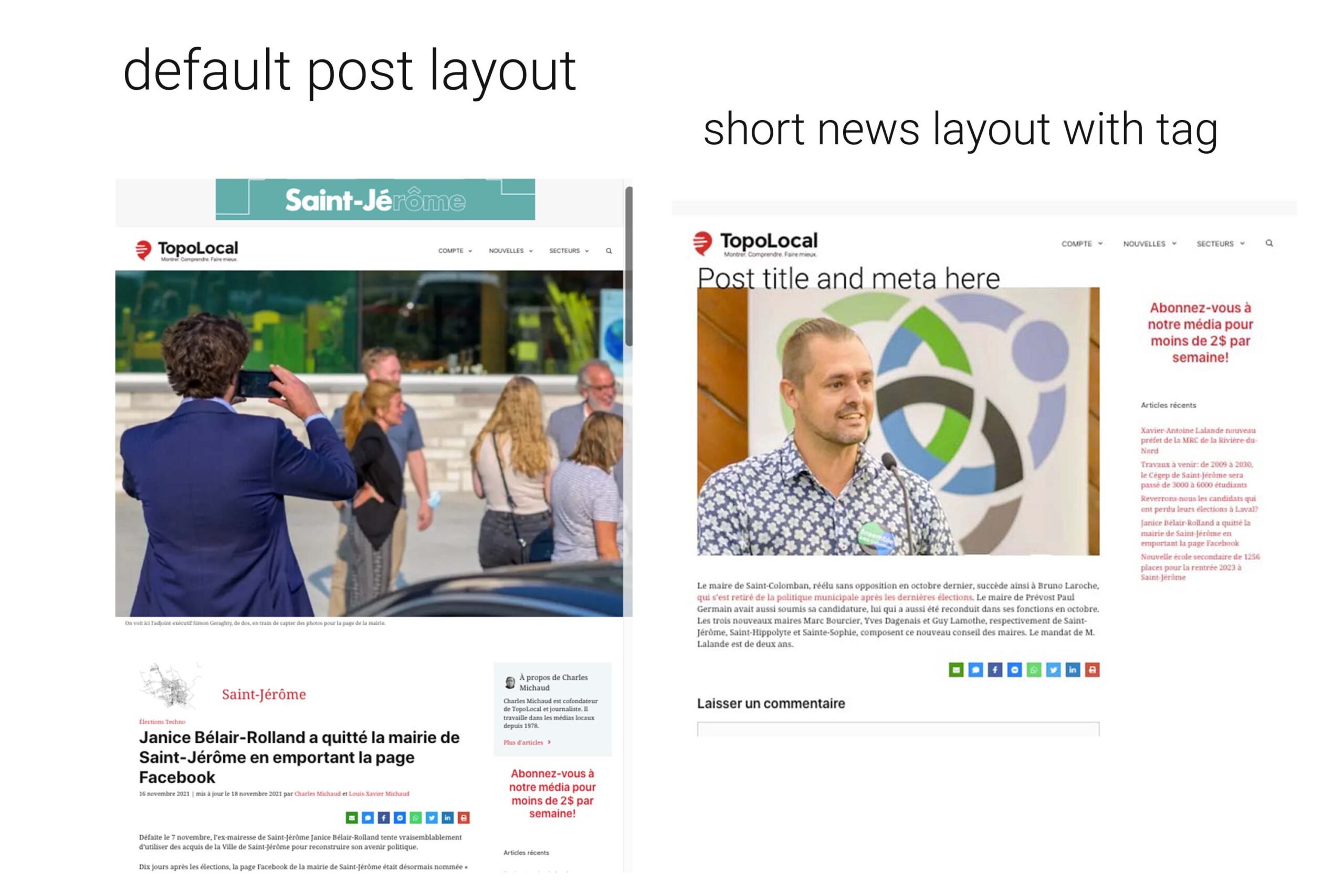
What would be the greatest way to achieve this?
I see, using a content template is the way to go.
You can use a Headline block to add title and meta, here's documentation of block element -content template with a demo video:
https://docs.generatepress.com/article/block-element-content-template/
Please watch the video, then you'll know how to add those info.
More videos that might help: https://youtube.com/c/GeneratePress/search?query=dynamic
Hi again,
Getting there! Now, if I'd like to systematically hide featured image on these posts based on a tag... I don't want to turn it off everytime I post a new one...
What should I do? I can't find the way somewhere else in the forum. Please let me know!
You can create a new block element - content template but without the dynamic image block.
Set the location to post tag > tag name.
Remember to exclude this location from your generalblock element - content template, so that their display rules don't get conflicted.
OK, I think I figured these parts but I forgot one detail:
My featured image for single posts is set as Above title in the Customizer.
I wanted to show the featured image Below title for this specific set of posts...
Is there anyhting I can do to pull that out also?
Thanks a lot!
If I remember correctly, you are using block element - content templateto make the layout of the single posts, right?
In that case, customizer option would not work anymore, how the layout works depends on how you build your the content template.
Let me know if I miss anything.
I'm sorry, I got confused! My featured image is actually set up as Above content area in the Customizer for all single posts. That's really how I want to display most of my posts and I'm not using the Elements for these posts... yet!
How do I control the featured image in other posts if I want to move it under the title in some cases? ( Just as I'm trying to do it with a Content Template block and post tags. )
Thanks for hanging with me!
If you don't want to use block element - content template, then try this PHP snippet:
https://docs.generatepress.com/article/option_generate_blog_settings/