
Archived topic
How do I change an existing URL?
7 replies · Started by Michael on November 13, 2021
I want to change the url from an existing page (from https://nlp-training.org/about-michael-beale/ to https://nlp-training.org/nlp-trainer-michael-beale/)
What's the best way of doing this?
Thanks,
Michael
Hi Michael,
If I understand correctly, you just need to change the page's slug to the whatever you want for the new URL, I shot a small clip for you:
https://www.screencast.com/t/VnWu2mHL7
Brilliant, thank you,
Michael
No problem :)
Dear Ying,
What if the slug already has the correct page name?
https://trolleyservice.fi/wp-content/uploads/2021/11/slug.jpg
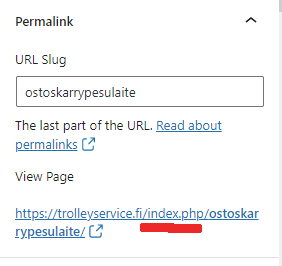
I have index.php there between the sitename and slug.
https://trolleyservice.fi/index.php/ostoskarrypesulaite/
How do I get rid of that index.php there?
Best regards,
Kris
Hi Kris,
Can you go to Settings > Permalinks and check if your permalink Common Settings have /index.php/ in it?
If it does, you can remove it from there.
Thanks Elvin! I set it up Post Name so all good now, mate.
(phew, that was a bit basic, eh :)
Cheers,
Kris
No problem. Glad you got it sorted. :D