
Archived topic
how can i enlarge the title of the website?
11 replies · Started by Torsten on July 16, 2021
Hello,
I bought Generatepress Pro yesterday.
I'm a beginner and don't know my way around very well.
Can I enlarge the front page?
and how can i enlarge the title?
Many Thanks!
Torsten
Hi there,
welcome to GP :)
First off go to Dashboard > Appearance > GeneratePress and enable the modules you need. For these changes you will need Typography, and you should enable Spacing as well.
1. Customizer > Layout > Container you can increase the Container Width.
2. Customizer > Layout > Typography > Headings - here you can increase the H1 title font size.
hello David,
Thank you so much!
it all worked.
I meant if I can enlarge the title an the subtitle of the website..
here the link:
https://www.kaltschaum-matratze-info.de/
The title of the Website:
Kaltschaum-Matratzen.
The title and the subtitle should be bigger. But I can't change the size in the customizer.
is that possible via CSS?
Torsten
The H1 should work fine,
But you have some inline styles on the H2:
https://www.screencast.com/t/ckpo6prp966
Which would require CSS to override:
.entry-content h2 span {
    font-size: 24px !important;
}OK...
how can I insert a screenshot here?
You need to provide a URL to the image file that is stored on a share drive ( Dropbox, Google drive, or the WP Media Library etc ) or use a service like IMGUR.
OK
here is the screenshot of my homepage.
I want to enlarge the title and subtitle (marked in red).
https://www.kaltschaum-matratze-info.de/wp-content/uploads/2021/07/generatrepress.jpg
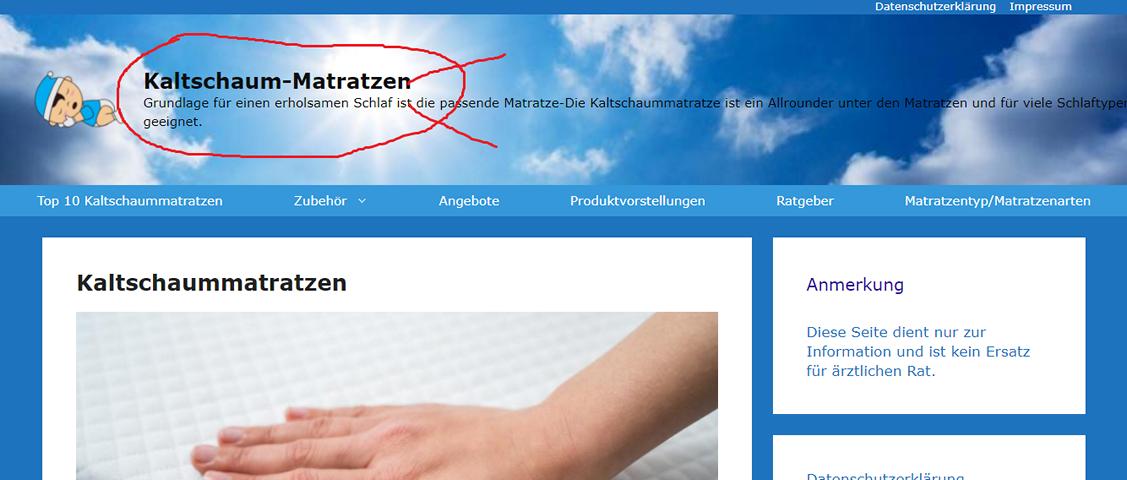
my english is not so good, so i hope that it will be easier to understand that way
Aah - my apologies.
Go to Customizer > Typography > Header and change the Site Title and the Tag Line.
here I can only set the font size body, h1, h2 and h3 ..
I can't change the font size in the header here ...
it's ok ... then I'll leave it that way ..
Many Thanks
Watch this video:
Hello David,
Thanks alot!
I found the mistake!
I forgot to activate the item Typography ...
I'm sorry I held you up for so long now.
Your support is great ...
Torsten
No apologies necessary. Glad to be of help