
Archived topic
Header Display Settings for a Glossary
13 replies · Started by William on January 22, 2021
Hi there,
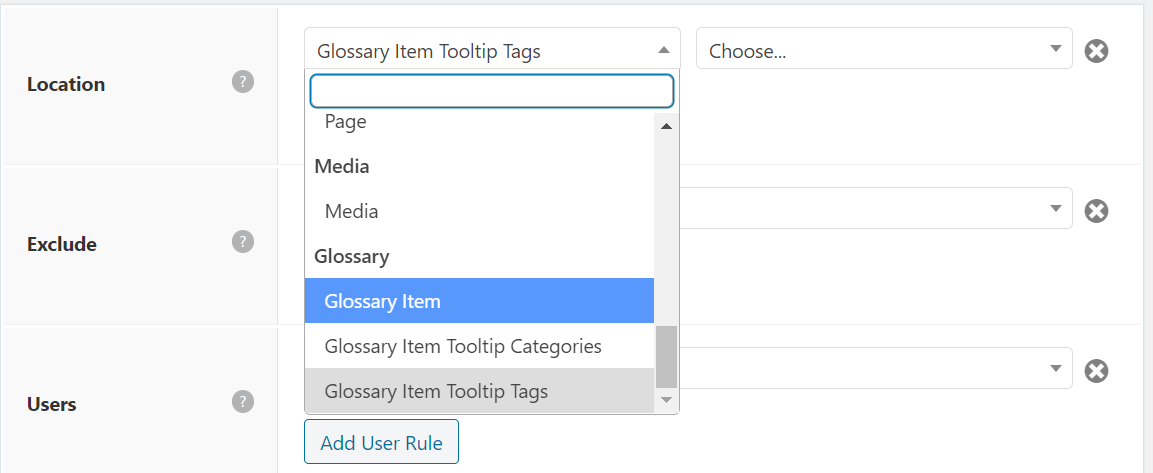
I want to have a different header appear for each of the different glossary categories I have (you can view this with the drop-down of the different categories).
The Glossary is created with a plugin called Cm Glossary Tooltip. GeneratePress shows that they can include the header for specific glossary terms, do it for the category and tag pages, but not for terms that fall under a specific category.
Is there a way for this to be possible?
Kind regards,
Will
Hi there,
If the condition you are looking for is not under the display rule then you will likely need to use this filter:
https://docs.generatepress.com/article/generate_header_element_display/
You will need to replace the is_author( 'Tom' ) with the conditional tags you are after.
Please check with the plugin support if you aren't sure what condition you should be using there.
Hope this helps :)
I think that is what I'm looking for, thanks :)
What would you change the is_author( 'Tom' ) to if you wanted the display setting be specific for, say a category? (I know you do this already but will help me do the functionality as the Glossary has its own categories).
Also, what this is for is a page hero. How would I be able to choose such a display location setting is currently a drop-down for pages, posts, categories etc.?
What would you change the is_author( 'Tom' ) to if you wanted the display setting be specific for, say a category? (I know you do this already but will help me do the functionality as the Glossary has its own categories).
It depends. If you're doing it for a post, you can use in_category():
https://developer.wordpress.org/reference/functions/in_category/
If you're doing checks for archive pages, you can use is_category():
https://developer.wordpress.org/reference/functions/is_category/
But I believe these 2 are already within the display rule location selection (post category and post category archive).
... How would I be able to choose such a display location setting is currently a drop-down for pages, posts, categories etc.?
I'm not sure I understand what you mean by this. Can you explain a bit more? Thank you.
I'll need an `in_category()' for Glossary terms - just these categories don't appear in normal categories but to their own section.
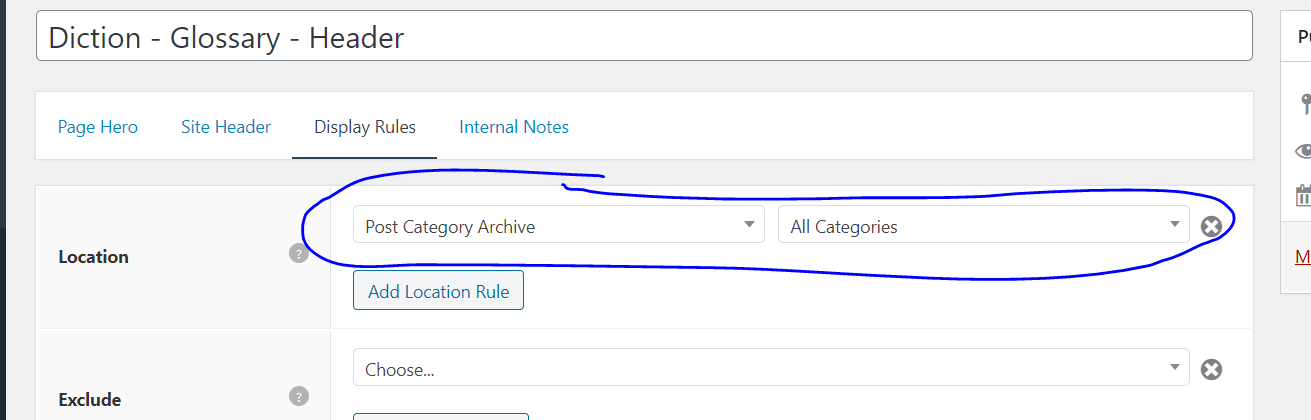
I added the above code as an example and the hero has this display location drop down - it does not appear here so not sure how to link the code to a hero display settings?
As Leo previously mentioned, here's the filter to apply your 'in_category' condition for the header element.
https://docs.generatepress.com/article/generate_header_element_display/
So if you're going to add 'in_category' instead of is_author, do this:
add_filter( 'generate_header_element_display', function( $display, $element_id ) {
    if ( 10 === $element_id && in_category( 'Dialogue' ) ) {
        $display = true;
    }

    return $display;
}, 10, 2 );
The 10 from 10 === $element_id is the ID of the header element you've created. The Dialogue is the category you want it to display in.
But as I've previously mentioned, this is basically the same as assigning a display rule of Post category - Dialogue on the dropdown you've marked.
If its a custom post type or taxonomy, it should also appear on the display rule location. Just make sure to select it instead of the default "posts".
Hi there,
Thanks for this. So I currently have this code:
add_filter( 'generate_header_element_display', function( $display, $element_id ) {
    if ( 2537663 === $element_id && has_term('','idioms') ){
        $display = true;
    }

    return $display;
}, 10, 2 );
Where element ID I took from the URL of that element I want to use for.

And currently, nothing is showing. The custom taxonomy for the website is 'Idioms' or 'idioms' in the URL and seemingly has an ID of 544506 from the URL:
https://wordpress-425633-1630880.cloudwaysapps.com/wp-admin/term.php?taxonomy=glossary-categories&tag_ID=544506&post_type=glossary&wp_http_referer=%2Fwp-admin%2Fedit-tags.php%3Ftaxonomy%3Dglossary-categories%26post_type%3Dglossary
I can't get the element to show for that category so I am unsure if I am doing something wrong with what you've provided or the conditional logic isn't correct for identifying the category?
The terms are WP posts with custom post type 'glossary' they belong (among others) to the custom taxonomy called 'glossary-categories' - so unsure how to use conditional logic to determine if the post is under a glossary category, such as 'Idioms'
Hi there,
where can i see the Idioms archive ? If i visit your site Glossary - selecting the Idioms category doesn't link me to an archive - it simply refreshes the lists, so there is no change to the template.
Sure thing, the category for idioms is here.
Instead of has_terms try the is_tax function - see last of the code example here:
https://developer.wordpress.org/reference/functions/is_tax/#user-contributed-notes
I've tried is_term('glossary-categories', 'idioms'), is_term('idioms', ''), is_term('idioms') and nothing seems to change for this applicable post for the header element.
Oh wait I had the element used elsewhere - works now - thank you sooo much for your support!!
Glad to hear that!
