
Archived topic
'generate_typography_default_fonts' not adding font to Customizer
2 replies · Started by Neil on November 19, 2021
Hi GP :)
I'm trying to add some custom fonts, but the 'generate_typography_default_fonts' filter is no longer working.
I'm using the latest version of the theme (with a child theme) and the lates version of the premium plugin and have disabled ALL other plugins.
Here is the entire contents of my Child Theme.
<?php
/**
 * GeneratePress child theme functions and definitions.
 *
 * Add your custom PHP in this file.
 * Only edit this file if you have direct access to it on your server (to fix errors if they happen).
 */

/**
 * Typkit Fonts
 */
add_filter( 'generate_typography_default_fonts','tu_add_system_fonts' );
function tu_add_system_fonts( $fonts ) {
    $fonts[] = 'bilo';
    return $fonts;
}
If add some logging;
/**
 * Typekit Fonts
 */
add_filter( 'generate_typography_default_fonts','tu_add_system_fonts' );
function tu_add_system_fonts( $fonts ) {
    $fonts[] = 'bilo';
    error_log(print_r($fonts,1));
    return $fonts;
}
That returns the following.
Array
(
    [0] => inherit
    [1] => System Stack
    [2] => Arial, Helvetica, sans-serif
    [3] => Century Gothic
    [4] => Comic Sans MS
    [5] => Courier New
    [6] => Georgia, Times New Roman, Times, serif
    [7] => Helvetica
    [8] => Impact
    [9] => Lucida Console
    [10] => Lucida Sans Unicode
    [11] => Palatino Linotype
    [12] => Segoe UI, Helvetica Neue, Helvetica, sans-serif
    [13] => Tahoma, Geneva, sans-serif
    [14] => Trebuchet MS, Helvetica, sans-serif
    [15] => Verdana, Geneva, sans-serif
    [16] => bilo
)
But in customiser I cannot see my custom "bilo" font.

In fact the only system fonts that appear are these;
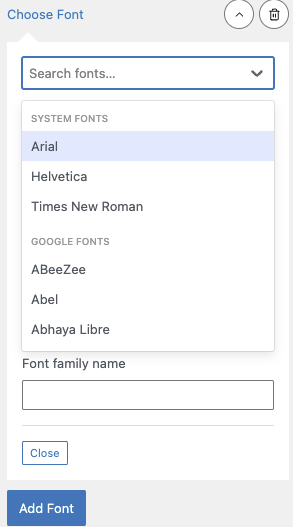
Any help much appreciated.
N
Okay - don;t worry - I was being stupid - not enough coffee.
The new UI threw me a little.
Glad to hear you got it resolved.
To cover - in case anyone has the same issue. The PHP Snippet is no longer required. You simply add the name of your Font in the field provided.