
Archived topic
Font awesome icons not showing in GeneratePress
5 replies · Started by Miguel on July 6, 2018
Hello.
I've been suffering a huge problem in the last days. When I've got GeneratePress active, Elementor's Awesome font icons disappear from the main window. I can still see them in the editor column, but inside the page I can only see squares and symbols, as you can see in this image:
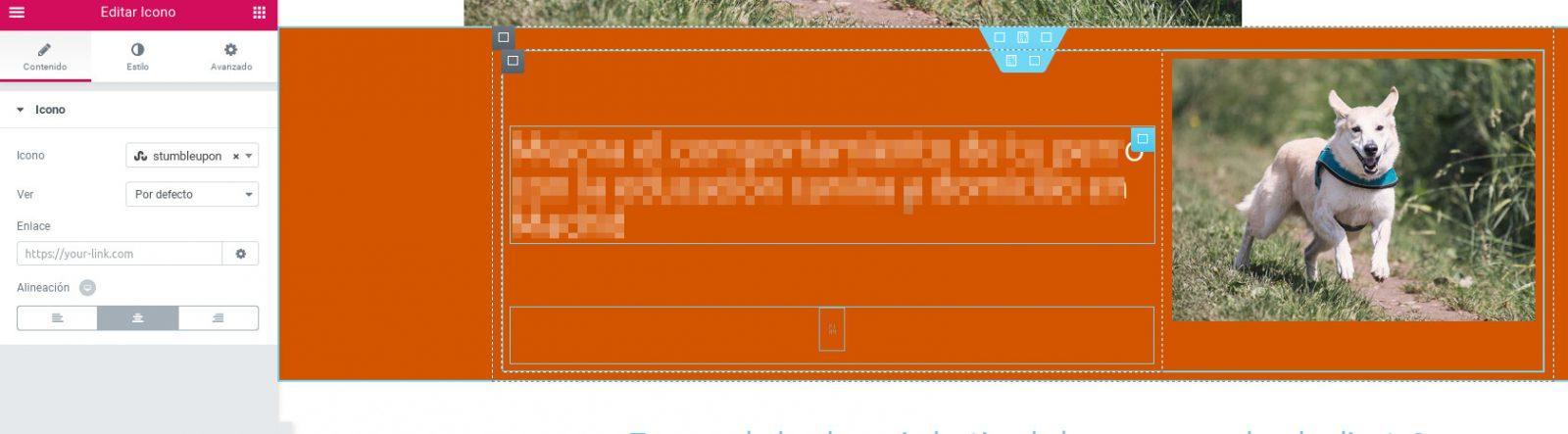
This happens both in the back end and the front end but only when GeneratePress is active. Using other themes make icons appear, but I've want to use GP! I've tried in different computers and deactivating all plug-ins, but the problem still happens.
I've checked in the console (Firefox) and I've got the same errors in all themes.
Hi there,
are you able to provide a link to the site? You can edit your original post and use the Site URL field for it to remain private.
Hi there David!
Done. The site is under construction, but I've disabled the maintenance mode. I've also placed some icons in the homepage so you can see what's happening.
This CSS is in the culprit:
.elementor * {font-family:'Ubuntu' !important;}
Remove that from you additional CSS
Great! That was the problem!! It was a tweak to make Elementor free use my custom font, but I'll make it work without causing this problem.
Thank you very much David.
Glad to be of help