
Archived topic
Can't edit Navigation Label
11 replies · Started by Louis on October 27, 2021
I am trying to edit one of the Navigation Labels, How to be a B2B Professional Salesperson Book. However, I cannot edit the text. I can edit the text in the other navigation labels. I can send a screenshot if there is a place for me to do that.
Thank you.
Hi Louie,
You can upload your screenshot to this site:https://postimages.org/
Then send us the link. It's better share your site link as well.
Let me know :)
Ok - thanks. I uploaded a screenshot. Url is my home page: https://sales-getters.com
The uploaded jpeg is titled navigation label.jpg
Hi there,
can you share the link to the screenshot you uploaded
Sure - https://sales-getters.com/wp-content/uploads/2021/11/navigation-label.jpg

Also uploaded it to the postimages.org
Sorry what i meant was.... when you uploaded to postimages.org - it should provide you with a URL to share with other so they can see that image. Can you share that URL?
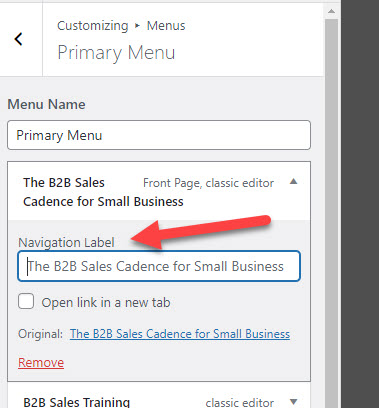
Looks like the label matches?
https://www.screencast.com/t/IOHncmcqAzO
The menu builder is a WP core feature so this cannot be a theme issue.
If you are still having problems, please disable all plugins except GP Premium to test.
Thanks for trying. I am trying to post on the Wordpress.org site, but I cannot find the place where you can post questions. Would you know where it is?
Did you try the debugging tips I've suggested?
It's unlikely a WP issue either - an obvious bug like this would've been reported by numerous users.
I did some digging, and here is where it can be edited. https://sales-getters.com/wp-content/uploads/2021/11/menu-change.jpg

No need to disable the plugins. Just cannot edit it through the theme. Hope this helps others.
Hi Louie,
The menu label assignment is a WordPress core functionality.
You can edit it through the default way which is Appearance > Menu and select the menu you want to edit labels on or through Appearance > Customize > Menu and select the menu you want to modify.
There's no "edit it through the theme" specifically as the theme itself is using WordPress core functionality of making/editing the menu and its menu items. :)