
Archived topic
Blog archive template do not work as I expected
9 replies · Started by Enrico on November 14, 2021
Hi there.
I'm making a website using "Realtor" starting site.
I'm not able to set up the Blog archive template.
After going to Appearance > Customize > Layout > Blog > Archives and setting up the content type as "Excerpt" the excertpt is not shown.
An example here: https://www.caicortina.org/category/gite-di-due-giorni/
Please, may you help me?
Thanks
Hi Enrico,
Can you check what's the Excerpt word count you set?
Let me know :)
Yes Ying.
I set 50 words.
I notice that the button "Read more" is not shown too.
See the screenshot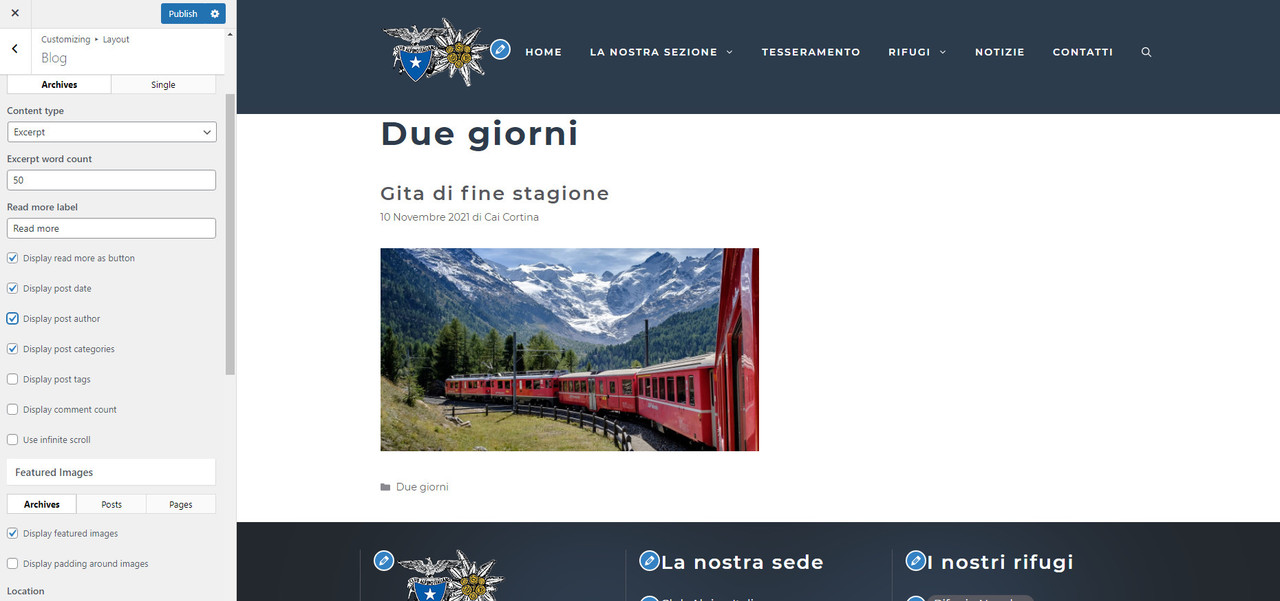 .
.
I checked the post, so the cause of excerpt doesn't show up is because everything is inside a container block.
Its a known issue with WordPress. Content that is part of an inner block – whether that be a Container Block or the core Group Block – will not be included in the post excerpt.
So before WordPress figure this out, here're 3 options:
1. Use the Manual Excerpt.( Read more button won't show)
2. Use the More tag.
3. Move the text out of the Container block.
Thank you Ying.
Unfortunately I'm a beginner...
How can I move the text out of the Container block? Or maybe use the More tag, if this is an easier solution.
Also, I see another issue related to Categoties.
It is in the post sidebar (e.g. https://www.caicortina.org/gite-di-due-giorni/gita-fine-stagione-2021/ )
The widget Category and its title are not close each other.
Apologize for my bad English :-)
Thank you
Hi Enrico,
You can move the contents of the Container block outward by using the drag tool on the Block editor.
Here's a demo video of how to do it - https://share.getcloudapp.com/llukdeRQ
You basically left-click, hold and drag it outside of the container block. :)
As for the "More" block.
The More block is a core editor block. See here - https://share.getcloudapp.com/z8u1mBPd
You place the "More" block where you want the automatically generated excerpt to end. Everything above the "More" block will display as the automatically generated excerpt. :)
Also, I see another issue related to Categoties.
It is in the post sidebar (e.g. https://www.caicortina.org/gite-di-due-giorni/gita-fine-stagione-2021/ )
The widget Category and its title are not close each other.
Apologize for my bad English 🙂
Thank you
Can you grouping try the Heading and the category listing like this? - https://share.getcloudapp.com/wbu8QOyo
Thank you very much.
I tried, but I'm not able to outward the contents of the Container block.
Please, may you access to my website and try? When you have a time.
I solved the other problem, I grouping the Heading and the Category.
Here's another example of how to do it. It's a video of me trying to move it out using one of your site's posts as an example.
https://share.getcloudapp.com/E0uKZNJ2
Note: I didn't save it because it's against our policy to make chances to any user's site without permission. :)
Thanks a lot!
I was searching inside the elements block, not inside the articles... What a dummy :-(
Now all works well, thank you.
Have a good day.
Ciao
No problem. Glad to be of any help. Stay safe. :)